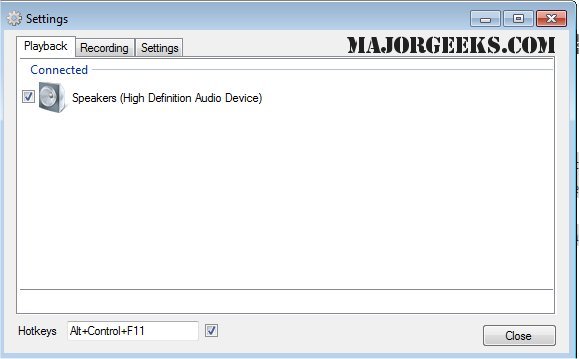
SoundSwitch has released its latest versions, 6.15.0 Beta 1 and 6.14.2, which enhance the user experience for managing multiple audio playback devices on Windows systems. This lightweight tool allows users to switch between connected audio devices—such as speakers, headphones, and USB DACs—using customizable hotkeys, thereby eliminating the need to navigate through cumbersome menus.
Upon installation, SoundSwitch integrates into the system tray, providing easy access to settings. Users can configure a hotkey (defaulting to Ctrl+Alt+F11) and select specific playback devices to cycle through, ensuring that only preferred devices are included. When activated, the hotkey instantly switches to the next device in the user-defined list, accompanied by a notification indicating the current active device.
SoundSwitch is particularly beneficial for various scenarios, such as toggling between headphones and speakers while streaming, gaming, or working remotely. It offers a quick solution for those using Bluetooth audio devices that may revert to lower-quality settings unexpectedly.
Pros:
- Free and open-source (GPL 3.0)
- Hotkey-based device switching saves time
- Lightweight and easy to set up
Cons:
- Lacks built-in audio profiles and per-application routing
- Only compatible with Windows; no support for macOS or Linux
- Focused solely on playback and recording switches, not comprehensive audio management
Geek Verdict:
SoundSwitch fills a notable gap in Windows functionality, providing a simple yet effective solution for users who frequently switch audio outputs. Its unobtrusive nature and ease of use make it a valuable addition for anyone who regularly manages multiple sound devices.
In extension, for users looking for deeper audio management capabilities, exploring additional software options that offer advanced features such as audio profiles or per-application routing may be beneficial. Moreover, as more people adapt to hybrid work environments, tools like SoundSwitch could become essential for seamless transitions between audio devices, enhancing overall productivity and user experience. As technology evolves, future updates may also bring support for more operating systems, broadening its accessibility and utility
Upon installation, SoundSwitch integrates into the system tray, providing easy access to settings. Users can configure a hotkey (defaulting to Ctrl+Alt+F11) and select specific playback devices to cycle through, ensuring that only preferred devices are included. When activated, the hotkey instantly switches to the next device in the user-defined list, accompanied by a notification indicating the current active device.
SoundSwitch is particularly beneficial for various scenarios, such as toggling between headphones and speakers while streaming, gaming, or working remotely. It offers a quick solution for those using Bluetooth audio devices that may revert to lower-quality settings unexpectedly.
Pros:
- Free and open-source (GPL 3.0)
- Hotkey-based device switching saves time
- Lightweight and easy to set up
Cons:
- Lacks built-in audio profiles and per-application routing
- Only compatible with Windows; no support for macOS or Linux
- Focused solely on playback and recording switches, not comprehensive audio management
Geek Verdict:
SoundSwitch fills a notable gap in Windows functionality, providing a simple yet effective solution for users who frequently switch audio outputs. Its unobtrusive nature and ease of use make it a valuable addition for anyone who regularly manages multiple sound devices.
In extension, for users looking for deeper audio management capabilities, exploring additional software options that offer advanced features such as audio profiles or per-application routing may be beneficial. Moreover, as more people adapt to hybrid work environments, tools like SoundSwitch could become essential for seamless transitions between audio devices, enhancing overall productivity and user experience. As technology evolves, future updates may also bring support for more operating systems, broadening its accessibility and utility
SoundSwitch 6.15.0 Beta 1 / 6.14.2 released
SoundSwitch allows you to easily switch between the different playback devices currently connected to your machine via hotkeys.