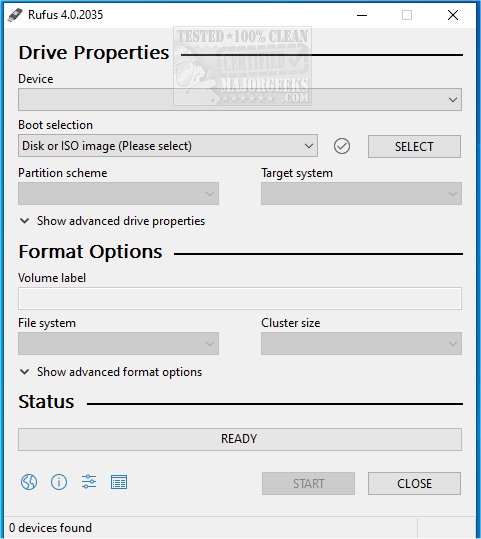
Rufus is an efficient, open-source utility designed for quickly formatting and creating bootable USB flash drives, which include USB keys, pen drives, and memory sticks. The latest versions, Rufus 4.14 Beta and 4.13, introduce integration with Fido, allowing users to download Windows 10 and 8.1 ISOs directly from Microsoft servers. A video guide is available for users seeking assistance.
Key Features of Rufus
Rufus stands out as an essential tool for anyone working with ISO files or needing to set up bootable USB drives. Its advantages include:
- Fast Bootable USB Creation: Users can easily install various operating systems, including Windows and Linux.
- Portability: Rufus is lightweight and does not require installation, allowing it to run instantly.
- Compatibility: It supports both UEFI and Legacy BIOS systems, ensuring usability across various hardware setups.
- Open Source: The tool is free to use, devoid of ads and bloatware.
Ideal Use Cases for Rufus
Rufus is particularly beneficial in several scenarios, such as:
- Creating bootable installation drives for operating systems.
- Developing rescue disks for system recovery and repair.
- Flashing firmware and updating BIOS.
- Running live operating systems without hard drive installation.
For IT professionals and tech support teams, Rufus proves invaluable for troubleshooting and maintaining multiple machines. However, it is optimized for single OS installations on a single USB drive. Users needing multiple operating systems on one USB may consider alternatives like Ventoy.
Additional Features and Benefits
Rufus is equipped with advanced features that enhance the bootable USB creation experience:
- Support for Various ISO Files: It accommodates a wide range of ISO types, including Windows and Linux distributions.
- Persistent Storage: Linux users can save files and settings across reboots.
- Partition Options: Users can select between MBR and GPT for better compatibility.
- Secure Boot and TPM Bypass: Facilitates Windows 11 installation on unsupported hardware.
- Automatic Bad Block Detection: Ensures reliability by checking USB drives before writing.
- Command-Line Support: Ideal for power users looking to automate tasks.
Safety Tips for USB Creation
- Backup Data: Ensure important files are backed up, as all data on the USB will be erased.
- Mac Users: Rufus does not support Mac; alternatives like BalenaEtcher are recommended.
- ISO Requirements: Some ISOs may require additional configurations.
- Partition Scheme: Choosing the correct partition scheme (GPT for UEFI, MBR for BIOS) is crucial for system compatibility.
Conclusion
Rufus is lauded as one of the best tools for creating bootable USB drives, earning a spot on the Ultimate 25 for 2025 list. Its lightweight nature, speed, and feature-rich environment make it a must-have for anyone involved in operating system installations or system recovery. Users are encouraged to download Rufus to streamline their bootable USB creation process.
Future Enhancements
Looking ahead, potential improvements could include enhanced support for macOS users, more intuitive user interfaces, and the introduction of cloud-based ISO management for seamless access to a wider range of operating systems. Additionally, expanding compatibility with various file systems and introducing multi-boot capabilities within a single USB could further cement Rufus as the go-to tool for bootable USB creation
Key Features of Rufus
Rufus stands out as an essential tool for anyone working with ISO files or needing to set up bootable USB drives. Its advantages include:
- Fast Bootable USB Creation: Users can easily install various operating systems, including Windows and Linux.
- Portability: Rufus is lightweight and does not require installation, allowing it to run instantly.
- Compatibility: It supports both UEFI and Legacy BIOS systems, ensuring usability across various hardware setups.
- Open Source: The tool is free to use, devoid of ads and bloatware.
Ideal Use Cases for Rufus
Rufus is particularly beneficial in several scenarios, such as:
- Creating bootable installation drives for operating systems.
- Developing rescue disks for system recovery and repair.
- Flashing firmware and updating BIOS.
- Running live operating systems without hard drive installation.
For IT professionals and tech support teams, Rufus proves invaluable for troubleshooting and maintaining multiple machines. However, it is optimized for single OS installations on a single USB drive. Users needing multiple operating systems on one USB may consider alternatives like Ventoy.
Additional Features and Benefits
Rufus is equipped with advanced features that enhance the bootable USB creation experience:
- Support for Various ISO Files: It accommodates a wide range of ISO types, including Windows and Linux distributions.
- Persistent Storage: Linux users can save files and settings across reboots.
- Partition Options: Users can select between MBR and GPT for better compatibility.
- Secure Boot and TPM Bypass: Facilitates Windows 11 installation on unsupported hardware.
- Automatic Bad Block Detection: Ensures reliability by checking USB drives before writing.
- Command-Line Support: Ideal for power users looking to automate tasks.
Safety Tips for USB Creation
- Backup Data: Ensure important files are backed up, as all data on the USB will be erased.
- Mac Users: Rufus does not support Mac; alternatives like BalenaEtcher are recommended.
- ISO Requirements: Some ISOs may require additional configurations.
- Partition Scheme: Choosing the correct partition scheme (GPT for UEFI, MBR for BIOS) is crucial for system compatibility.
Conclusion
Rufus is lauded as one of the best tools for creating bootable USB drives, earning a spot on the Ultimate 25 for 2025 list. Its lightweight nature, speed, and feature-rich environment make it a must-have for anyone involved in operating system installations or system recovery. Users are encouraged to download Rufus to streamline their bootable USB creation process.
Future Enhancements
Looking ahead, potential improvements could include enhanced support for macOS users, more intuitive user interfaces, and the introduction of cloud-based ISO management for seamless access to a wider range of operating systems. Additionally, expanding compatibility with various file systems and introducing multi-boot capabilities within a single USB could further cement Rufus as the go-to tool for bootable USB creation
Rufus 4.14 Beta / 4.13 released
Rufus is a small Open Source utility that helps quickly format and creates bootable USB flash drives, such as USB keys/pen drives, memory sticks, etc. Rufus is now integrated with Fido to download Windows 10 and 8.1 ISOs from Microsoft servers. Video guide available.