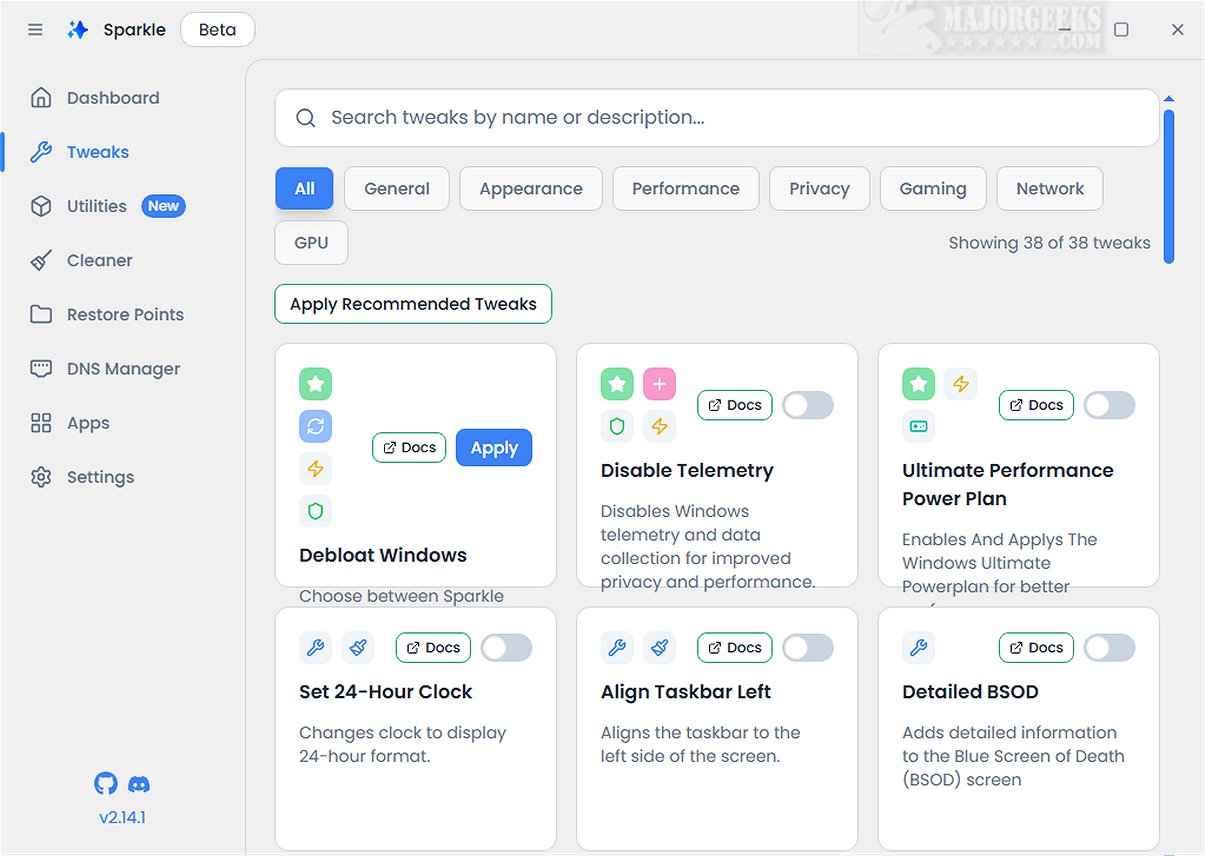
Sparkle is an innovative Windows application aimed at optimizing system performance by removing unnecessary Microsoft bloatware and applying various customization tweaks. The latest version, Sparkle 2.25.0 Beta, introduces enhanced features and functionalities designed to streamline user experience and improve system efficiency.
Key Features of Sparkle:
With Sparkle, users can disable telemetry features that monitor user activity, turn off Copilot for a smoother workflow, and implement specialized NVIDIA optimizations tailored for an enhanced gaming experience. Moreover, it provides the functionality to easily uninstall OneDrive, granting users greater control over their installed applications.
App Installer Integration:
A noteworthy aspect of Sparkle is its integration with powerful app installers such as Winget and Chocolatey. These built-in installers ensure that users have access to the latest software effortlessly, as they are regularly updated with new applications—eliminating the need for manual downloads.
User-Friendly Interface:
Sparkle features a straightforward, user-friendly interface, including a dedicated Utilities page where users can perform essential maintenance tasks. These tasks include running Disk Cleanup to free up space, viewing detailed system information for performance monitoring, and quickly restarting graphics drivers to resolve any display issues.
Creating a Restore Point:
Before utilizing Sparkle, it is advisable to create a system restore point, which the application offers to do automatically. This precaution ensures that users have a backup of their system state in case any issues arise during or after using the software. Additionally, maintaining a current backup is always a wise practice.
Geek Verdict:
In summary, Sparkle emerges as a comprehensive solution that combines various essential features into a seamless experience. Its intuitive Winget and Chocolatey App Installers, effective Windows Debloat Tool, efficient temporary file cleaner, and dynamic DNS Changer make Sparkle a top choice for optimizing and personalizing your Windows experience.
Future Directions:
Looking ahead, Sparkle aims to further expand its capabilities by integrating more customization options, enhancing security features, and providing support for an even wider range of applications. Users can expect regular updates that will introduce new functionalities and improve existing tools, ensuring Sparkle remains at the forefront of Windows optimization solutions. Additionally, user feedback will be actively sought to guide future developments, ensuring the application continues to meet the evolving needs of its user base.
Related Topics:
- Best Drive Cleaner: Comparing CCleaner, Wise Disk Cleaner, and PrivaZer
- Using Storage Sense for Automatic Junk File Deletion in Windows 10 & 11
- Securely Deleting Files in Windows 10 & 11 Using PowerShell and Cipher
- Backing Up or Restoring the Windows Registr
Key Features of Sparkle:
With Sparkle, users can disable telemetry features that monitor user activity, turn off Copilot for a smoother workflow, and implement specialized NVIDIA optimizations tailored for an enhanced gaming experience. Moreover, it provides the functionality to easily uninstall OneDrive, granting users greater control over their installed applications.
App Installer Integration:
A noteworthy aspect of Sparkle is its integration with powerful app installers such as Winget and Chocolatey. These built-in installers ensure that users have access to the latest software effortlessly, as they are regularly updated with new applications—eliminating the need for manual downloads.
User-Friendly Interface:
Sparkle features a straightforward, user-friendly interface, including a dedicated Utilities page where users can perform essential maintenance tasks. These tasks include running Disk Cleanup to free up space, viewing detailed system information for performance monitoring, and quickly restarting graphics drivers to resolve any display issues.
Creating a Restore Point:
Before utilizing Sparkle, it is advisable to create a system restore point, which the application offers to do automatically. This precaution ensures that users have a backup of their system state in case any issues arise during or after using the software. Additionally, maintaining a current backup is always a wise practice.
Geek Verdict:
In summary, Sparkle emerges as a comprehensive solution that combines various essential features into a seamless experience. Its intuitive Winget and Chocolatey App Installers, effective Windows Debloat Tool, efficient temporary file cleaner, and dynamic DNS Changer make Sparkle a top choice for optimizing and personalizing your Windows experience.
Future Directions:
Looking ahead, Sparkle aims to further expand its capabilities by integrating more customization options, enhancing security features, and providing support for an even wider range of applications. Users can expect regular updates that will introduce new functionalities and improve existing tools, ensuring Sparkle remains at the forefront of Windows optimization solutions. Additionally, user feedback will be actively sought to guide future developments, ensuring the application continues to meet the evolving needs of its user base.
Related Topics:
- Best Drive Cleaner: Comparing CCleaner, Wise Disk Cleaner, and PrivaZer
- Using Storage Sense for Automatic Junk File Deletion in Windows 10 & 11
- Securely Deleting Files in Windows 10 & 11 Using PowerShell and Cipher
- Backing Up or Restoring the Windows Registr
Sparkle 2.25.0 Beta released
Sparkle is a versatile Windows application designed to enhance your system's performance by effectively removing unnecessary Microsoft bloatware and applying various customization tweaks.