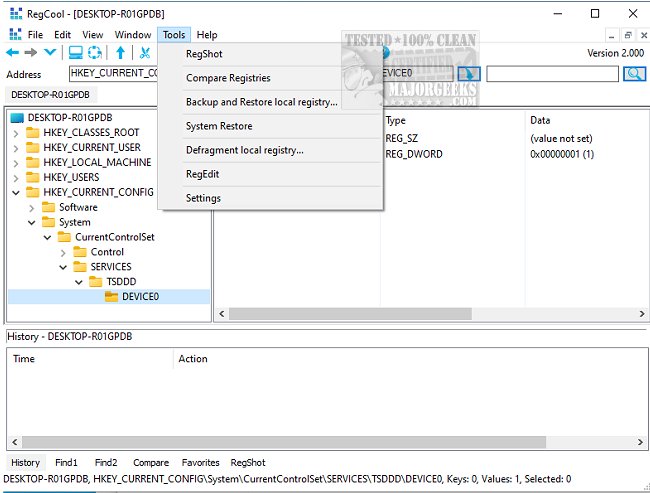
RegCool version 3.1.0.7 has been released, offering users a robust Explorer-like interface for managing and editing Windows registry information. The software features a tree-like structure on the left side that displays registry keys and a corresponding right window that reveals the individual values associated with those keys. One of RegCool's standout features is its Boolean search functionality, which allows users to efficiently locate specific keys and values, with the results conveniently listed for review.
In addition to its search capabilities, RegCool boasts a wide range of powerful tools designed to enhance registry management. These include options for multiple undo/redo actions, search and replace functions, registry comparisons, snapshots, and defragmentation. Users can perform standard operations such as cut, copy, paste, and drag-and-drop, making it a versatile and user-friendly registry tool. The ability to back up and restore registry settings adds another layer of utility, ensuring that users can safeguard their configurations.
For those looking to maximize their registry editing experience, RegCool also provides helpful resources, such as guides on backing up or restoring the Windows registry, automatic backup procedures for Windows 10 and 11, methods for accessing the Registry Editor, and instructions for disabling the Registry Editor (Regedit) in Windows.
In extension, RegCool's intuitive design and comprehensive features not only simplify registry management for both novice and advanced users but also encourage best practices in registry maintenance. By enabling easy comparisons and backups, it empowers users to make informed changes while minimizing the risks associated with registry edits. This makes RegCool an essential tool for anyone working with Windows systems, particularly IT professionals and system administrators who require reliable and efficient registry management solutions
In addition to its search capabilities, RegCool boasts a wide range of powerful tools designed to enhance registry management. These include options for multiple undo/redo actions, search and replace functions, registry comparisons, snapshots, and defragmentation. Users can perform standard operations such as cut, copy, paste, and drag-and-drop, making it a versatile and user-friendly registry tool. The ability to back up and restore registry settings adds another layer of utility, ensuring that users can safeguard their configurations.
For those looking to maximize their registry editing experience, RegCool also provides helpful resources, such as guides on backing up or restoring the Windows registry, automatic backup procedures for Windows 10 and 11, methods for accessing the Registry Editor, and instructions for disabling the Registry Editor (Regedit) in Windows.
In extension, RegCool's intuitive design and comprehensive features not only simplify registry management for both novice and advanced users but also encourage best practices in registry maintenance. By enabling easy comparisons and backups, it empowers users to make informed changes while minimizing the risks associated with registry edits. This makes RegCool an essential tool for anyone working with Windows systems, particularly IT professionals and system administrators who require reliable and efficient registry management solutions
RegCool 3.1.0.7 released
RegCool is an Explorer-like search tool for editing information in your registry.