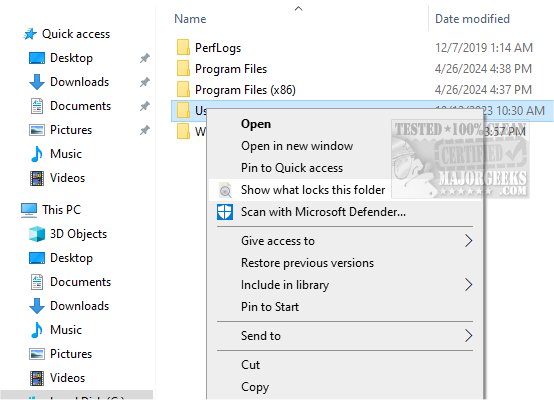
ShowWhatProcessLocksFile 11.0 has been released, bringing with it a powerful tool designed to help users identify which processes are locking specific files or folders on their systems. This utility streamlines the process of diagnosing file access issues, making it particularly beneficial for users who frequently encounter difficulties when trying to modify or delete files.
One of the standout features of ShowWhatProcessLocksFile is its ability to not only identify the locking process but also to terminate it instantly. This functionality enables users to quickly regain access to their files and folders, facilitating uninterrupted workflow. The tool seamlessly integrates with the native context menu, making it particularly user-friendly for those who prefer mouse navigation.
The interface of ShowWhatProcessLocksFile is designed to be simple and intuitive, providing users with a clear overview of processes locking files on both local and external storage drives. It displays important information, including the location of the locked folder and the process IDs, which can assist users in troubleshooting via the Task Manager. Users can expand listed processes to view the specific files they require for operation, offering a comprehensive understanding of how various services may interact with the locked item.
Additionally, if users need to eject USB flash drives safely, they can conveniently right-click on the process locking a file and terminate it without having to navigate through the Task Manager. This feature is particularly useful for preventing data loss and ensuring smooth operation.
Overall, ShowWhatProcessLocksFile is an indispensable tool for anyone who works with files on their computer, saving time and effort by quickly pinpointing locking processes and enabling rapid resolution of file access issues.
To enhance your productivity even further, users might also explore related topics such as identifying processes or services running on their computer, saving a text file of all running processes, customizing process information in Task Manager, and managing startup applications in Windows 10 and 11. This holistic approach to file management can significantly improve efficiency and user experience
One of the standout features of ShowWhatProcessLocksFile is its ability to not only identify the locking process but also to terminate it instantly. This functionality enables users to quickly regain access to their files and folders, facilitating uninterrupted workflow. The tool seamlessly integrates with the native context menu, making it particularly user-friendly for those who prefer mouse navigation.
The interface of ShowWhatProcessLocksFile is designed to be simple and intuitive, providing users with a clear overview of processes locking files on both local and external storage drives. It displays important information, including the location of the locked folder and the process IDs, which can assist users in troubleshooting via the Task Manager. Users can expand listed processes to view the specific files they require for operation, offering a comprehensive understanding of how various services may interact with the locked item.
Additionally, if users need to eject USB flash drives safely, they can conveniently right-click on the process locking a file and terminate it without having to navigate through the Task Manager. This feature is particularly useful for preventing data loss and ensuring smooth operation.
Overall, ShowWhatProcessLocksFile is an indispensable tool for anyone who works with files on their computer, saving time and effort by quickly pinpointing locking processes and enabling rapid resolution of file access issues.
To enhance your productivity even further, users might also explore related topics such as identifying processes or services running on their computer, saving a text file of all running processes, customizing process information in Task Manager, and managing startup applications in Windows 10 and 11. This holistic approach to file management can significantly improve efficiency and user experience
ShowWhatProcessLocksFile 11.0 released
ShowWhatProcessLocksFile is a tool that identifies the processes that are locking a particular file or folder.