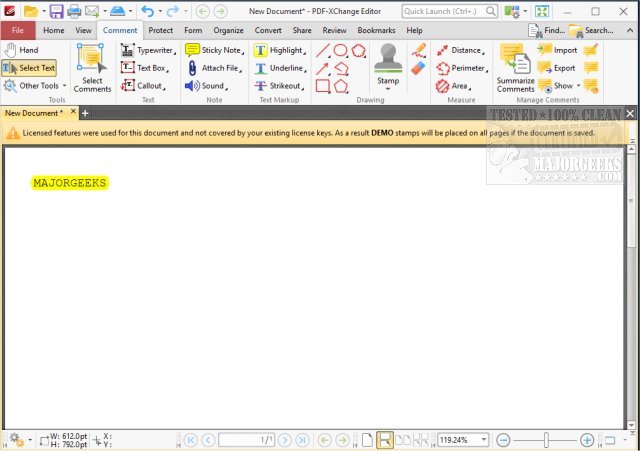
PDF-XChange Editor 11.1.2.0 has been released, offering a comprehensive solution for PDF management. This powerful software allows users to annotate, create, edit, view, perform optical character recognition (OCR), and digitally sign PDF files, making it an all-in-one tool for both casual users and professionals.
Why Choose PDF-XChange Editor?
Many PDF editors on the market can be cumbersome and expensive, but PDF-XChange Editor stands out for its combination of robust functionality, speed, and user-friendly interface. It simplifies tasks such as document modification, file conversion, and form filling, making it an essential tool for various users—from office professionals to students.
Key Features of PDF-XChange Editor:
- Full PDF Editing: Users can edit text, images, and layout directly in their PDFs, eliminating the need for original documents.
- Optical Character Recognition (OCR): This feature allows scanned documents to be converted into searchable and editable text, facilitating the digitization of paper files.
- Form Creation and Editing: Users can easily create interactive and fillable forms without needing advanced skills.
- File Conversion: The software enables conversion of PDFs to other formats like Word, Excel, and PowerPoint effortlessly.
- Built-in Security: Users can secure their documents with digital signatures, password protection, and encryption.
Applications in Various Fields:
PDF-XChange Editor is invaluable across numerous professions. It allows office workers to efficiently handle form-filling and document annotations, enhances productivity for educators and students through easy note organization and commenting, and helps businesses streamline document workflows with quick conversions and electronic signatures. The OCR feature is particularly useful for anyone looking to organize and digitize physical documents into an easily accessible electronic format.
Conclusion:
PDF-XChange Editor offers a compelling blend of power and simplicity, making it an ideal choice for anyone who frequently works with PDFs. Its affordability and extensive feature set set it apart from other, more expensive options, providing users with complete control over their PDF tasks without unnecessary complexity. If you regularly engage with PDF documents, this software is undoubtedly worth considering.
Related Topics:
- Tips for managing PDF files, such as preventing Microsoft Edge from automatically opening them.
- Instructions on how to work with CAB files and extracting or creating them via command-line tools.
- Understanding various file formats, including RAR files and LZMA compression.
Overall, PDF-XChange Editor is not just a tool; it’s an essential companion for anyone looking to enhance their productivity and efficiency in handling PDF documents
Why Choose PDF-XChange Editor?
Many PDF editors on the market can be cumbersome and expensive, but PDF-XChange Editor stands out for its combination of robust functionality, speed, and user-friendly interface. It simplifies tasks such as document modification, file conversion, and form filling, making it an essential tool for various users—from office professionals to students.
Key Features of PDF-XChange Editor:
- Full PDF Editing: Users can edit text, images, and layout directly in their PDFs, eliminating the need for original documents.
- Optical Character Recognition (OCR): This feature allows scanned documents to be converted into searchable and editable text, facilitating the digitization of paper files.
- Form Creation and Editing: Users can easily create interactive and fillable forms without needing advanced skills.
- File Conversion: The software enables conversion of PDFs to other formats like Word, Excel, and PowerPoint effortlessly.
- Built-in Security: Users can secure their documents with digital signatures, password protection, and encryption.
Applications in Various Fields:
PDF-XChange Editor is invaluable across numerous professions. It allows office workers to efficiently handle form-filling and document annotations, enhances productivity for educators and students through easy note organization and commenting, and helps businesses streamline document workflows with quick conversions and electronic signatures. The OCR feature is particularly useful for anyone looking to organize and digitize physical documents into an easily accessible electronic format.
Conclusion:
PDF-XChange Editor offers a compelling blend of power and simplicity, making it an ideal choice for anyone who frequently works with PDFs. Its affordability and extensive feature set set it apart from other, more expensive options, providing users with complete control over their PDF tasks without unnecessary complexity. If you regularly engage with PDF documents, this software is undoubtedly worth considering.
Related Topics:
- Tips for managing PDF files, such as preventing Microsoft Edge from automatically opening them.
- Instructions on how to work with CAB files and extracting or creating them via command-line tools.
- Understanding various file formats, including RAR files and LZMA compression.
Overall, PDF-XChange Editor is not just a tool; it’s an essential companion for anyone looking to enhance their productivity and efficiency in handling PDF documents
PDF-XChange Editor 11.1.2.0 released
PDF-XChange Editor is a full-featured PDF editor/viewer that permits you to annotate, create, edit, view, and OCR as well as digitally sign PDF files.