Razer has released version 11.12.0.14 of Razer Cortex, a comprehensive tool designed to enhance gaming performance and optimize PC systems. The software offers a range of functionalities, including monitoring frames per second (FPS), cleaning up junk files, optimizing system performance, and defragmenting games.
Initially, users may have mixed feelings about Razer Cortex due to the requirement of creating an account and opting out of promotional emails. However, many appreciate the valuable game deals that come with the app, especially given the competitive prices for various titles.
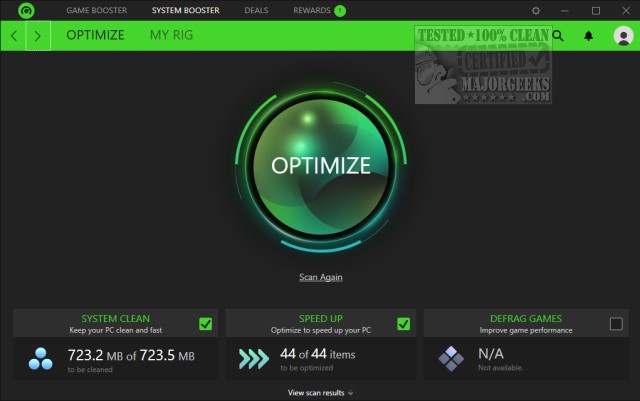
At its core, Razer Cortex is comparable to other game-launching applications, allowing users to access its features easily. The interface includes key sections like Game Booster and System Booster, which are readily accessible from the main window. Game Booster allows users to manually add games to apply specific optimizations, while System Booster can scan for junk files, enhance system performance, and defrag games. All features come with customizable options, so users can choose what to optimize or remove based on their preferences.
In addition to these primary functions, Razer Cortex provides users with system information and diagnostic reports, ensuring both casual users and tech enthusiasts can effectively tweak their systems.
As gaming technology continues to evolve, having tools like Razer Cortex will be increasingly important for gamers looking to maximize their experience. Future updates may include even more advanced features, integration with other gaming platforms, or enhanced customization options to meet the demands of a diverse user base. Overall, Razer Cortex is a practical solution for gamers seeking to streamline their gaming experience and system performance
Initially, users may have mixed feelings about Razer Cortex due to the requirement of creating an account and opting out of promotional emails. However, many appreciate the valuable game deals that come with the app, especially given the competitive prices for various titles.
At its core, Razer Cortex is comparable to other game-launching applications, allowing users to access its features easily. The interface includes key sections like Game Booster and System Booster, which are readily accessible from the main window. Game Booster allows users to manually add games to apply specific optimizations, while System Booster can scan for junk files, enhance system performance, and defrag games. All features come with customizable options, so users can choose what to optimize or remove based on their preferences.
In addition to these primary functions, Razer Cortex provides users with system information and diagnostic reports, ensuring both casual users and tech enthusiasts can effectively tweak their systems.
As gaming technology continues to evolve, having tools like Razer Cortex will be increasingly important for gamers looking to maximize their experience. Future updates may include even more advanced features, integration with other gaming platforms, or enhanced customization options to meet the demands of a diverse user base. Overall, Razer Cortex is a practical solution for gamers seeking to streamline their gaming experience and system performance
Razer Cortex 11.12.0.14 released
Razer Cortex can improve game performance, monitor FPS, clean junk, optimize your PC, and defrag games.