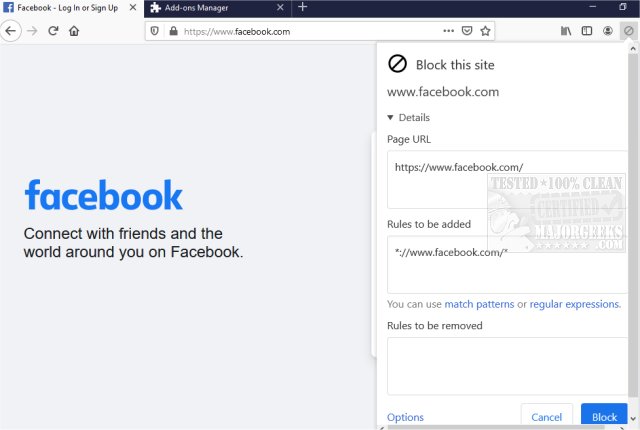
The latest version of uBlacklist, 9.6.0, has been released for Chrome and Firefox. This browser extension is designed to enhance users' search experiences by allowing them to block specific websites from appearing in Google search results. Users can easily add sites to their blacklist by clicking on the toolbar icon, and they have the option to specify rules using match patterns or regular expressions. This functionality enables users to customize their search results by eliminating unwanted or irrelevant sites, allowing for a more focused search experience.
Furthermore, uBlacklist provides features that facilitate synchronization of blacklists across devices through Google Drive, and users can also subscribe to public blacklists created by others. This makes it an invaluable tool for researchers or anyone looking to streamline their browsing by avoiding time-wasting content. The extension not only helps in refining search results but also aids in honing in on more relevant topics.
In addition to uBlacklist, users can explore other tools and techniques to enhance their browsing experience, such as utilizing specific Google Chrome flags, managing browser history settings, or optimizing both Chrome and Firefox for better performance. These strategies can collectively contribute to a more efficient and enjoyable online experience.
As the internet continues to evolve, tools like uBlacklist play a crucial role in helping users navigate the vast amount of information available, ensuring they can customize their search results to meet their specific needs and preferences
Furthermore, uBlacklist provides features that facilitate synchronization of blacklists across devices through Google Drive, and users can also subscribe to public blacklists created by others. This makes it an invaluable tool for researchers or anyone looking to streamline their browsing by avoiding time-wasting content. The extension not only helps in refining search results but also aids in honing in on more relevant topics.
In addition to uBlacklist, users can explore other tools and techniques to enhance their browsing experience, such as utilizing specific Google Chrome flags, managing browser history settings, or optimizing both Chrome and Firefox for better performance. These strategies can collectively contribute to a more efficient and enjoyable online experience.
As the internet continues to evolve, tools like uBlacklist play a crucial role in helping users navigate the vast amount of information available, ensuring they can customize their search results to meet their specific needs and preferences
uBlacklist for Chrome and Firefox 9.6.0 released
uBlacklist for Chrome and Firefox removes specific sites from showing up in Google search.
uBlacklist for Chrome and Firefox 9.6.0 released @ MajorGeeks