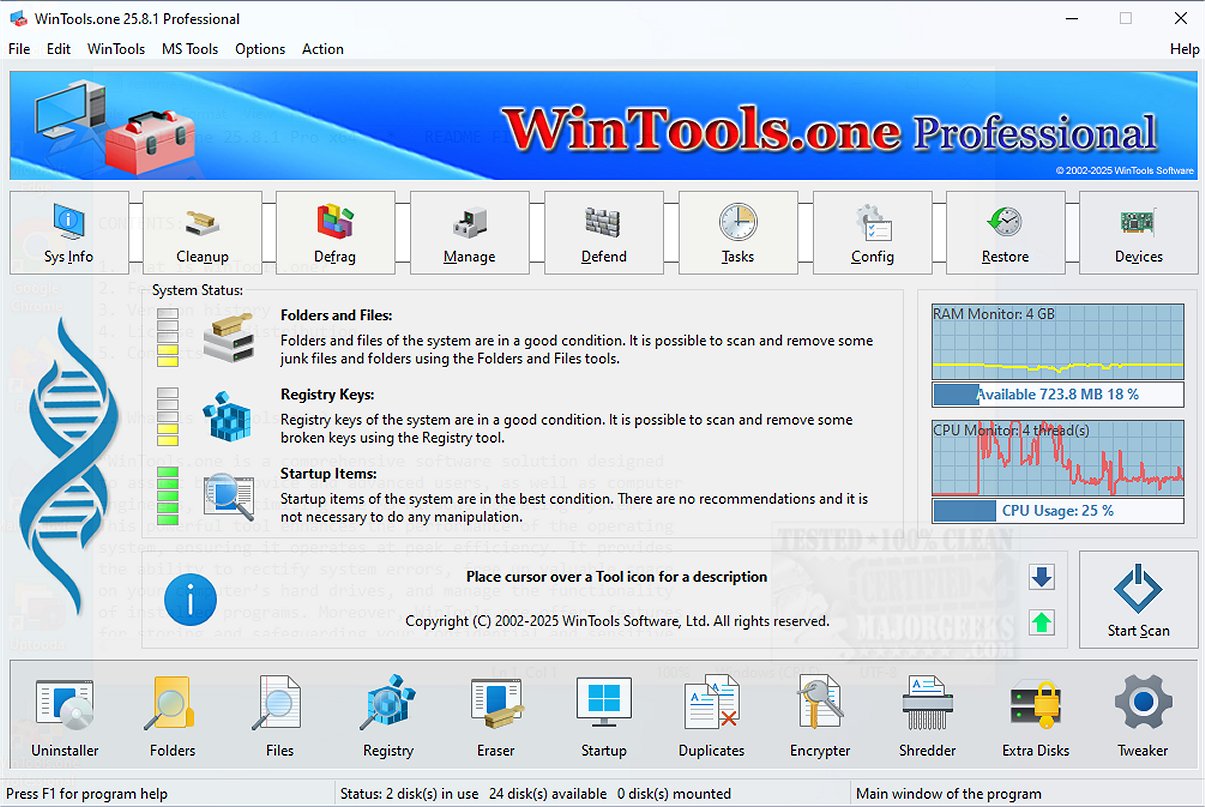
WinTools.one has released version 26.4.1, enhancing its reputation as a comprehensive system maintenance and cleanup tool. This software suite is equipped with various diagnostic tools that assess your computer's performance, pinpointing areas that require improvement. It effectively optimizes system functionality to ensure smooth operation.
What is WinTools.one?
WinTools.one serves as an all-in-one solution for system maintenance, file management, folder organization, system registry management, and startup item control. It addresses common issues and errors that can slow down your computer, helping users free up storage space and improve overall responsiveness.
Editions Available
The software is available in two editions: one for home users and another for advanced users. The Professional edition encompasses all features of the Home edition while introducing advanced tools like a duplicate file manager and a wider array of options in the 'Tweaker' section.
Key Features of WinTools.one:
- Clean Uninstaller: Safely removes unwanted applications.
- Scan Tools: Analyze folders, files, shortcuts, and the registry for issues.
- Objects Eraser: Deletes sensitive data securely.
- Startup Manager: Optimizes boot times by managing startup items.
- Duplicate Files Manager: Identifies and removes duplicate files to save space.
- File Encryptor and Shredder: Enhances security by encrypting files and permanently deleting sensitive data.
- Extra Disks Manager: Helps manage additional storage devices.
- System Tweaker: Offers numerous settings and fixes to enhance system performance.
User-Friendly Interface
The main interface is designed for ease of use, presenting a primary diagnostic overview that evaluates files, folders, registry entries, and startup items. WinTools.one provides actionable suggestions based on its analysis. With a single click, users can conduct an in-depth scan for temporary files, Windows logs, web caches, drivers, and other unnecessary data.
Built-In Maintenance Tools
WinTools.one includes maintenance tools that facilitate the removal of unwanted applications, the cleaning of invalid shortcuts, and the elimination of empty folders. Its registry scanner enhances performance by cleaning up the registry, while the startup manager ensures faster boot times. Features like the file eraser and duplicate manager work together to create a more efficient system.
Customization and Control
The Tweaker section stands out, offering users the ability to customize their systems, fix network issues, manage drivers, and access a variety of tools that enhance control over the Windows environment.
Final Thoughts
In summary, WinTools.one combines system cleanup, file and startup management, optimization, and customization tools into a single, powerful toolkit aimed at facilitating regular maintenance and improving performance. While the Professional edition caters to advanced users, the Home edition provides enough functionality for everyday users.
Related Resources:
- Explore how to use Storage Sense for automatic junk file deletion in Windows 10/11.
- Learn to manage startup applications in Windows 10 & 11 effectively.
- Discover how to disable privacy-related tasks in Windows 10 Task Scheduler.
- Find ways to remove built-in apps from Windows 11, 10, 8, and 8.1 using PowerShell.
With its extensive features and user-friendly design, WinTools.one stands as an essential tool for anyone looking to maintain their computer's health and efficiency
What is WinTools.one?
WinTools.one serves as an all-in-one solution for system maintenance, file management, folder organization, system registry management, and startup item control. It addresses common issues and errors that can slow down your computer, helping users free up storage space and improve overall responsiveness.
Editions Available
The software is available in two editions: one for home users and another for advanced users. The Professional edition encompasses all features of the Home edition while introducing advanced tools like a duplicate file manager and a wider array of options in the 'Tweaker' section.
Key Features of WinTools.one:
- Clean Uninstaller: Safely removes unwanted applications.
- Scan Tools: Analyze folders, files, shortcuts, and the registry for issues.
- Objects Eraser: Deletes sensitive data securely.
- Startup Manager: Optimizes boot times by managing startup items.
- Duplicate Files Manager: Identifies and removes duplicate files to save space.
- File Encryptor and Shredder: Enhances security by encrypting files and permanently deleting sensitive data.
- Extra Disks Manager: Helps manage additional storage devices.
- System Tweaker: Offers numerous settings and fixes to enhance system performance.
User-Friendly Interface
The main interface is designed for ease of use, presenting a primary diagnostic overview that evaluates files, folders, registry entries, and startup items. WinTools.one provides actionable suggestions based on its analysis. With a single click, users can conduct an in-depth scan for temporary files, Windows logs, web caches, drivers, and other unnecessary data.
Built-In Maintenance Tools
WinTools.one includes maintenance tools that facilitate the removal of unwanted applications, the cleaning of invalid shortcuts, and the elimination of empty folders. Its registry scanner enhances performance by cleaning up the registry, while the startup manager ensures faster boot times. Features like the file eraser and duplicate manager work together to create a more efficient system.
Customization and Control
The Tweaker section stands out, offering users the ability to customize their systems, fix network issues, manage drivers, and access a variety of tools that enhance control over the Windows environment.
Final Thoughts
In summary, WinTools.one combines system cleanup, file and startup management, optimization, and customization tools into a single, powerful toolkit aimed at facilitating regular maintenance and improving performance. While the Professional edition caters to advanced users, the Home edition provides enough functionality for everyday users.
Related Resources:
- Explore how to use Storage Sense for automatic junk file deletion in Windows 10/11.
- Learn to manage startup applications in Windows 10 & 11 effectively.
- Discover how to disable privacy-related tasks in Windows 10 Task Scheduler.
- Find ways to remove built-in apps from Windows 11, 10, 8, and 8.1 using PowerShell.
With its extensive features and user-friendly design, WinTools.one stands as an essential tool for anyone looking to maintain their computer's health and efficiency
WinTools.one 26.4.1 released
WinTools.one is a comprehensive system maintenance and cleanup solution that includes a range of diagnostic tools that evaluate your computer's performance, identifying areas for improvement. Additionally, it offers effective solutions to optimize the functionality of your system, ensuring it runs smoothly.