RSS Guard has recently released version 5.2.0, enhancing its capabilities as a robust RSS/ATOM feed aggregator built on the Qt framework. This version supports online feed synchronization and includes a portable variant that requires no external dependencies.
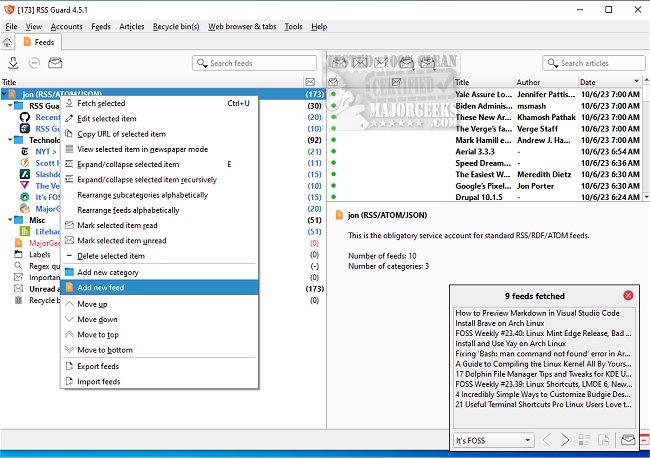
Upon launching RSS Guard, users can easily add various accounts, such as Gmail, Inoreader, NextCloud News, Tiny Tiny RSS, or standard online feeds, facilitating the management of multiple sources. A notable improvement in this version is the introduction of a right-click menu that allows users to add feeds to existing categories, streamlining the user experience. However, the absence of an auto-detect feature for feeds, which is common in other RSS readers, might be a drawback for some users.
The interface is organized into three panes—showing feeds, headlines, and articles—allowing users to skim through content effectively. However, some users may find the notifications distracting, leading them to disable this feature immediately. A significant concern reported is that feeds often do not pull headlines correctly, which undermines the primary function of RSS Guard. Despite the assertion from developers that the software is simple and lightweight, some users may find it complex and not as intuitive as expected.
While there are some negatives, such as the initial 0xC000007B error that can be resolved by updating Visual C++ runtimes, the overall wealth of features and functionality surpasses these issues. RSS Guard offers an extensive range of tools beyond what is found in typical RSS readers, making it a potentially valuable addition for users seeking a more comprehensive feed aggregation solution.
In summary, RSS Guard 5.2.0 presents an array of improvements and features that cater to RSS feed enthusiasts, while also acknowledging that there is room for further refinement in user experience. Future updates may focus on enhancing usability and fixing existing bugs to solidify its position as a competitive RSS aggregator
Upon launching RSS Guard, users can easily add various accounts, such as Gmail, Inoreader, NextCloud News, Tiny Tiny RSS, or standard online feeds, facilitating the management of multiple sources. A notable improvement in this version is the introduction of a right-click menu that allows users to add feeds to existing categories, streamlining the user experience. However, the absence of an auto-detect feature for feeds, which is common in other RSS readers, might be a drawback for some users.
The interface is organized into three panes—showing feeds, headlines, and articles—allowing users to skim through content effectively. However, some users may find the notifications distracting, leading them to disable this feature immediately. A significant concern reported is that feeds often do not pull headlines correctly, which undermines the primary function of RSS Guard. Despite the assertion from developers that the software is simple and lightweight, some users may find it complex and not as intuitive as expected.
While there are some negatives, such as the initial 0xC000007B error that can be resolved by updating Visual C++ runtimes, the overall wealth of features and functionality surpasses these issues. RSS Guard offers an extensive range of tools beyond what is found in typical RSS readers, making it a potentially valuable addition for users seeking a more comprehensive feed aggregation solution.
In summary, RSS Guard 5.2.0 presents an array of improvements and features that cater to RSS feed enthusiasts, while also acknowledging that there is room for further refinement in user experience. Future updates may focus on enhancing usability and fixing existing bugs to solidify its position as a competitive RSS aggregator
RSS Guard 5.2.0 released
RSS Guard is an RSS/ATOM feed aggregator developed using the Qt framework and supports online feed synchronization. A zero-dependency portable version is also available.