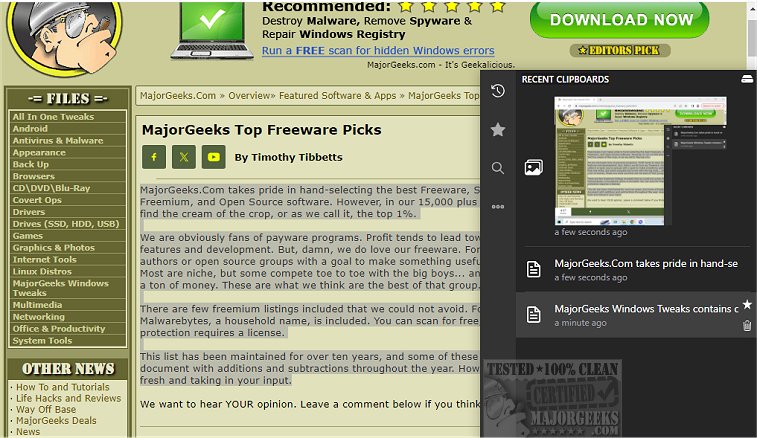
Clippy 1.7.1 has been released, enhancing its role as a dedicated clipboard manager and a robust alternative to the default Windows clipboard manager. This tool is meticulously designed to track all copied text and images, making it easy for users to search for important items when needed. Accessing Clippy is straightforward; a simple hotkey brings up the manager near the system tray, providing quick access to clipboard contents. Clippy records every copy event and stores this data locally, ensuring user privacy.
In addition to tracking, Clippy allows users to mark important clipboard entries as favorites, facilitating easier access to frequently used items. The application is highly customizable, enabling users to set their own hotkeys for quick navigation to recent or starred clipboard items. Clippy also offers cloud backup options and synchronization with various cloud providers directly from the app.
Key features of Clippy include:
- Options to display/hide clipboard entries with customizable shortcuts
- Support for both text and image clipboard data
- Customizable keybindings for all functionalities
- A smart and instant search feature for various data types, including links and colors
- The ability to change the database location and keyboard bindings
- A toggle for dark mode and light mode
Clippy serves as a powerful tool for those looking to streamline their clipboard management, enhancing productivity and organization.
Moreover, as users increasingly rely on digital communication and content sharing, the need for efficient clipboard management tools like Clippy becomes even more relevant. Features such as cloud synchronization and customizable settings not only cater to individual preferences but also support collaborative workflows, making it an ideal solution for professionals and casual users alike. The application could further evolve by incorporating advanced functionalities such as AI-driven suggestions for frequently used clipboard items or integration with other productivity applications, maximizing user efficiency
In addition to tracking, Clippy allows users to mark important clipboard entries as favorites, facilitating easier access to frequently used items. The application is highly customizable, enabling users to set their own hotkeys for quick navigation to recent or starred clipboard items. Clippy also offers cloud backup options and synchronization with various cloud providers directly from the app.
Key features of Clippy include:
- Options to display/hide clipboard entries with customizable shortcuts
- Support for both text and image clipboard data
- Customizable keybindings for all functionalities
- A smart and instant search feature for various data types, including links and colors
- The ability to change the database location and keyboard bindings
- A toggle for dark mode and light mode
Clippy serves as a powerful tool for those looking to streamline their clipboard management, enhancing productivity and organization.
Moreover, as users increasingly rely on digital communication and content sharing, the need for efficient clipboard management tools like Clippy becomes even more relevant. Features such as cloud synchronization and customizable settings not only cater to individual preferences but also support collaborative workflows, making it an ideal solution for professionals and casual users alike. The application could further evolve by incorporating advanced functionalities such as AI-driven suggestions for frequently used clipboard items or integration with other productivity applications, maximizing user efficiency
clippy 1.7.1 released
clippy provides a dedicated clipboard manager, a solid alternative to the default Windows manager.