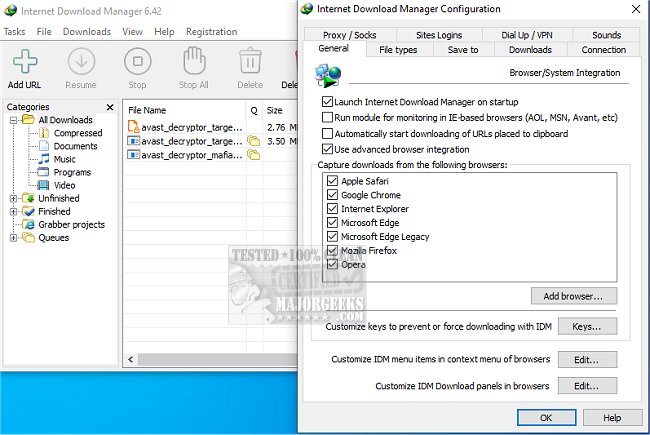
Internet Download Manager (IDM) has recently released version 6.43 Build 8, further enhancing its capabilities as a powerful tool for improving download speeds and managing downloads seamlessly. This software is designed to address common frustrations associated with slow, interrupted, or poorly organized downloads, providing a more efficient and user-friendly experience.
Key Features of Internet Download Manager:
1. Lightning-Fast Downloads: IDM can increase download speeds by up to five times through its innovative file-segmentation technology. By splitting files into multiple segments that download simultaneously, IDM maximizes bandwidth usage and overcomes server speed limitations, significantly reducing latency.
2. Resume and Recover Broken Downloads: IDM allows users to resume interrupted downloads, saving progress in case of internet disruptions, system crashes, or unexpected restarts. This feature ensures users never have to start their downloads from scratch.
3. Easy Browser Integration: The software integrates seamlessly with major web browsers like Chrome, Firefox, Edge, and Opera. It automatically detects downloadable files on web pages, offering a convenient "Download" button for instant access without the need to copy and paste URLs.
4. Streaming Video and Audio Downloads: IDM supports the downloading of streaming media from popular sites such as YouTube and Dailymotion. Users can easily save videos for offline viewing, including tutorials and music mixes.
5. Advanced Download Organization: Downloads are automatically categorized into folders (documents, music, videos), keeping files organized and easily accessible.
6. Customization for Power Users: IDM offers extensive customization options, allowing users to set download limits, schedule downloads during off-peak hours, and control simultaneous downloads. Advanced users can also initiate downloads via the command line.
7. Security Features: The software is compatible with antivirus programs, automatically scanning downloads to protect against malware, ensuring safer file transfers.
Conclusion: Internet Download Manager is an essential tool for anyone frequently downloading files, whether for work or leisure. Its robust features and efficiency make it a standout choice for enhancing the downloading experience. While the user interface could benefit from an update, the performance improvements and reliability it offers make it a worthwhile investment for users looking to optimize their download capabilities.
Further Reading: For those interested in enhancing their internet experience, consider exploring topics such as improving wireless network performance, fixing slow internet issues on Windows, monitoring internet usage, understanding Windows auto-tuning, and checking Wi-Fi security settings
Key Features of Internet Download Manager:
1. Lightning-Fast Downloads: IDM can increase download speeds by up to five times through its innovative file-segmentation technology. By splitting files into multiple segments that download simultaneously, IDM maximizes bandwidth usage and overcomes server speed limitations, significantly reducing latency.
2. Resume and Recover Broken Downloads: IDM allows users to resume interrupted downloads, saving progress in case of internet disruptions, system crashes, or unexpected restarts. This feature ensures users never have to start their downloads from scratch.
3. Easy Browser Integration: The software integrates seamlessly with major web browsers like Chrome, Firefox, Edge, and Opera. It automatically detects downloadable files on web pages, offering a convenient "Download" button for instant access without the need to copy and paste URLs.
4. Streaming Video and Audio Downloads: IDM supports the downloading of streaming media from popular sites such as YouTube and Dailymotion. Users can easily save videos for offline viewing, including tutorials and music mixes.
5. Advanced Download Organization: Downloads are automatically categorized into folders (documents, music, videos), keeping files organized and easily accessible.
6. Customization for Power Users: IDM offers extensive customization options, allowing users to set download limits, schedule downloads during off-peak hours, and control simultaneous downloads. Advanced users can also initiate downloads via the command line.
7. Security Features: The software is compatible with antivirus programs, automatically scanning downloads to protect against malware, ensuring safer file transfers.
Conclusion: Internet Download Manager is an essential tool for anyone frequently downloading files, whether for work or leisure. Its robust features and efficiency make it a standout choice for enhancing the downloading experience. While the user interface could benefit from an update, the performance improvements and reliability it offers make it a worthwhile investment for users looking to optimize their download capabilities.
Further Reading: For those interested in enhancing their internet experience, consider exploring topics such as improving wireless network performance, fixing slow internet issues on Windows, monitoring internet usage, understanding Windows auto-tuning, and checking Wi-Fi security settings
Internet Download Manager 6.43 Build 8 released
Internet Download Manager is a tool for drastically increasing your download speeds and resuming/scheduling downloads, including the capability to download any streaming video.
Internet Download Manager 6.43 Build 8 released @ MajorGeeks