FxSound has recently released version 1.2.10.0 Beta and 1.2.6.0 of its sound enhancement application. This free software aims to significantly improve audio quality on computers, enhancing experiences across various activities such as gaming, movie watching, and music listening. Historically, sound improvement has been a focus in the computer industry, dating back to the introduction of third-party speakers and sound cards like Sound Blaster. Today, many users rely on onboard sound solutions like Realtek, which, while adequate, often lack the richness that dedicated sound enhancement software can provide.
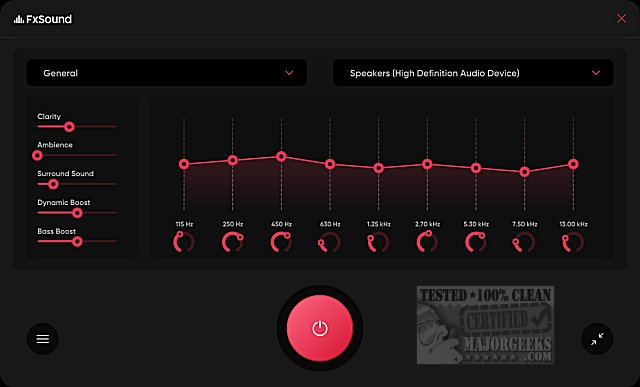
The FxSound interface features a user-friendly black-and-red design, making navigation intuitive. Users can easily select their audio device, which the application automatically detects, and choose from various sound categories. A primary feature is the equalizer, which allows users to customize sound settings, including clarity, ambiance, surround sound, dynamic boost, and bass enhancement. For those satisfied with initial adjustments, additional settings can be fine-tuned for specific scenarios such as movies, TV, music, gaming, and more.
Key features of FxSound include:
- Equalizer: Offers customizable center frequencies for tailored sound.
- Visualizer: Combines audio with visuals for an immersive experience.
- Effects: Enhances bass and other sound characteristics.
- Presets: Provides tailored sound settings for different activities like gaming and video watching.
Unlike many sound enhancement applications that cater to audiophiles, FxSound is designed for ease of use, allowing any user to immediately perceive improvements in audio quality. Previously available as shareware, FxSound is now offered as freeware, with an option for users to support the developers through donations via PayPal.
Overall, FxSound represents a convenient and effective solution for users looking to elevate their audio experience without requiring extensive technical knowledge or investment in expensive hardware
The FxSound interface features a user-friendly black-and-red design, making navigation intuitive. Users can easily select their audio device, which the application automatically detects, and choose from various sound categories. A primary feature is the equalizer, which allows users to customize sound settings, including clarity, ambiance, surround sound, dynamic boost, and bass enhancement. For those satisfied with initial adjustments, additional settings can be fine-tuned for specific scenarios such as movies, TV, music, gaming, and more.
Key features of FxSound include:
- Equalizer: Offers customizable center frequencies for tailored sound.
- Visualizer: Combines audio with visuals for an immersive experience.
- Effects: Enhances bass and other sound characteristics.
- Presets: Provides tailored sound settings for different activities like gaming and video watching.
Unlike many sound enhancement applications that cater to audiophiles, FxSound is designed for ease of use, allowing any user to immediately perceive improvements in audio quality. Previously available as shareware, FxSound is now offered as freeware, with an option for users to support the developers through donations via PayPal.
Overall, FxSound represents a convenient and effective solution for users looking to elevate their audio experience without requiring extensive technical knowledge or investment in expensive hardware
FxSound 1.2.10.0 Beta / 1.2.6.0 released
FxSound is a free app to improve the sound on your computer, whether you are gaming, watching movies, listening to music, and more.