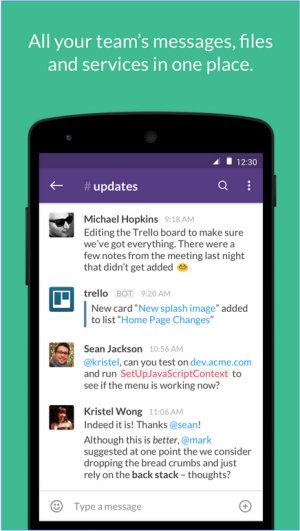
Slack has recently released version 4.52.171, further enhancing its capabilities as a premier tool for team communication. Designed to consolidate all team interactions in one accessible platform, Slack facilitates real-time messaging, file sharing, and both individual and group conversations.
Overview of Slack's Features
As a communication and collaboration powerhouse, Slack aims to reduce email dependency and unify messaging. Its user-friendly interface supports real-time chat, video calls, and deep integrations with a myriad of productivity applications, making it indispensable for businesses and remote teams seeking a cohesive workspace.
Key Functionalities
At its core, Slack is a messaging platform, but its Channels feature significantly enhances communication by organizing discussions around specific projects, departments, or topics. This structure minimizes clutter and ensures that pertinent information remains easily accessible. Additionally, users can engage in direct messaging for private conversations and share files directly within chats, streamlining communication and reducing the need for excessive email attachments. Slack's robust search functionality allows users to quickly locate past messages and files, enhancing efficiency.
Another standout feature is its extensive integration capability. Slack can connect with numerous tools such as Google Drive, Trello, Zoom, and Asana, transforming it into a central hub for collaboration, project management, and workflow automation.
Main Features at a Glance
- Channels & Direct Messages: Organize discussions by project or topic.
- File Sharing: Directly upload and share files in chats.
- Integrations: Connect with numerous third-party applications.
- Searchable History: Retrieve past conversations and files with ease.
- Automation & Bots: Utilize Slackbot for reminders and task automation.
- Voice & Video Calls: Communicate with teammates seamlessly.
Pricing Structure
Slack offers a free plan that includes 90 days of message history, up to 10 integrations, and one-on-one video calls. For users needing more features, the Pro plan provides unlimited message history and group video calls with screen sharing. Business+ and Enterprise Grid plans include advanced security and administrative controls tailored for larger organizations.
Comparative Advantages and Disadvantages
Slack is particularly favored for its intuitive design and adaptability, making it ideal for remote teams requiring organized communication. However, the limitations of the free plan, such as restricted message history and integrations, may pose challenges for growing teams. Additionally, the costs of paid plans can accumulate for larger organizations.
Pros:
- User-friendly interface
- Extensive integrations
- Organized channels for discussions
- Cross-device compatibility
- Searchable message history (in paid plans)
Cons:
- Free plan limits message history to 90 days
- Potential distractions from excessive notifications
- Costly paid plans for larger teams
Conclusion
Overall, Slack remains a top choice for enhancing communication and productivity within teams. Its versatile feature set, strong integration capabilities, and user experience make it an excellent tool for modern workplaces. While it effectively streamlines communication and centralizes work tools, users should be mindful of notification management and the implications of plan pricing as their teams grow. As Slack continues to evolve, it reinforces its position as a vital resource for collaboration and team efficiency
Overview of Slack's Features
As a communication and collaboration powerhouse, Slack aims to reduce email dependency and unify messaging. Its user-friendly interface supports real-time chat, video calls, and deep integrations with a myriad of productivity applications, making it indispensable for businesses and remote teams seeking a cohesive workspace.
Key Functionalities
At its core, Slack is a messaging platform, but its Channels feature significantly enhances communication by organizing discussions around specific projects, departments, or topics. This structure minimizes clutter and ensures that pertinent information remains easily accessible. Additionally, users can engage in direct messaging for private conversations and share files directly within chats, streamlining communication and reducing the need for excessive email attachments. Slack's robust search functionality allows users to quickly locate past messages and files, enhancing efficiency.
Another standout feature is its extensive integration capability. Slack can connect with numerous tools such as Google Drive, Trello, Zoom, and Asana, transforming it into a central hub for collaboration, project management, and workflow automation.
Main Features at a Glance
- Channels & Direct Messages: Organize discussions by project or topic.
- File Sharing: Directly upload and share files in chats.
- Integrations: Connect with numerous third-party applications.
- Searchable History: Retrieve past conversations and files with ease.
- Automation & Bots: Utilize Slackbot for reminders and task automation.
- Voice & Video Calls: Communicate with teammates seamlessly.
Pricing Structure
Slack offers a free plan that includes 90 days of message history, up to 10 integrations, and one-on-one video calls. For users needing more features, the Pro plan provides unlimited message history and group video calls with screen sharing. Business+ and Enterprise Grid plans include advanced security and administrative controls tailored for larger organizations.
Comparative Advantages and Disadvantages
Slack is particularly favored for its intuitive design and adaptability, making it ideal for remote teams requiring organized communication. However, the limitations of the free plan, such as restricted message history and integrations, may pose challenges for growing teams. Additionally, the costs of paid plans can accumulate for larger organizations.
Pros:
- User-friendly interface
- Extensive integrations
- Organized channels for discussions
- Cross-device compatibility
- Searchable message history (in paid plans)
Cons:
- Free plan limits message history to 90 days
- Potential distractions from excessive notifications
- Costly paid plans for larger teams
Conclusion
Overall, Slack remains a top choice for enhancing communication and productivity within teams. Its versatile feature set, strong integration capabilities, and user experience make it an excellent tool for modern workplaces. While it effectively streamlines communication and centralizes work tools, users should be mindful of notification management and the implications of plan pricing as their teams grow. As Slack continues to evolve, it reinforces its position as a vital resource for collaboration and team efficiency
Slack 4.52.171 released
Slack puts all your team communications in one place wherever you go with real-time messaging, file sharing, and one-to-one and group conversations.