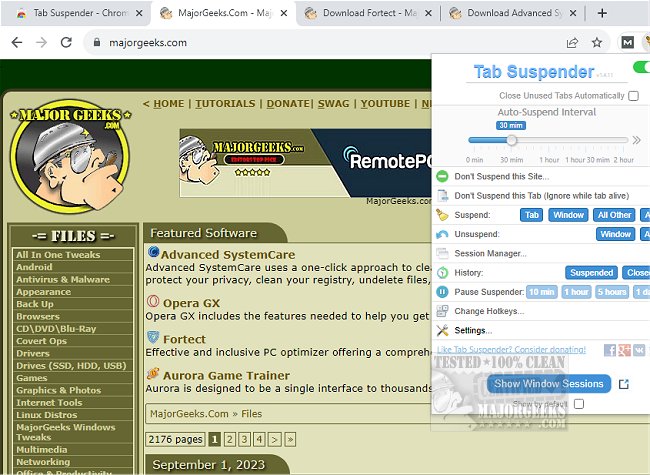
The recently released Tab Suspender version 2.0.13 offers a smart solution for users who frequently keep multiple tabs open in their web browsers. This extension is designed to automatically suspend inactive tabs, which can lead to a significant reduction in memory usage—up to 80%—and a decrease in the overall load on your device.
If you often find yourself overwhelmed by numerous open tabs, Tab Suspender can enhance your browsing experience by accelerating your browser’s performance and purging unnecessary memory usage. By suspending idle or forgotten tabs, the extension helps to free up valuable memory and device resources, thereby extending battery life and minimizing heat generation.
When you wish to revisit a suspended tab, it can be restored to its original state with ease, making it convenient to manage your browsing sessions. Additionally, Tab Suspender features an auto-close function that can automatically close unused tabs, allowing you to maintain a manageable tab count without manual intervention.
This extension is particularly beneficial for users seeking to optimize their browser's efficiency and improve overall performance. Alongside Tab Suspender, users might also be interested in related topics such as muting tabs in different browsers, restoring closed tabs, and tips for rejuvenating the performance of Google Chrome and Mozilla Firefox.
In future updates, it would be beneficial for Tab Suspender to include customizable settings that allow users to define their own criteria for suspending tabs, such as time limits or specific websites. Additionally, the incorporation of an analytics feature could provide users with insights into their tab usage and memory savings, further enhancing the utility of this extension
If you often find yourself overwhelmed by numerous open tabs, Tab Suspender can enhance your browsing experience by accelerating your browser’s performance and purging unnecessary memory usage. By suspending idle or forgotten tabs, the extension helps to free up valuable memory and device resources, thereby extending battery life and minimizing heat generation.
When you wish to revisit a suspended tab, it can be restored to its original state with ease, making it convenient to manage your browsing sessions. Additionally, Tab Suspender features an auto-close function that can automatically close unused tabs, allowing you to maintain a manageable tab count without manual intervention.
This extension is particularly beneficial for users seeking to optimize their browser's efficiency and improve overall performance. Alongside Tab Suspender, users might also be interested in related topics such as muting tabs in different browsers, restoring closed tabs, and tips for rejuvenating the performance of Google Chrome and Mozilla Firefox.
In future updates, it would be beneficial for Tab Suspender to include customizable settings that allow users to define their own criteria for suspending tabs, such as time limits or specific websites. Additionally, the incorporation of an analytics feature could provide users with insights into their tab usage and memory savings, further enhancing the utility of this extension
Tab Suspender 2.0.13 released
Tab Suspender will automatically suspend inactive tabs, potentially saving up to 80% of memory as well as reducing the load on your device.