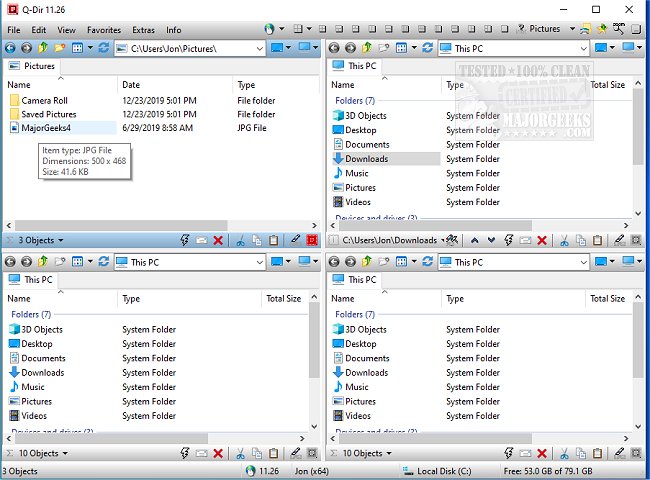
Q-Dir version 12.67 has been released, providing users with a powerful and intuitive way to manage their files and folders more efficiently. This free file management tool is particularly useful for those who need to handle multiple storage devices, including hard disks, network folders, USB drives, and more.
Unlike the standard Windows File Explorer, which is suited for basic tasks, Q-Dir, known as the Quad Explorer, offers advanced features that enhance speed and control over file management. Its standout quad-pane interface allows users to view and manage up to four folders at once, streamlining operations like copying and moving files. Additional features include drag-and-drop support, customizable layouts and color filters, tab support for multiple folders within each panel, and a portable version that requires no installation.
Q-Dir is designed to optimize workflows for various user groups: everyday users can organize personal files with ease, IT professionals can manage system files and backups efficiently, developers and designers can keep project directories accessible, power users can execute bulk operations swiftly, and network admins can facilitate file transfers seamlessly.
Moreover, Q-Dir is packed with productivity-enhancing tools such as bookmarking options for quick access to frequently used folders, a file preview feature for quick views of different file types, clipboard and shortcut integration for ease of use, and multi-monitor support. The software also provides built-in file filters, tree view navigation, and compatibility with ZIP and FTP for handling compressed and remote directories. Users can further customize their experience with dark mode and various themes.
However, new users may find the interface overwhelming initially, and while Q-Dir excels in file management, it lacks a built-in file search function, meaning users might still need to rely on Windows Search for comprehensive file lookups. Customization is encouraged, with options for hotkeys and personalized layouts to enhance workflow.
In summary, if Windows File Explorer does not meet your needs, Q-Dir is a robust alternative that offers speed, efficiency, and extensive customization options. It stands out as one of the best free file management tools available, making it worthwhile to download and experience its features firsthand.
For users looking to further improve their file management skills, exploring Q-Dir's advanced functionalities and customization options can lead to a significantly enhanced experience. Whether you're managing large projects or simply organizing personal files, Q-Dir aims to make the process as smooth and efficient as possible
Unlike the standard Windows File Explorer, which is suited for basic tasks, Q-Dir, known as the Quad Explorer, offers advanced features that enhance speed and control over file management. Its standout quad-pane interface allows users to view and manage up to four folders at once, streamlining operations like copying and moving files. Additional features include drag-and-drop support, customizable layouts and color filters, tab support for multiple folders within each panel, and a portable version that requires no installation.
Q-Dir is designed to optimize workflows for various user groups: everyday users can organize personal files with ease, IT professionals can manage system files and backups efficiently, developers and designers can keep project directories accessible, power users can execute bulk operations swiftly, and network admins can facilitate file transfers seamlessly.
Moreover, Q-Dir is packed with productivity-enhancing tools such as bookmarking options for quick access to frequently used folders, a file preview feature for quick views of different file types, clipboard and shortcut integration for ease of use, and multi-monitor support. The software also provides built-in file filters, tree view navigation, and compatibility with ZIP and FTP for handling compressed and remote directories. Users can further customize their experience with dark mode and various themes.
However, new users may find the interface overwhelming initially, and while Q-Dir excels in file management, it lacks a built-in file search function, meaning users might still need to rely on Windows Search for comprehensive file lookups. Customization is encouraged, with options for hotkeys and personalized layouts to enhance workflow.
In summary, if Windows File Explorer does not meet your needs, Q-Dir is a robust alternative that offers speed, efficiency, and extensive customization options. It stands out as one of the best free file management tools available, making it worthwhile to download and experience its features firsthand.
For users looking to further improve their file management skills, exploring Q-Dir's advanced functionalities and customization options can lead to a significantly enhanced experience. Whether you're managing large projects or simply organizing personal files, Q-Dir aims to make the process as smooth and efficient as possible
Q-Dir 12.67 released
Q-Dir is a free option to make managing your files and folders easy by allowing you to quickly regulate your hard disks, network folders, USB-drives, floppy disks, and other storage devices.