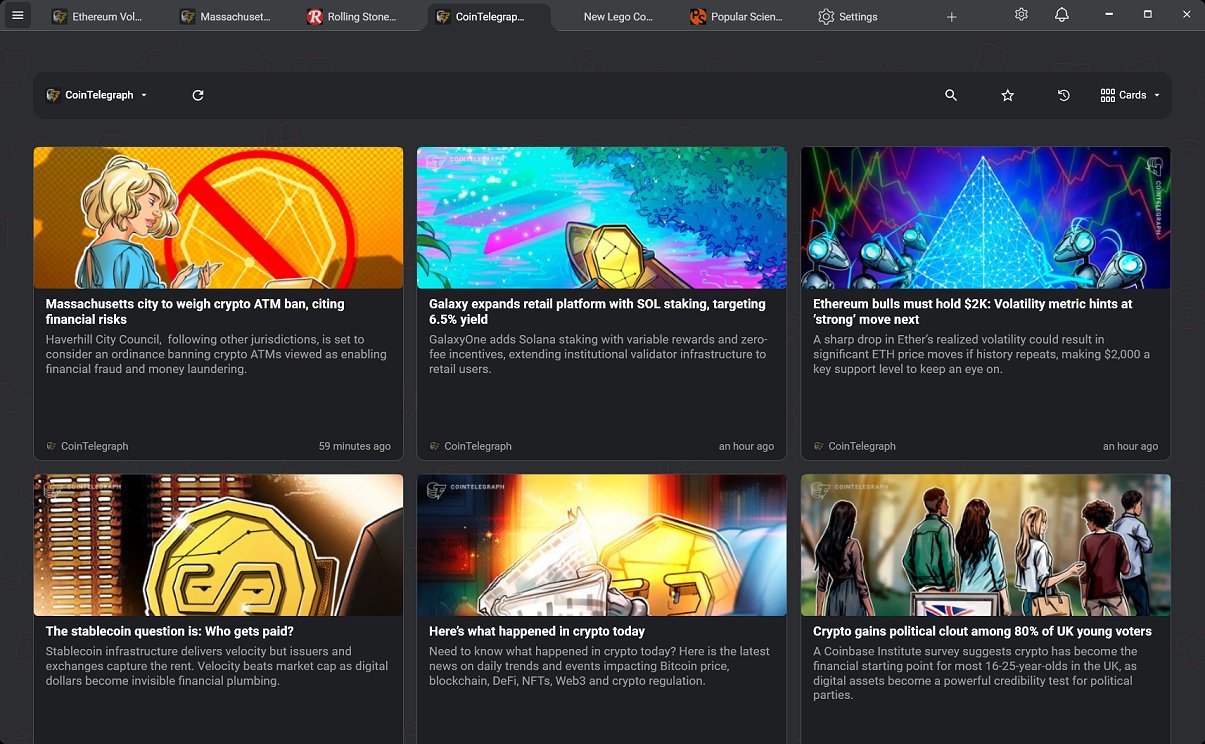
RSSly version 2026.10.2 has been released as a dedicated RSS reader for Windows, offering a fully native and efficient experience. This application stands out with its true multi-tab interface, allowing users to manage and read multiple feeds effortlessly. One of its key features is complete offline functionality, meaning users do not need to create accounts or rely on cloud services, ensuring data privacy and security. This positions RSSly as a clean alternative to popular web-based readers such as Feedly and Inoreader.
The app offers a variety of RSS feeds covering numerous topics, enhancing the reading experience. Users can easily add their feeds through the Settings section, either manually or via OPML file import. Although there are 100 curated feeds available from the start, users may need to search online for additional feeds to add manually.
Key features of RSSly include:
- A native Windows desktop application (not built on Electron)
- A true multi-tab interface for simultaneous reading
- OPML import for easy migration from other readers
- 100 curated feeds for quick access
- Built-in ad blocking for distraction-free reading
- Fully offline usage with no accounts, cloud sync, or telemetry
- Free to use as part of a commitment to user-friendly tools for Windows
The app's integrated ad-blocker enhances the user experience, allowing for smooth navigation. Users can also adjust settings to manage the number of articles loaded, which is beneficial for systems that may struggle with high volumes of content. Articles can be read directly within the app, either in a popup overlay or as a full tab, providing flexibility and immersion.
In conclusion, RSSly is a robust tool for efficient RSS feed management, offering a user-friendly interface that facilitates content organization. It's a valuable resource for both personal interests and professional needs, ensuring users stay informed on topics that matter to them. The application embodies a commitment to privacy and simplicity, making it an essential addition for anyone looking to enhance their RSS reading experience. As RSSly continues to evolve, future updates may further expand its features and improve usability, solidifying its position as a leading RSS reader for Windows
The app offers a variety of RSS feeds covering numerous topics, enhancing the reading experience. Users can easily add their feeds through the Settings section, either manually or via OPML file import. Although there are 100 curated feeds available from the start, users may need to search online for additional feeds to add manually.
Key features of RSSly include:
- A native Windows desktop application (not built on Electron)
- A true multi-tab interface for simultaneous reading
- OPML import for easy migration from other readers
- 100 curated feeds for quick access
- Built-in ad blocking for distraction-free reading
- Fully offline usage with no accounts, cloud sync, or telemetry
- Free to use as part of a commitment to user-friendly tools for Windows
The app's integrated ad-blocker enhances the user experience, allowing for smooth navigation. Users can also adjust settings to manage the number of articles loaded, which is beneficial for systems that may struggle with high volumes of content. Articles can be read directly within the app, either in a popup overlay or as a full tab, providing flexibility and immersion.
In conclusion, RSSly is a robust tool for efficient RSS feed management, offering a user-friendly interface that facilitates content organization. It's a valuable resource for both personal interests and professional needs, ensuring users stay informed on topics that matter to them. The application embodies a commitment to privacy and simplicity, making it an essential addition for anyone looking to enhance their RSS reading experience. As RSSly continues to evolve, future updates may further expand its features and improve usability, solidifying its position as a leading RSS reader for Windows
RSSly 2026.10.2 released
RSSly is an efficient, fully native RSS reader designed specifically for Windows, offering a seamless, responsive experience.