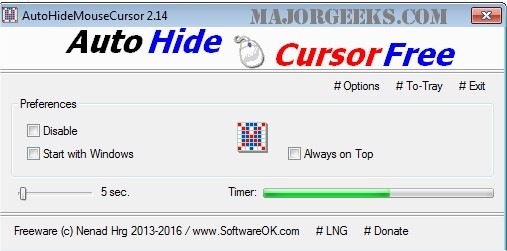
AutoHideMouseCursor is a compact, portable utility designed to enhance user experience by allowing the mouse cursor to vanish from the screen after a specified period. This tool is particularly beneficial for users who give presentations, as it helps eliminate distractions caused by a visible cursor.
Setting up AutoHideMouseCursor is user-friendly: simply select the desired duration on the adjustable timer and start the countdown. The timer resets with any mouse movement, ensuring that the cursor only disappears when you want it to.
- Low CPU Usage: Designed to operate efficiently, it ensures minimal impact on system performance.
- Adjustable Timer: Users can customize the duration for which the cursor will be hidden, catering to individual preferences.
- Optional Translation: The tool may also offer a feature for translations, enhancing accessibility for non-English speakers.
- Techniques to activate windows using mouse hover actions.
- Methods to enable mouse pointer trails for enhanced visibility.
- Options for configuring the snap pointer to the default button in Windows settings.
In an increasingly digital world where presentations and online meetings are commonplace, tools like AutoHideMouseCursor are essential for maintaining professionalism and focus. Whether in a classroom, boardroom, or virtual space, this utility can significantly contribute to an engaging and distraction-free environment
Setting up AutoHideMouseCursor is user-friendly: simply select the desired duration on the adjustable timer and start the countdown. The timer resets with any mouse movement, ensuring that the cursor only disappears when you want it to.
Key Features and Benefits:
- Compact Size: The program is lightweight, making it easy to run on any system without taking up significant resources.- Low CPU Usage: Designed to operate efficiently, it ensures minimal impact on system performance.
- Adjustable Timer: Users can customize the duration for which the cursor will be hidden, catering to individual preferences.
- Optional Translation: The tool may also offer a feature for translations, enhancing accessibility for non-English speakers.
Related Topics:
- Troubleshooting mouse cursor issues, such as jumping or erratic movements while typing.- Techniques to activate windows using mouse hover actions.
- Methods to enable mouse pointer trails for enhanced visibility.
- Options for configuring the snap pointer to the default button in Windows settings.
In an increasingly digital world where presentations and online meetings are commonplace, tools like AutoHideMouseCursor are essential for maintaining professionalism and focus. Whether in a classroom, boardroom, or virtual space, this utility can significantly contribute to an engaging and distraction-free environment
AutoHideMouseCursor 6.29 released
AutoHideMouseCursor is a small portable tool that allows you to set specific times for your mouse cursor to disappear from the screen.