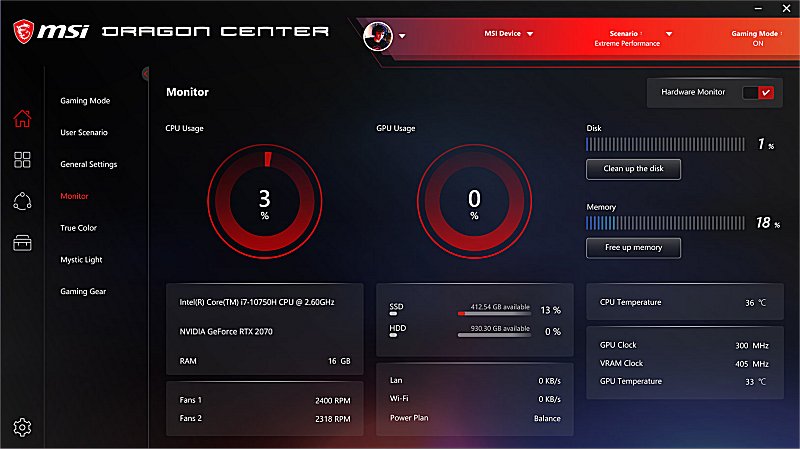
MSI has released version 2.0.158.0 of its Dragon Center software, aimed at enhancing the gaming experience for users of MSI devices. The software allows gamers to monitor and optimize their system performance easily, featuring a user-friendly interface that enables quick adjustments to user scenarios, display color modes, sound effects, LED-backlit colors, and more with just a click. The innovative UI facilitates seamless transitions across different MSI devices, giving gamers the confidence to excel in their gameplay. It's important to note that some features of the Dragon Center may vary depending on the specific MSI product being used.
In addition to these core functionalities, MSI Dragon Center also offers a range of features tailored to improve the overall gaming experience, such as real-time monitoring of system resources, customizable profiles for different games, and hardware monitoring capabilities. Gamers can also benefit from regular updates that enhance performance and introduce new features, ensuring that they always have the latest tools at their disposal.
For users looking to maximize their gaming potential, the following resources may also be useful: guides on discovering indie games, tips for using the Windows 10 and 11 gaming task managers, instructions for uninstalling the Xbox Game Bar and the Xbox Console Companion, and methods for monitoring FPS in Windows 10 and 11. These additional tools can complement MSI Dragon Center, providing a comprehensive approach to optimizing the gaming experience
In addition to these core functionalities, MSI Dragon Center also offers a range of features tailored to improve the overall gaming experience, such as real-time monitoring of system resources, customizable profiles for different games, and hardware monitoring capabilities. Gamers can also benefit from regular updates that enhance performance and introduce new features, ensuring that they always have the latest tools at their disposal.
For users looking to maximize their gaming potential, the following resources may also be useful: guides on discovering indie games, tips for using the Windows 10 and 11 gaming task managers, instructions for uninstalling the Xbox Game Bar and the Xbox Console Companion, and methods for monitoring FPS in Windows 10 and 11. These additional tools can complement MSI Dragon Center, providing a comprehensive approach to optimizing the gaming experience
MSI Dragon Center 2.0.158.0 released
MSI Dragon Center is designed for gamers to enhance users’ gaming experience on MSI devices.