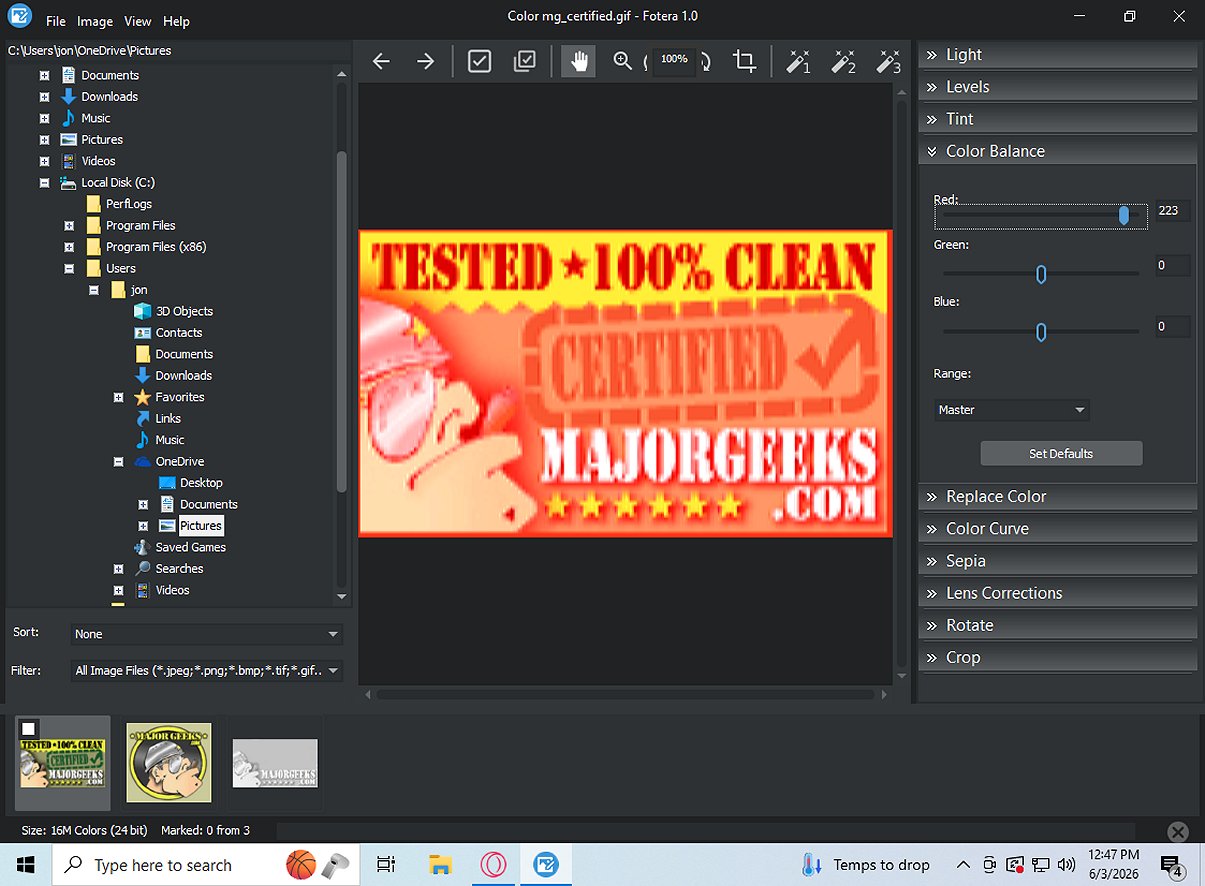
Fotera 2.4 has been released as a free photo-editing software that emphasizes quick, efficient, and non-destructive editing. Aimed at users who want to enhance their images without compromising the original files, Fotera saves every modification separately, allowing for easy reversion to the original image at any time.
Key Features of Fotera:
- Non-destructive Editing: Changes made to images, including adjustments to exposure, contrast, saturation, and more, are saved as separate data rather than altering the original files. This enables users to experiment freely without risking the quality of their source images.
- Folder-Based Workflow: Fotera utilizes an intuitive folder system for browsing images. Users can view thumbnails, select images to edit, and navigate easily through a photo library. The software includes features for sorting, filtering, marking images, and batch exporting multiple photos, streamlining the editing process.
- RAW Photo Support: Fotera stands out with its capability to edit RAW images from various camera formats, providing advanced settings for better control over the editing process. It includes options for managing color spaces, gamma settings, and white balance adjustments, ensuring precise results.
- Comprehensive Image Correction Tools: Users can perform various transformations on their images, such as rotation and cropping, and correct lens distortions. Creative features like sepia effects and one-click auto enhancement presets are also included to elevate image aesthetics.
Exporting Capabilities: Fotera allows for efficient batch export of edited images while preserving the original, high-resolution files. Users can save marked photos to a designated folder, ensuring their source files remain untouched.
Conclusion: Fotera is an excellent choice for anyone looking for high-quality, free photo editing software on Windows. Its non-destructive editing approach ensures that original images are safeguarded while providing a range of tools and features for effective and creative photo enhancement.
Future Enhancements: Looking ahead, Fotera could benefit from the integration of AI-based editing features, enabling automated enhancements and more sophisticated editing options. Additionally, expanding support for more file formats and enhancing user interface customization could further improve user experience
Key Features of Fotera:
- Non-destructive Editing: Changes made to images, including adjustments to exposure, contrast, saturation, and more, are saved as separate data rather than altering the original files. This enables users to experiment freely without risking the quality of their source images.
- Folder-Based Workflow: Fotera utilizes an intuitive folder system for browsing images. Users can view thumbnails, select images to edit, and navigate easily through a photo library. The software includes features for sorting, filtering, marking images, and batch exporting multiple photos, streamlining the editing process.
- RAW Photo Support: Fotera stands out with its capability to edit RAW images from various camera formats, providing advanced settings for better control over the editing process. It includes options for managing color spaces, gamma settings, and white balance adjustments, ensuring precise results.
- Comprehensive Image Correction Tools: Users can perform various transformations on their images, such as rotation and cropping, and correct lens distortions. Creative features like sepia effects and one-click auto enhancement presets are also included to elevate image aesthetics.
Exporting Capabilities: Fotera allows for efficient batch export of edited images while preserving the original, high-resolution files. Users can save marked photos to a designated folder, ensuring their source files remain untouched.
Conclusion: Fotera is an excellent choice for anyone looking for high-quality, free photo editing software on Windows. Its non-destructive editing approach ensures that original images are safeguarded while providing a range of tools and features for effective and creative photo enhancement.
Future Enhancements: Looking ahead, Fotera could benefit from the integration of AI-based editing features, enabling automated enhancements and more sophisticated editing options. Additionally, expanding support for more file formats and enhancing user interface customization could further improve user experience
Fotera 2.4 released
Fotera is freeware photo-editing software tailored for individuals seeking quick, efficient, and non-destructive image editing. It ensures that every modification is saved separately from the original image, preserving the integrity of your source photos.