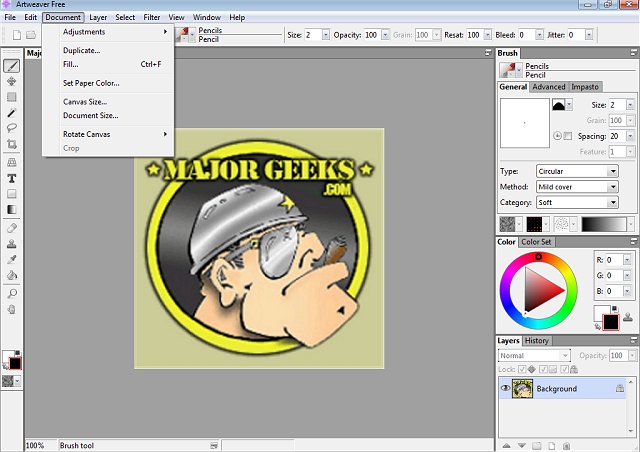
Artweaver Free 8.1.7 has been released, offering an accessible and feature-rich digital painting tool for artists of all skill levels. This software allows users to creatively paint, sketch from photos, and experiment with colors without the financial burden typically associated with high-end graphic design software like Photoshop.
Unleashing Creativity with Artweaver Free
Artweaver Free stands out with its extensive range of painting tools and effects. It provides a comprehensive digital art studio experience right on your PC. The application is particularly beneficial for beginners and casual artists who may not be ready to invest in expensive alternatives. With tools for sketching, airbrushing, and texture manipulation, Artweaver Free is designed to accommodate a variety of artistic styles.
Feature-Rich for All Artists
The software boasts a customizable brush system, allowing users to manipulate settings such as pressure, size, and opacity for precision in their artwork. Layer support enables complex compositions, giving artists the ability to make adjustments without affecting the overall piece. One of its standout features is the seamless PSD file support, allowing users to open, edit, and save files compatible with Photoshop, facilitating collaboration with other artists.
For those who utilize drawing tablets, Artweaver Free provides pressure-sensitive input, ensuring that brush strokes flow naturally in response to hand movements. This enhances the user experience, making it an ideal tool for digital painting.
Collaboration and Versions
Artweaver is available in two versions: the free Artweaver Free and the paid Artweaver Plus. The latter offers advanced features, including real-time collaboration, which is ideal for team projects or digital art classes. Users have the opportunity to try the Plus version for 14 days without restrictions before deciding to invest in it.
Pros and Cons
Pros of Artweaver Free include its vast feature set, layer and PSD support, customizable brush engine, and compatibility with drawing tablets. However, some users may find the interface somewhat outdated, and the free version lacks advanced tools and real-time collaboration found in the Plus version.
Final Thoughts
Artweaver Free is an excellent choice for beginners and casual artists looking for a user-friendly digital painting tool. Its robust capabilities, including layers, custom brushes, and PSD compatibility, make it a strong contender in the realm of free digital art software. For those seeking additional features, the Plus version offers enhanced functionality, solidifying Artweaver’s position as a valuable resource for digital artists.
Extensions
As digital art continues to gain popularity, tools like Artweaver Free play a crucial role in democratizing access to creative software. Future updates could focus on enhancing user experience, improving the interface, and expanding the range of brushes and effects. Additionally, integrating tutorials or community features could further support users in developing their skills and fostering collaboration among artists. As technology progresses, Artweaver's potential for innovation and user engagement remains promising
Unleashing Creativity with Artweaver Free
Artweaver Free stands out with its extensive range of painting tools and effects. It provides a comprehensive digital art studio experience right on your PC. The application is particularly beneficial for beginners and casual artists who may not be ready to invest in expensive alternatives. With tools for sketching, airbrushing, and texture manipulation, Artweaver Free is designed to accommodate a variety of artistic styles.
Feature-Rich for All Artists
The software boasts a customizable brush system, allowing users to manipulate settings such as pressure, size, and opacity for precision in their artwork. Layer support enables complex compositions, giving artists the ability to make adjustments without affecting the overall piece. One of its standout features is the seamless PSD file support, allowing users to open, edit, and save files compatible with Photoshop, facilitating collaboration with other artists.
For those who utilize drawing tablets, Artweaver Free provides pressure-sensitive input, ensuring that brush strokes flow naturally in response to hand movements. This enhances the user experience, making it an ideal tool for digital painting.
Collaboration and Versions
Artweaver is available in two versions: the free Artweaver Free and the paid Artweaver Plus. The latter offers advanced features, including real-time collaboration, which is ideal for team projects or digital art classes. Users have the opportunity to try the Plus version for 14 days without restrictions before deciding to invest in it.
Pros and Cons
Pros of Artweaver Free include its vast feature set, layer and PSD support, customizable brush engine, and compatibility with drawing tablets. However, some users may find the interface somewhat outdated, and the free version lacks advanced tools and real-time collaboration found in the Plus version.
Final Thoughts
Artweaver Free is an excellent choice for beginners and casual artists looking for a user-friendly digital painting tool. Its robust capabilities, including layers, custom brushes, and PSD compatibility, make it a strong contender in the realm of free digital art software. For those seeking additional features, the Plus version offers enhanced functionality, solidifying Artweaver’s position as a valuable resource for digital artists.
Extensions
As digital art continues to gain popularity, tools like Artweaver Free play a crucial role in democratizing access to creative software. Future updates could focus on enhancing user experience, improving the interface, and expanding the range of brushes and effects. Additionally, integrating tutorials or community features could further support users in developing their skills and fostering collaboration among artists. As technology progresses, Artweaver's potential for innovation and user engagement remains promising
Artweaver Free 8.1.7 released
Artweaver Free lets you paint creatively with the help of a vast range of painting tools so you can create sketches from photos or experiment with colors.