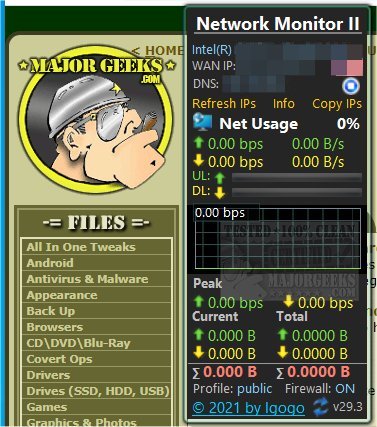
The latest version of Network Monitor II, now at 33.0, offers enhanced capabilities for monitoring your internet connection status and activity. This tool provides users with a comprehensive overview of their network performance, including real-time metrics for both outgoing and incoming speeds, as well as details on upload and download traffic. Users can easily access information regarding their Wi-Fi connection, such as its strength and source, along with their internal and external IP addresses—complete with country flags—Gateway information, and DNS settings.
For users operating on Windows 8.1 or 10 who experience difficulties installing the application, it may be necessary to use Desktop Gadgets Revived or a similar tool to facilitate its functionality. Network Monitor II stands out as an essential resource for users looking to find their current IP address effortlessly. It not only displays both external and internal IP addresses but also aids in accessing the router's web interface for configuration purposes.
One of the key features of Network Monitor II is its ability to automatically update IP addresses whenever a server restart occurs or when a new internet connection is established. The application also maintains a log file that records all changes to IP addresses, ensuring users have a complete history of their network activity.
In addition to its primary functionalities, users may find related tools beneficial, such as guides on using the Windows 10 & 11 Network Packet Sniffer and instructions on creating a WLAN Report in Windows.
Extended Features and Potential Enhancements:
Moving forward, future updates could expand Network Monitor II's capabilities by integrating more advanced analytics for network performance, such as real-time bandwidth usage per application and alerts for unusual activity. Furthermore, incorporating a user-friendly dashboard could enhance the overall experience, allowing for easier navigation and customization of displayed metrics. Additionally, providing mobile compatibility would enable users to monitor their internet connections on the go, making Network Monitor II an even more versatile tool for network management
For users operating on Windows 8.1 or 10 who experience difficulties installing the application, it may be necessary to use Desktop Gadgets Revived or a similar tool to facilitate its functionality. Network Monitor II stands out as an essential resource for users looking to find their current IP address effortlessly. It not only displays both external and internal IP addresses but also aids in accessing the router's web interface for configuration purposes.
One of the key features of Network Monitor II is its ability to automatically update IP addresses whenever a server restart occurs or when a new internet connection is established. The application also maintains a log file that records all changes to IP addresses, ensuring users have a complete history of their network activity.
In addition to its primary functionalities, users may find related tools beneficial, such as guides on using the Windows 10 & 11 Network Packet Sniffer and instructions on creating a WLAN Report in Windows.
Extended Features and Potential Enhancements:
Moving forward, future updates could expand Network Monitor II's capabilities by integrating more advanced analytics for network performance, such as real-time bandwidth usage per application and alerts for unusual activity. Furthermore, incorporating a user-friendly dashboard could enhance the overall experience, allowing for easier navigation and customization of displayed metrics. Additionally, providing mobile compatibility would enable users to monitor their internet connections on the go, making Network Monitor II an even more versatile tool for network management
Network Monitor II 33.0 released
Network Monitor II enables monitoring of your internet connection status and activity.