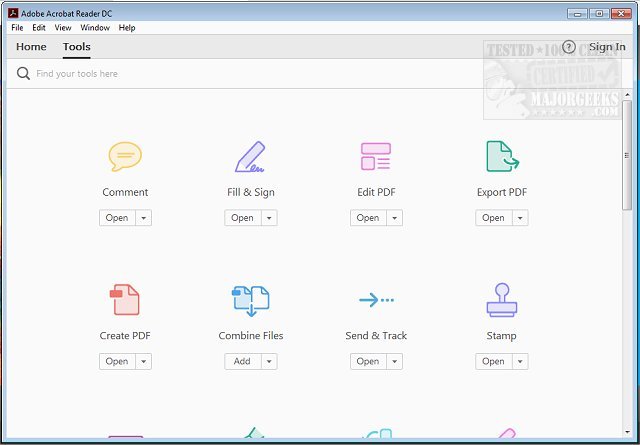
Adobe has recently released version 26.002.21869 of Adobe Acrobat Reader DC, a versatile and free software that allows users to view and print Portable Document Format (PDF) files. In an age where PDFs are ubiquitous—used for everything from school reports to business contracts—Adobe Acrobat Reader DC stands out as an invaluable tool designed to streamline the PDF experience.
1. Seamless Viewing and Navigation:
Opening PDFs in Acrobat Reader DC is user-friendly and efficient. The application supports multi-page navigation, enabling users to quickly jump to particular sections or search for specific text, making it ideal for both lengthy documents and short forms.
2. Professional Annotation Tools:
Users can enhance PDFs with features that allow for highlighting, underlining, and adding sticky notes. The inclusion of a drawing tool for sketches and the ability to insert text boxes empowers users to make detailed comments easily, catering to all levels of tech proficiency.
3. Simplified Digital Signatures:
The "Fill & Sign" feature allows users to electronically sign documents without needing to print them. This functionality is perfect for various scenarios, such as signing contracts or approvals, ensuring a paperless and efficient process.
4. Integration with Adobe Document Cloud:
Adobe Acrobat Reader DC seamlessly integrates with Adobe Document Cloud, allowing users to access and edit PDFs across multiple devices, including desktops, smartphones, and tablets. This cross-device functionality eliminates the hassle of managing different versions of files.
5. Optional Premium Features:
While the free version is robust, users can opt for a premium subscription to unlock additional capabilities, such as creating new PDFs, converting them to other formats (like Word or Excel), merging multiple PDFs, and performing advanced edits directly on existing documents.
6. Enhanced Security:
Adobe prioritizes user safety with its Protected Mode feature, which safeguards against potentially harmful files, making it a trustworthy choice for handling sensitive information.
Adobe Acrobat Reader DC transcends the basic functions of a typical PDF reader. It combines effective viewing and printing capabilities with advanced features like annotation, e-signatures, and cloud integration, making it a multifaceted tool suitable for students, professionals, and casual users alike.
Benefits of Downloading Adobe Acrobat Reader DC:
- Completely free, with optional upgrades available.
- Compatible across various operating systems including Windows, macOS, iOS, Android, and web platforms.
- Enhances PDFs through interactive features like annotations and electronic signatures.
- Consistently updated for improved functionality and security.
In conclusion, if you're navigating the world of PDFs—whether for academic, professional, or personal use—Adobe Acrobat Reader DC is a must-have tool. Its comprehensive features ensure that managing PDF documents is efficient, secure, and straightforward. Ready to enhance your PDF experience? Download Adobe Acrobat Reader DC today and discover its powerful capabilities
Key Features of Adobe Acrobat Reader DC
1. Seamless Viewing and Navigation:
Opening PDFs in Acrobat Reader DC is user-friendly and efficient. The application supports multi-page navigation, enabling users to quickly jump to particular sections or search for specific text, making it ideal for both lengthy documents and short forms.
2. Professional Annotation Tools:
Users can enhance PDFs with features that allow for highlighting, underlining, and adding sticky notes. The inclusion of a drawing tool for sketches and the ability to insert text boxes empowers users to make detailed comments easily, catering to all levels of tech proficiency.
3. Simplified Digital Signatures:
The "Fill & Sign" feature allows users to electronically sign documents without needing to print them. This functionality is perfect for various scenarios, such as signing contracts or approvals, ensuring a paperless and efficient process.
4. Integration with Adobe Document Cloud:
Adobe Acrobat Reader DC seamlessly integrates with Adobe Document Cloud, allowing users to access and edit PDFs across multiple devices, including desktops, smartphones, and tablets. This cross-device functionality eliminates the hassle of managing different versions of files.
5. Optional Premium Features:
While the free version is robust, users can opt for a premium subscription to unlock additional capabilities, such as creating new PDFs, converting them to other formats (like Word or Excel), merging multiple PDFs, and performing advanced edits directly on existing documents.
6. Enhanced Security:
Adobe prioritizes user safety with its Protected Mode feature, which safeguards against potentially harmful files, making it a trustworthy choice for handling sensitive information.
Why Adobe Acrobat Reader DC Is Essential
Adobe Acrobat Reader DC transcends the basic functions of a typical PDF reader. It combines effective viewing and printing capabilities with advanced features like annotation, e-signatures, and cloud integration, making it a multifaceted tool suitable for students, professionals, and casual users alike.
Benefits of Downloading Adobe Acrobat Reader DC:
- Completely free, with optional upgrades available.
- Compatible across various operating systems including Windows, macOS, iOS, Android, and web platforms.
- Enhances PDFs through interactive features like annotations and electronic signatures.
- Consistently updated for improved functionality and security.
In conclusion, if you're navigating the world of PDFs—whether for academic, professional, or personal use—Adobe Acrobat Reader DC is a must-have tool. Its comprehensive features ensure that managing PDF documents is efficient, secure, and straightforward. Ready to enhance your PDF experience? Download Adobe Acrobat Reader DC today and discover its powerful capabilities
Adobe Acrobat Reader DC 26.002.21869 released
Adobe Acrobat Reader DC is free and freely distributable software that lets you view and print Portable Document Format (PDF) files.