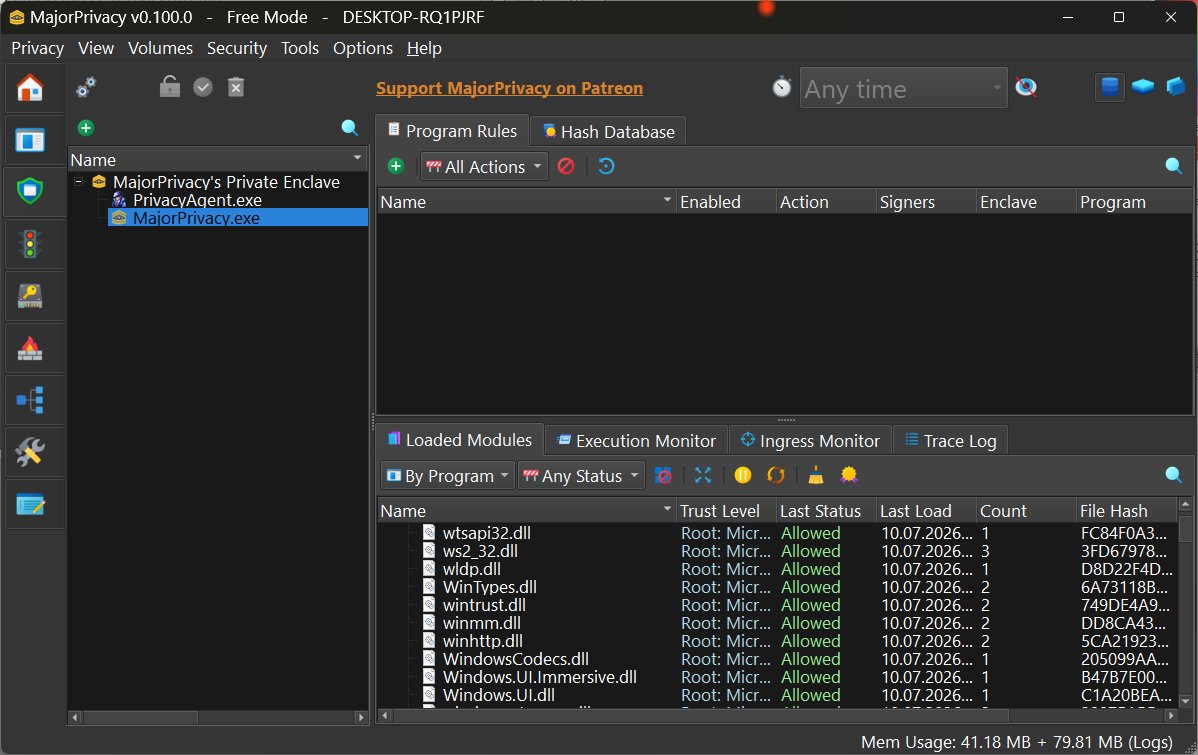
MajorPrivacy is a sophisticated privacy and system protection tool for Windows, designed to provide users with extensive control over applications, files, network activities, and sensitive data. Developed by Xanasoft, known for products like Sandboxie and Diskcryptor, MajorPrivacy targets power users and security enthusiasts seeking greater visibility and control than what standard Windows security features offer.
Core Features and Functionality
MajorPrivacy combines various functionalities, such as application control, privacy management, network monitoring, file protection, and system hardening into a unified interface. It serves as a successor to PrivateWin10, offering active monitoring and enforcement capabilities that surpass basic privacy tweaks. Notably, it incorporates kernel-level protection, which enables it to monitor processes, restrict file access, manage network activity, and thwart unauthorized applications.
Why Use MajorPrivacy?
While Windows offers a range of security features, it often lacks transparency regarding application behaviors. MajorPrivacy addresses this by revealing hidden activities, such as unexpected network connections from newly installed applications, and allowing users to restrict these actions. This tool is invaluable for IT professionals and advanced users, offering both monitoring and enforcement capabilities, along with detailed logging for better insight into system activities.
Key Features
1. Flexible Installation: Users can choose traditional installation or portable extraction, making it convenient for testing or multi-system deployment.
2. Import/Export Rules: This feature saves time by allowing users to transfer custom application restrictions and network policies between systems.
3. Activity Logging: Centralized logging of application activities simplifies troubleshooting and provides a clear overview of background processes.
4. Encrypted Disk Images: Users can create and mount encrypted virtual hard drives, ideal for securing sensitive documents and data.
5. User-Friendly Interface: Despite its complexity, MajorPrivacy's interface is well-organized, making navigation intuitive. A built-in setup wizard aids new users in configuring settings.
Usage Recommendations
Before making significant changes, users should create a System Restore point and back up their registry due to the depth of MajorPrivacy's system-level operations. While the interface is polished, some advanced settings may require additional documentation for clarity.
Limitations and Considerations
The primary drawback of MajorPrivacy is its complexity, which comes with a learning curve. Although the interface is user-friendly, some advanced features could benefit from more thorough explanations. Additionally, while MajorPrivacy is open-source, certain functionalities require a registration key, which is free for the first 90 days and can be renewed through user support on platforms like Patreon or PayPal. Personal licenses are flexible, allowing use across multiple PCs, while commercial users must acquire individual licenses for each machine.
Final Thoughts
MajorPrivacy distinguishes itself from conventional privacy tools by offering profound insights and control over application behaviors. Its features, such as portable deployment, detailed monitoring, and a user-friendly interface, enhance its appeal. However, users should be prepared for a complex setup process and potential licensing inquiries. Overall, for those seeking advanced privacy management and system oversight, MajorPrivacy is a formidable choice among privacy and system control utilities.
Looking Ahead
As privacy concerns continue to grow, tools like MajorPrivacy will likely evolve to meet new challenges. Users can expect ongoing updates and community support, with forums like MajorGeeks offering a platform for troubleshooting and information exchange. As developments unfold, MajorPrivacy is poised to remain a key player in the realm of Windows privacy solutions, appealing to both individual users and IT professionals alike
Core Features and Functionality
MajorPrivacy combines various functionalities, such as application control, privacy management, network monitoring, file protection, and system hardening into a unified interface. It serves as a successor to PrivateWin10, offering active monitoring and enforcement capabilities that surpass basic privacy tweaks. Notably, it incorporates kernel-level protection, which enables it to monitor processes, restrict file access, manage network activity, and thwart unauthorized applications.
Why Use MajorPrivacy?
While Windows offers a range of security features, it often lacks transparency regarding application behaviors. MajorPrivacy addresses this by revealing hidden activities, such as unexpected network connections from newly installed applications, and allowing users to restrict these actions. This tool is invaluable for IT professionals and advanced users, offering both monitoring and enforcement capabilities, along with detailed logging for better insight into system activities.
Key Features
1. Flexible Installation: Users can choose traditional installation or portable extraction, making it convenient for testing or multi-system deployment.
2. Import/Export Rules: This feature saves time by allowing users to transfer custom application restrictions and network policies between systems.
3. Activity Logging: Centralized logging of application activities simplifies troubleshooting and provides a clear overview of background processes.
4. Encrypted Disk Images: Users can create and mount encrypted virtual hard drives, ideal for securing sensitive documents and data.
5. User-Friendly Interface: Despite its complexity, MajorPrivacy's interface is well-organized, making navigation intuitive. A built-in setup wizard aids new users in configuring settings.
Usage Recommendations
Before making significant changes, users should create a System Restore point and back up their registry due to the depth of MajorPrivacy's system-level operations. While the interface is polished, some advanced settings may require additional documentation for clarity.
Limitations and Considerations
The primary drawback of MajorPrivacy is its complexity, which comes with a learning curve. Although the interface is user-friendly, some advanced features could benefit from more thorough explanations. Additionally, while MajorPrivacy is open-source, certain functionalities require a registration key, which is free for the first 90 days and can be renewed through user support on platforms like Patreon or PayPal. Personal licenses are flexible, allowing use across multiple PCs, while commercial users must acquire individual licenses for each machine.
Final Thoughts
MajorPrivacy distinguishes itself from conventional privacy tools by offering profound insights and control over application behaviors. Its features, such as portable deployment, detailed monitoring, and a user-friendly interface, enhance its appeal. However, users should be prepared for a complex setup process and potential licensing inquiries. Overall, for those seeking advanced privacy management and system oversight, MajorPrivacy is a formidable choice among privacy and system control utilities.
Looking Ahead
As privacy concerns continue to grow, tools like MajorPrivacy will likely evolve to meet new challenges. Users can expect ongoing updates and community support, with forums like MajorGeeks offering a platform for troubleshooting and information exchange. As developments unfold, MajorPrivacy is poised to remain a key player in the realm of Windows privacy solutions, appealing to both individual users and IT professionals alike
MajorPrivacy 0.100.1 released
Major Privacy is an advanced Windows privacy and system protection tool designed to give you granular control over applications, files, network activity, and sensitive data.