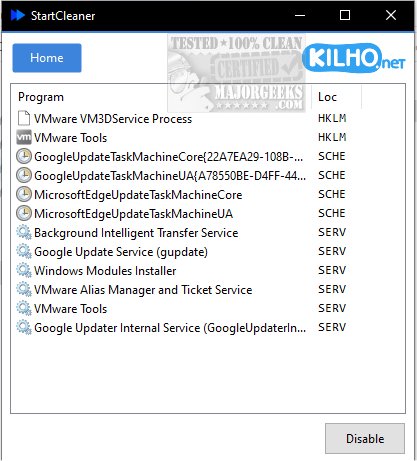
StartCleaner is a powerful tool designed to help users efficiently manage the programs that launch automatically during system startup. With its intuitive interface, StartCleaner allows for quick review and control over startup applications, which can significantly improve boot time and overall system performance. By streamlining the startup process, users can ensure their devices operate smoothly from the moment they are powered on.
Simplified Startup Management
The latest version, StartCleaner 2.0.3, offers a unified platform for managing startup folders. Users can easily add, remove, or disable programs that initiate at startup. In addition, StartCleaner provides access to the task scheduler, allowing users to configure the timing and conditions for specific tasks. This feature, combined with system service management, gives users the ability to control which services run at startup, further enhancing system speed and efficiency.
Easy to Use and Safe to Experiment
Using StartCleaner is straightforward. To disable a startup item, users simply select it and click the "Disable" button. This process is not only quick but also advisable to conduct with a current restore point in place, in case any issues arise. One of the unique features of StartCleaner is its ability to disable settings rather than permanently deleting them. This allows users to customize their startup experience safely, experimenting with different configurations without the risk of losing essential settings.
Maximize Your Device's Potential
With StartCleaner, users can unlock the full potential of their devices. The tool empowers them to personalize their startup experiences, leading to potentially faster boot times and improved functionality. Whether the goal is to enhance performance or streamline startup processes, StartCleaner provides the tools to take control confidently, with the assurance that any disabled settings can be easily restored if needed.
Conclusion
StartCleaner is an essential tool for anyone looking to optimize their system's startup performance. With its user-friendly features and safe management options, it stands out as a comprehensive solution for startup management. For additional guidance, users can refer to related resources on managing startup apps and configuring startup impacts in Windows.
Similar Resources:
- How to Manage Startup Apps in Windows
- How to See the Startup Impact of Apps in Windows
- How to Run Microsoft Store and Other Apps at Startup in Window
Simplified Startup Management
The latest version, StartCleaner 2.0.3, offers a unified platform for managing startup folders. Users can easily add, remove, or disable programs that initiate at startup. In addition, StartCleaner provides access to the task scheduler, allowing users to configure the timing and conditions for specific tasks. This feature, combined with system service management, gives users the ability to control which services run at startup, further enhancing system speed and efficiency.
Easy to Use and Safe to Experiment
Using StartCleaner is straightforward. To disable a startup item, users simply select it and click the "Disable" button. This process is not only quick but also advisable to conduct with a current restore point in place, in case any issues arise. One of the unique features of StartCleaner is its ability to disable settings rather than permanently deleting them. This allows users to customize their startup experience safely, experimenting with different configurations without the risk of losing essential settings.
Maximize Your Device's Potential
With StartCleaner, users can unlock the full potential of their devices. The tool empowers them to personalize their startup experiences, leading to potentially faster boot times and improved functionality. Whether the goal is to enhance performance or streamline startup processes, StartCleaner provides the tools to take control confidently, with the assurance that any disabled settings can be easily restored if needed.
Conclusion
StartCleaner is an essential tool for anyone looking to optimize their system's startup performance. With its user-friendly features and safe management options, it stands out as a comprehensive solution for startup management. For additional guidance, users can refer to related resources on managing startup apps and configuring startup impacts in Windows.
Similar Resources:
- How to Manage Startup Apps in Windows
- How to See the Startup Impact of Apps in Windows
- How to Run Microsoft Store and Other Apps at Startup in Window
StartCleaner 2.0.3 released
StartCleaner helps you effectively manage the programs that launch automatically on startup.