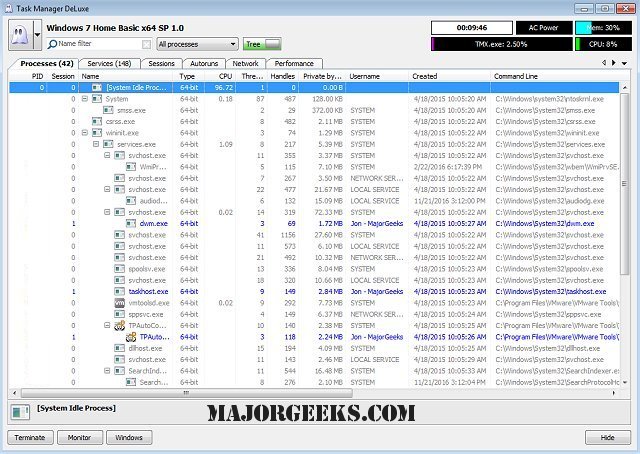
MiTeC Task Manager Deluxe version 5.2.0.0 has been released, providing users with an enhanced alternative to the standard Windows Task Manager. This free, lightweight, and portable application offers a range of advanced features that cater to users who require more in-depth system monitoring and management. Unlike the basic Windows Task Manager, which is user-friendly for casual users, MiTeC Task Manager Deluxe allows for custom filtering, advanced error monitoring, and detailed management of services and their dependencies.
The application excels in tracking processes, threads, services, and network activity, ensuring users have comprehensive insights into system performance. It delivers detailed information on process modules, handles, and I/O statistics, making it an invaluable tool for troubleshooting performance issues. Additionally, MiTeC Task Manager Deluxe includes features for managing autorun programs, monitoring active user sessions, and taking system snapshots to analyze changes over time.
One of the key advantages of MiTeC Task Manager Deluxe is its portability, as it requires no installation and leaves no traces on the user's system. This makes it easy to keep on a USB drive for use on different machines. The software also boasts an AutoRefresh feature that updates the current screen at set intervals, enhancing the monitoring experience.
A notable component of the application is the session viewer, which includes an automatic session journal that records every login, logout, lock, and status change—especially useful for monitoring user activity on terminal servers.
MiTeC Task Manager Deluxe allows for the browsing and administration of several critical domains, including processes, windows, services, sessions, autoruns, environment variables, and system information and performance.
In summary, MiTeC Task Manager Deluxe 5.2.0.0 is a powerful tool for anyone needing more than what the standard Windows Task Manager offers. Its advanced features and ease of portability make it an essential addition to any tech toolkit. Users can leverage its capabilities to optimize their system management and troubleshoot issues effectively.
For those interested in enhancing their task management experience, additional resources such as guides on opening Task Manager, closing programs, and customizing process information are readily available
The application excels in tracking processes, threads, services, and network activity, ensuring users have comprehensive insights into system performance. It delivers detailed information on process modules, handles, and I/O statistics, making it an invaluable tool for troubleshooting performance issues. Additionally, MiTeC Task Manager Deluxe includes features for managing autorun programs, monitoring active user sessions, and taking system snapshots to analyze changes over time.
One of the key advantages of MiTeC Task Manager Deluxe is its portability, as it requires no installation and leaves no traces on the user's system. This makes it easy to keep on a USB drive for use on different machines. The software also boasts an AutoRefresh feature that updates the current screen at set intervals, enhancing the monitoring experience.
A notable component of the application is the session viewer, which includes an automatic session journal that records every login, logout, lock, and status change—especially useful for monitoring user activity on terminal servers.
MiTeC Task Manager Deluxe allows for the browsing and administration of several critical domains, including processes, windows, services, sessions, autoruns, environment variables, and system information and performance.
In summary, MiTeC Task Manager Deluxe 5.2.0.0 is a powerful tool for anyone needing more than what the standard Windows Task Manager offers. Its advanced features and ease of portability make it an essential addition to any tech toolkit. Users can leverage its capabilities to optimize their system management and troubleshoot issues effectively.
For those interested in enhancing their task management experience, additional resources such as guides on opening Task Manager, closing programs, and customizing process information are readily available
MiTeC Task Manager Deluxe 5.2.0.0 released
MiTeC Task Manager Deluxe provides a free, lightweight, portable package that will enhance the features available in the standard Windows Task Manager.