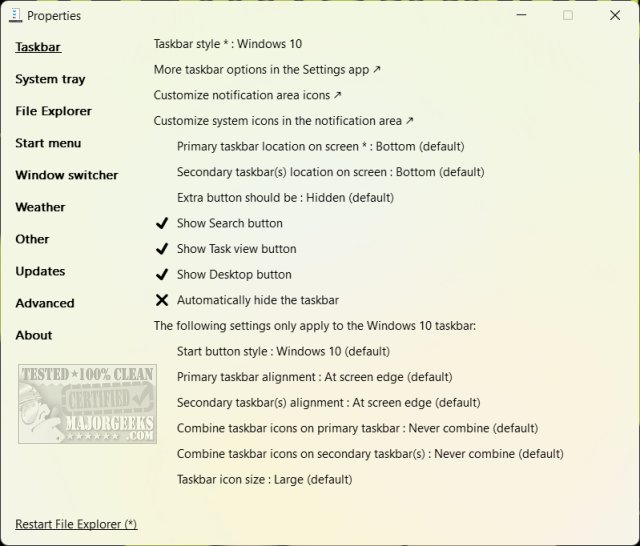
ExplorerPatcher has recently released its pre-release versions 26100.9711.71.1 and 26100.8457.70.3. This open-source, portable application allows users to customize various elements of the Windows 11 interface, including the Start Menu, Taskbar, System Tray, and File Explorer. For those who find the UI changes in Windows 11 unappealing, ExplorerPatcher serves as a powerful tool to revert to more familiar Windows 10 functionalities.
The software provides several features to enhance user experience:
1. Start Menu Customization: Users can toggle between Windows 10 and 11 styles, eliminate unwanted "Recommended" tiles, and streamline the Start Menu to their preference.
2. Taskbar Adjustments: The utility allows for resizing and repositioning of the Taskbar, offering functionalities reminiscent of Windows 10.
3. System Tray Options: Users can revert to the older style of tray icons and adjust notification settings to their liking.
4. File Explorer Enhancements: ExplorerPatcher enables the disabling of modern search features, customization of the right-click context menu, and more.
5. Multitasking Features: The application includes options for customizing the Alt + Tab behavior and improving multi-monitor setups.
6. Weather Widget Customization: Users can modify the appearance and functionality of the weather widget on the Taskbar.
7. Advanced Tweaks: For those wanting to dive deeper, an “Advanced” section offers experimental features—users are advised to consult documentation before exploring these options.
What sets ExplorerPatcher apart is its lightweight design and user-friendly interface, allowing for easy navigation and configuration without the burden of bloatware. It prioritizes efficiency, consistency, and user control, making it an attractive option for both casual users and seasoned Windows enthusiasts.
With its capacity to ease the transition to Windows 11 and restore familiar features, ExplorerPatcher is particularly beneficial for long-time Windows users. Its simplicity and practicality make it a valuable tool for anyone looking to enhance their Windows experience without any cost.
Extended Insights:
In light of the growing demand for customization in operating systems, tools like ExplorerPatcher signify a shift towards user empowerment in software design. As more users express dissatisfaction with enforced UI changes, the importance of open-source solutions that cater to individual preferences becomes increasingly evident.
Going forward, we may see more applications like ExplorerPatcher emerging, as they not only provide essential features that users crave but also contribute to a richer, more personalized computing experience. The ongoing evolution of Windows could further prompt developers to create modular and customizable tools, potentially fostering a vibrant ecosystem of user-centric software solutions that prioritize flexibility and choice.
In conclusion, ExplorerPatcher is not just a tool for customization; it represents a growing trend towards user autonomy in software environments, encouraging users to mold their interfaces according to their unique needs and preferences
The software provides several features to enhance user experience:
1. Start Menu Customization: Users can toggle between Windows 10 and 11 styles, eliminate unwanted "Recommended" tiles, and streamline the Start Menu to their preference.
2. Taskbar Adjustments: The utility allows for resizing and repositioning of the Taskbar, offering functionalities reminiscent of Windows 10.
3. System Tray Options: Users can revert to the older style of tray icons and adjust notification settings to their liking.
4. File Explorer Enhancements: ExplorerPatcher enables the disabling of modern search features, customization of the right-click context menu, and more.
5. Multitasking Features: The application includes options for customizing the Alt + Tab behavior and improving multi-monitor setups.
6. Weather Widget Customization: Users can modify the appearance and functionality of the weather widget on the Taskbar.
7. Advanced Tweaks: For those wanting to dive deeper, an “Advanced” section offers experimental features—users are advised to consult documentation before exploring these options.
What sets ExplorerPatcher apart is its lightweight design and user-friendly interface, allowing for easy navigation and configuration without the burden of bloatware. It prioritizes efficiency, consistency, and user control, making it an attractive option for both casual users and seasoned Windows enthusiasts.
With its capacity to ease the transition to Windows 11 and restore familiar features, ExplorerPatcher is particularly beneficial for long-time Windows users. Its simplicity and practicality make it a valuable tool for anyone looking to enhance their Windows experience without any cost.
Extended Insights:
In light of the growing demand for customization in operating systems, tools like ExplorerPatcher signify a shift towards user empowerment in software design. As more users express dissatisfaction with enforced UI changes, the importance of open-source solutions that cater to individual preferences becomes increasingly evident.
Going forward, we may see more applications like ExplorerPatcher emerging, as they not only provide essential features that users crave but also contribute to a richer, more personalized computing experience. The ongoing evolution of Windows could further prompt developers to create modular and customizable tools, potentially fostering a vibrant ecosystem of user-centric software solutions that prioritize flexibility and choice.
In conclusion, ExplorerPatcher is not just a tool for customization; it represents a growing trend towards user autonomy in software environments, encouraging users to mold their interfaces according to their unique needs and preferences
ExplorerPatcher 26100.9711.71.1 Pre-Release / 26100.8457.70.3 released
ExplorerPatcher is an Open Source, portable executable that lets you customize the Windows 11 Start Menu, Taskbar, System Tray, File Explorer, and more.
ExplorerPatcher 26100.9711.71.1 Pre-Release / 26100.8457.70.3 released @ MajorGeeks