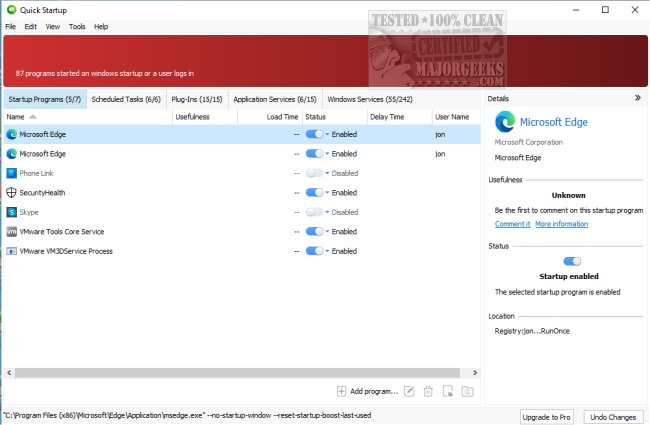
Glarysoft has released version 6.0.1.21 of its free startup management tool, Quick Startup. This application is designed to help users streamline their system boot times by disabling or delaying auto-start programs that can slow down the startup process. Managing startup applications can often be confusing, as users may not know which programs are necessary and which are not. Quick Startup simplifies this process by allowing users to view a comprehensive list of startup items, scheduled tasks, plug-ins, application services, and Windows services.
Key features of Glarysoft Quick Startup include:
- An elegant list view to browse all startup entries.
- A security risk rating for each startup entry to help users assess potential threats.
- Detailed information about individual startup programs.
- Options to add, edit, or delete startup entries as needed.
- The ability to leave comments on program entries for future reference.
This user-friendly tool is suitable for individuals with varying levels of computer expertise, making it accessible for everyone who wants to optimize their system's performance.
In addition to its main functionality, users may find it helpful to explore similar resources related to managing startup applications in Windows 10 and 11, adjusting shutdown options, and understanding boot settings. Overall, Glarysoft Quick Startup is a valuable tool for those looking to enhance their computer's speed and efficiency during startup.
As technology continues to evolve, tools like Quick Startup will likely incorporate more advanced features, such as AI-driven recommendations for startup management or integration with cloud services for remote access and monitoring. Users can expect ongoing improvements that will further simplify the process of maintaining an efficient and secure startup environment
Key features of Glarysoft Quick Startup include:
- An elegant list view to browse all startup entries.
- A security risk rating for each startup entry to help users assess potential threats.
- Detailed information about individual startup programs.
- Options to add, edit, or delete startup entries as needed.
- The ability to leave comments on program entries for future reference.
This user-friendly tool is suitable for individuals with varying levels of computer expertise, making it accessible for everyone who wants to optimize their system's performance.
In addition to its main functionality, users may find it helpful to explore similar resources related to managing startup applications in Windows 10 and 11, adjusting shutdown options, and understanding boot settings. Overall, Glarysoft Quick Startup is a valuable tool for those looking to enhance their computer's speed and efficiency during startup.
As technology continues to evolve, tools like Quick Startup will likely incorporate more advanced features, such as AI-driven recommendations for startup management or integration with cloud services for remote access and monitoring. Users can expect ongoing improvements that will further simplify the process of maintaining an efficient and secure startup environment
Glarysoft Quick Startup 6.0.1.21 released
Glarysoft Quick Startup is a free startup manager designed to disable or delay auto-start programs to speed up system boot times.