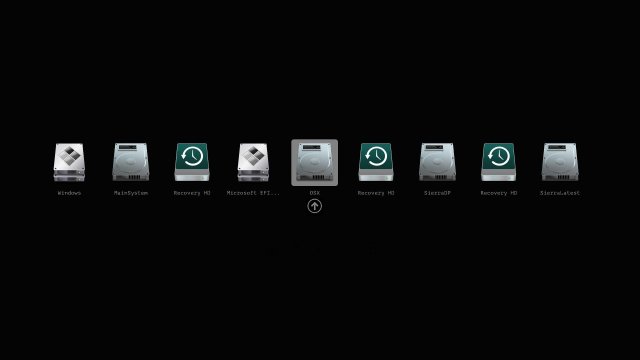
The Clover EFI Bootloader version 5175 has been released, offering versatile booting options for OS X, Windows, and Linux across both Mac and PC systems equipped with UEFI or BIOS firmware. This bootloader allows users to initiate operating systems in either UEFI or legacy mode, leveraging either direct UEFI firmware or Clover EFI emulation.
Key features of Clover EFI Bootloader include:
- A customizable graphical user interface (GUI) with options for themes, icons, fonts, background images, animations, and mouse pointers.
- Access to a theme database and a theme manager for users to personalize their boot experience.
- Enhanced GUI functionalities such as the ability to change screen resolution, save preboot logs, and create custom boot entries.
- Support for various keyboard shortcuts to ease navigation and configuration, including saving ACPI tables and testing DSDT patching.
- The ability to boot previously selected entries after a timeout and scroll through the boot entries menu if screen resolution is limited.
For users looking to enhance their booting experience, Clover EFI Bootloader 5175 offers extensive customization options and user-friendly features to ensure seamless operation across multiple operating systems.
Moving forward, users can expect continued updates and enhancements to Clover EFI, focusing on improving compatibility with new operating systems and firmware versions, along with providing more extensive customization tools. This could include further refinements to the GUI, additional themes, and improved support for troubleshooting boot issues, thereby enriching the user experience in multi-boot environments
Key features of Clover EFI Bootloader include:
- A customizable graphical user interface (GUI) with options for themes, icons, fonts, background images, animations, and mouse pointers.
- Access to a theme database and a theme manager for users to personalize their boot experience.
- Enhanced GUI functionalities such as the ability to change screen resolution, save preboot logs, and create custom boot entries.
- Support for various keyboard shortcuts to ease navigation and configuration, including saving ACPI tables and testing DSDT patching.
- The ability to boot previously selected entries after a timeout and scroll through the boot entries menu if screen resolution is limited.
For users looking to enhance their booting experience, Clover EFI Bootloader 5175 offers extensive customization options and user-friendly features to ensure seamless operation across multiple operating systems.
Moving forward, users can expect continued updates and enhancements to Clover EFI, focusing on improving compatibility with new operating systems and firmware versions, along with providing more extensive customization tools. This could include further refinements to the GUI, additional themes, and improved support for troubleshooting boot issues, thereby enriching the user experience in multi-boot environments
Clover EFI Bootloader 5175 released
Clover EFI Bootloader can boot OS X, Windows, and Linux on Mac or PC with UEFI or BIOS firmware.