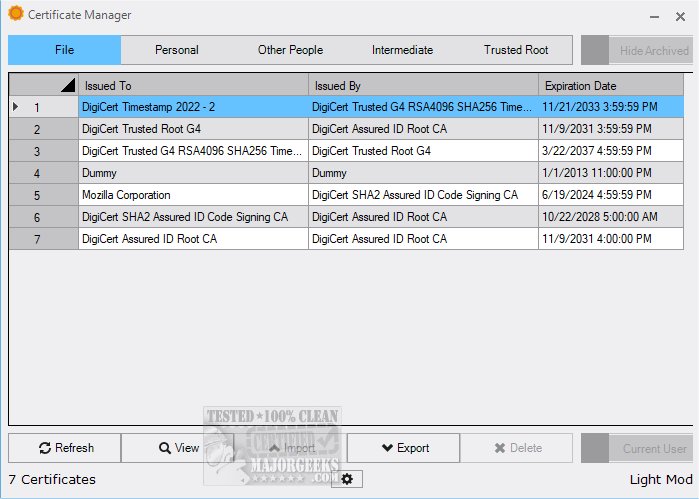
The newly released Certificate Manager 19.15 provides users with a comprehensive overview of their digital certificates, allowing for easy access to detailed information. This tool not only offers a clear view of existing certificates but also enhances management capabilities by enabling users to import new certificates and export existing ones.
While app certificates may often be overlooked by the average user until a problem occurs during installation, they are vital for developers who must ensure their software is properly signed. Certificate Manager serves as an essential resource in this context, granting users the ability to view all relevant certificates associated with their systems.
Key Features of Certificate Manager:
- User-Friendly Interface: Users can easily navigate through their personal certificates connected to user profiles. By double-clicking on any entry, detailed information—including the issuer, validity period, and other technical specifics—can be accessed effortlessly.
- Organized Certificate Sections: The application is structured with dedicated areas for Intermediate and Trusted Root certificates, allowing users to check expiration dates and issuers without the hassle of examining each certificate individually.
- Enhanced Management Functions: The ability to import and export certificates adds significant value, making Certificate Manager a practical tool for effective app certification management.
Conclusion:
Certificate Manager 19.15 stands out as an exceptional solution for managing digital certificates. Its intuitive design simplifies the often complex process of certificate management, ensuring a seamless and enjoyable user experience. By streamlining navigation through its robust features, Certificate Manager transforms certificate management from a daunting task into a straightforward journey. Users are encouraged to download the software and experience its capabilities firsthand.
Future Extensions:
As technology and security standards evolve, future updates to Certificate Manager could include enhanced automation features, such as automatic renewal reminders for expiring certificates or integration with cloud services for better certificate storage and management. Additionally, the introduction of analytics tools could help users monitor certificate usage trends and identify potential security risks associated with outdated or untrusted certificates
While app certificates may often be overlooked by the average user until a problem occurs during installation, they are vital for developers who must ensure their software is properly signed. Certificate Manager serves as an essential resource in this context, granting users the ability to view all relevant certificates associated with their systems.
Key Features of Certificate Manager:
- User-Friendly Interface: Users can easily navigate through their personal certificates connected to user profiles. By double-clicking on any entry, detailed information—including the issuer, validity period, and other technical specifics—can be accessed effortlessly.
- Organized Certificate Sections: The application is structured with dedicated areas for Intermediate and Trusted Root certificates, allowing users to check expiration dates and issuers without the hassle of examining each certificate individually.
- Enhanced Management Functions: The ability to import and export certificates adds significant value, making Certificate Manager a practical tool for effective app certification management.
Conclusion:
Certificate Manager 19.15 stands out as an exceptional solution for managing digital certificates. Its intuitive design simplifies the often complex process of certificate management, ensuring a seamless and enjoyable user experience. By streamlining navigation through its robust features, Certificate Manager transforms certificate management from a daunting task into a straightforward journey. Users are encouraged to download the software and experience its capabilities firsthand.
Future Extensions:
As technology and security standards evolve, future updates to Certificate Manager could include enhanced automation features, such as automatic renewal reminders for expiring certificates or integration with cloud services for better certificate storage and management. Additionally, the introduction of analytics tools could help users monitor certificate usage trends and identify potential security risks associated with outdated or untrusted certificates
Certificate Manager 19.15 released
Certificate Manager offers an in-depth overview of your current certificates, enabling you to access detailed information with ease.