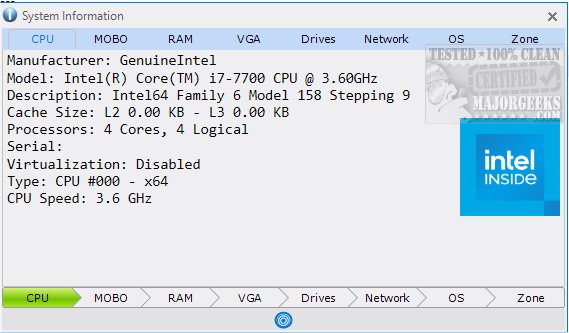
The newly released System Information 19.15 offers users a simple and portable solution for gathering essential system information through a single, user-friendly graphical interface (GUI). This tool is particularly beneficial for those seeking straightforward insights into their computer systems without the complexities that come with more advanced applications like HWiNFO.
User-Friendly Interface
System Information boasts an intuitively organized interface, allowing users to easily navigate through various components of their system. Key information about the CPU, motherboard, RAM, graphics card, and network can be accessed with just a click. The layout prioritizes user accessibility, placing relevant areas at the bottom of the interface for quick reference.
Practical Features
In addition to information retrieval, System Information enhances user experience by allowing functions such as printing, copying, saving, and refreshing data through a simple blue button. This feature opens a menu for users to manage their data efficiently, catering to individual needs.
Centralized Information Access
Instead of manually searching through multiple sources for system details, System Information consolidates all relevant data into a single interface. This not only streamlines the information-gathering process but also facilitates easy copying and sharing of data when needed.
Comprehensive Insights
With System Information, users can easily discover significant details about their computers, including hardware specifications, drive information, and network configurations. This tool provides vital insights such as processor model, RAM capacity, and operating system version, making it an efficient resource for understanding computer components.
Conclusion
System Information 19.15 is an excellent choice for users seeking a straightforward and effective tool to access and manage their computer's specifications. Its ease of use, combined with a centralized display of information, positions it as a valuable asset for both novice and experienced users alike.
As technology continues to evolve, tools like System Information will remain essential for helping users navigate and understand their computer systems more efficiently. With a focus on user experience and accessibility, this tool is sure to cater to a wide range of needs in the realm of system information retrieval.
Related Resources:
- How to Identify the Hardware in Your Computer
- How to Find the Serial Number of Your Windows PC
- How to Find Motherboard Manufacturer, Model, Serial Number, and Version
- How to Check What Graphic Card (GPU) Is in Your Computer
- How to Identify My Intel Processor and Generation
- How to Check Your Memory (RAM) Speed, Available Slots, and Mor
User-Friendly Interface
System Information boasts an intuitively organized interface, allowing users to easily navigate through various components of their system. Key information about the CPU, motherboard, RAM, graphics card, and network can be accessed with just a click. The layout prioritizes user accessibility, placing relevant areas at the bottom of the interface for quick reference.
Practical Features
In addition to information retrieval, System Information enhances user experience by allowing functions such as printing, copying, saving, and refreshing data through a simple blue button. This feature opens a menu for users to manage their data efficiently, catering to individual needs.
Centralized Information Access
Instead of manually searching through multiple sources for system details, System Information consolidates all relevant data into a single interface. This not only streamlines the information-gathering process but also facilitates easy copying and sharing of data when needed.
Comprehensive Insights
With System Information, users can easily discover significant details about their computers, including hardware specifications, drive information, and network configurations. This tool provides vital insights such as processor model, RAM capacity, and operating system version, making it an efficient resource for understanding computer components.
Conclusion
System Information 19.15 is an excellent choice for users seeking a straightforward and effective tool to access and manage their computer's specifications. Its ease of use, combined with a centralized display of information, positions it as a valuable asset for both novice and experienced users alike.
As technology continues to evolve, tools like System Information will remain essential for helping users navigate and understand their computer systems more efficiently. With a focus on user experience and accessibility, this tool is sure to cater to a wide range of needs in the realm of system information retrieval.
Related Resources:
- How to Identify the Hardware in Your Computer
- How to Find the Serial Number of Your Windows PC
- How to Find Motherboard Manufacturer, Model, Serial Number, and Version
- How to Check What Graphic Card (GPU) Is in Your Computer
- How to Identify My Intel Processor and Generation
- How to Check Your Memory (RAM) Speed, Available Slots, and Mor
System Information 19.15 released
System Information provides a simple portable option for retrieving system information all through a single GUI.