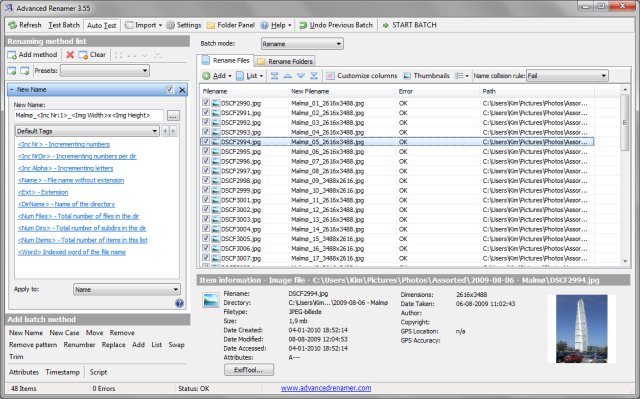
Advanced Renamer 4.28 is a free software tool designed for bulk renaming of files and folders. This program simplifies the process of managing large numbers of files by allowing users to set up batch jobs with various methods to modify file names, attributes, and timestamps simultaneously. With 13 different techniques available, users can easily construct new file names by adding, removing, or replacing text, changing letter cases, or even generating entirely new names based on existing file information.
Before executing any renaming operations, users can preview the changes to ensure accuracy. Additionally, if a rename operation does not yield the desired results, users have the option to undo the entire batch.
Key features of Advanced Renamer include:
- Support for Unicode
- Real-time preview of new names
- Tag-based renaming capabilities
- Ability to rename files using MP3/ID3 data
- Support for regular expressions and wildcards
- Image renaming with EXIF data
- Thumbnail display for images
- Renaming based on video tags
- Utilization of GPS information from image files
- Compatibility with both files and folders
- Batch modes for renaming, copying, or moving files
- Custom method creation using JavaScript
- Setting file timestamps and attributes
In addition to these features, Advanced Renamer also provides functionalities similar to managing default apps, resetting file associations, clearing recent items in Windows 10, and adjusting folder view settings.
Overall, Advanced Renamer 4.28 is a powerful tool for anyone needing to efficiently manage and rename large groups of files and folders, making it an invaluable resource for personal and professional use alike.
To extend the capabilities of Advanced Renamer, users might consider integrating it with other file management software or scripts to automate their workflows further. For instance, utilizing the software alongside a file synchronization tool could streamline the organization of multimedia libraries, ensuring that filenames remain consistent across devices. Additionally, users can explore advanced scripting options to tailor renaming processes to specific needs, enhancing productivity and file management efficiency
Before executing any renaming operations, users can preview the changes to ensure accuracy. Additionally, if a rename operation does not yield the desired results, users have the option to undo the entire batch.
Key features of Advanced Renamer include:
- Support for Unicode
- Real-time preview of new names
- Tag-based renaming capabilities
- Ability to rename files using MP3/ID3 data
- Support for regular expressions and wildcards
- Image renaming with EXIF data
- Thumbnail display for images
- Renaming based on video tags
- Utilization of GPS information from image files
- Compatibility with both files and folders
- Batch modes for renaming, copying, or moving files
- Custom method creation using JavaScript
- Setting file timestamps and attributes
In addition to these features, Advanced Renamer also provides functionalities similar to managing default apps, resetting file associations, clearing recent items in Windows 10, and adjusting folder view settings.
Overall, Advanced Renamer 4.28 is a powerful tool for anyone needing to efficiently manage and rename large groups of files and folders, making it an invaluable resource for personal and professional use alike.
To extend the capabilities of Advanced Renamer, users might consider integrating it with other file management software or scripts to automate their workflows further. For instance, utilizing the software alongside a file synchronization tool could streamline the organization of multimedia libraries, ensuring that filenames remain consistent across devices. Additionally, users can explore advanced scripting options to tailor renaming processes to specific needs, enhancing productivity and file management efficiency
Advanced Renamer 4.28 released
Advanced Renamer is a free program for renaming multiple files and folders at once.