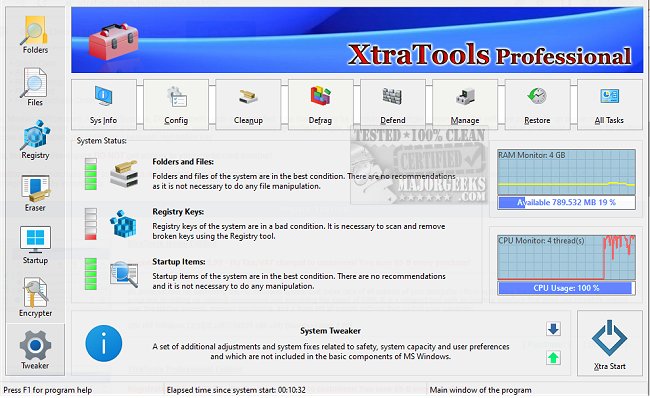
XtraTools is a comprehensive utility suite designed for Windows users seeking to optimize their system without the hassle of managing multiple applications. The latest version, 26.7.1, enhances its functionality, providing an all-in-one solution for system tweaking, cleaning, and maintenance.
Functionality of XtraTools
This utility suite focuses on several core areas:
- System Tweaking: Users can adjust hidden operating system settings to boost performance and improve user interface responsiveness.
- Folder Scanning: It helps clear temporary files, outdated logs, and other unnecessary digital clutter that consumes storage space.
- Process Monitoring: Users have the ability to terminate or manage processes that are resource-intensive or malfunctioning.
- File Shredding: XtraTools includes a feature that securely deletes files to prevent recovery.
- RAM Management: It offers tools to optimize memory usage for enhanced multitasking capabilities.
- Activity Privacy: The Objects Eraser feature removes recent registry traces, enhancing user privacy.
Additionally, the System Tune-up module provides quick access to tools for managing service autoloads, adjusting task priorities, and modifying network settings for better overall performance.
Pros and Cons
Pros:
- Combines a wide array of utilities into a single application, eliminating the need for multiple tools.
- Offers a portable version suitable for technicians and administrators.
- Provides real-time monitoring of processes and memory usage.
- Efficiently cleans up junk files and unnecessary system traces.
- Compatible with various Windows versions.
Cons:
- The user interface may feel outdated compared to newer utility suites.
- There is no free version available, only a trial.
- Some advanced features may be overwhelming for casual users.
Conclusion
Overall, XtraTools 26.7.1 presents a robust set of utilities for users who want to enhance their Windows experience by cleaning, tuning, and optimizing their systems. For those frustrated with sluggish performance and the need to juggle various tools, XtraTools offers a streamlined solution that could significantly improve system responsiveness.
Extended Features and Considerations
In addition to its primary functions, future updates could consider modernizing the user interface for a more intuitive experience, as well as offering a free version with limited functionality to attract casual users. Additionally, integrating more automated cleaning options and user tutorials could enhance usability for those less familiar with system management. Overall, XtraTools stands out as a valuable asset for tech-savvy individuals and system administrators alike, seeking efficiency and control over their Windows environments
Functionality of XtraTools
This utility suite focuses on several core areas:
- System Tweaking: Users can adjust hidden operating system settings to boost performance and improve user interface responsiveness.
- Folder Scanning: It helps clear temporary files, outdated logs, and other unnecessary digital clutter that consumes storage space.
- Process Monitoring: Users have the ability to terminate or manage processes that are resource-intensive or malfunctioning.
- File Shredding: XtraTools includes a feature that securely deletes files to prevent recovery.
- RAM Management: It offers tools to optimize memory usage for enhanced multitasking capabilities.
- Activity Privacy: The Objects Eraser feature removes recent registry traces, enhancing user privacy.
Additionally, the System Tune-up module provides quick access to tools for managing service autoloads, adjusting task priorities, and modifying network settings for better overall performance.
Pros and Cons
Pros:
- Combines a wide array of utilities into a single application, eliminating the need for multiple tools.
- Offers a portable version suitable for technicians and administrators.
- Provides real-time monitoring of processes and memory usage.
- Efficiently cleans up junk files and unnecessary system traces.
- Compatible with various Windows versions.
Cons:
- The user interface may feel outdated compared to newer utility suites.
- There is no free version available, only a trial.
- Some advanced features may be overwhelming for casual users.
Conclusion
Overall, XtraTools 26.7.1 presents a robust set of utilities for users who want to enhance their Windows experience by cleaning, tuning, and optimizing their systems. For those frustrated with sluggish performance and the need to juggle various tools, XtraTools offers a streamlined solution that could significantly improve system responsiveness.
Extended Features and Considerations
In addition to its primary functions, future updates could consider modernizing the user interface for a more intuitive experience, as well as offering a free version with limited functionality to attract casual users. Additionally, integrating more automated cleaning options and user tutorials could enhance usability for those less familiar with system management. Overall, XtraTools stands out as a valuable asset for tech-savvy individuals and system administrators alike, seeking efficiency and control over their Windows environments
XtraTools 26.7.1 released
XtraTools is an all-in-one Windows utility suite packed with tools designed to tweak, clean, and optimize your system, without needing five different apps.