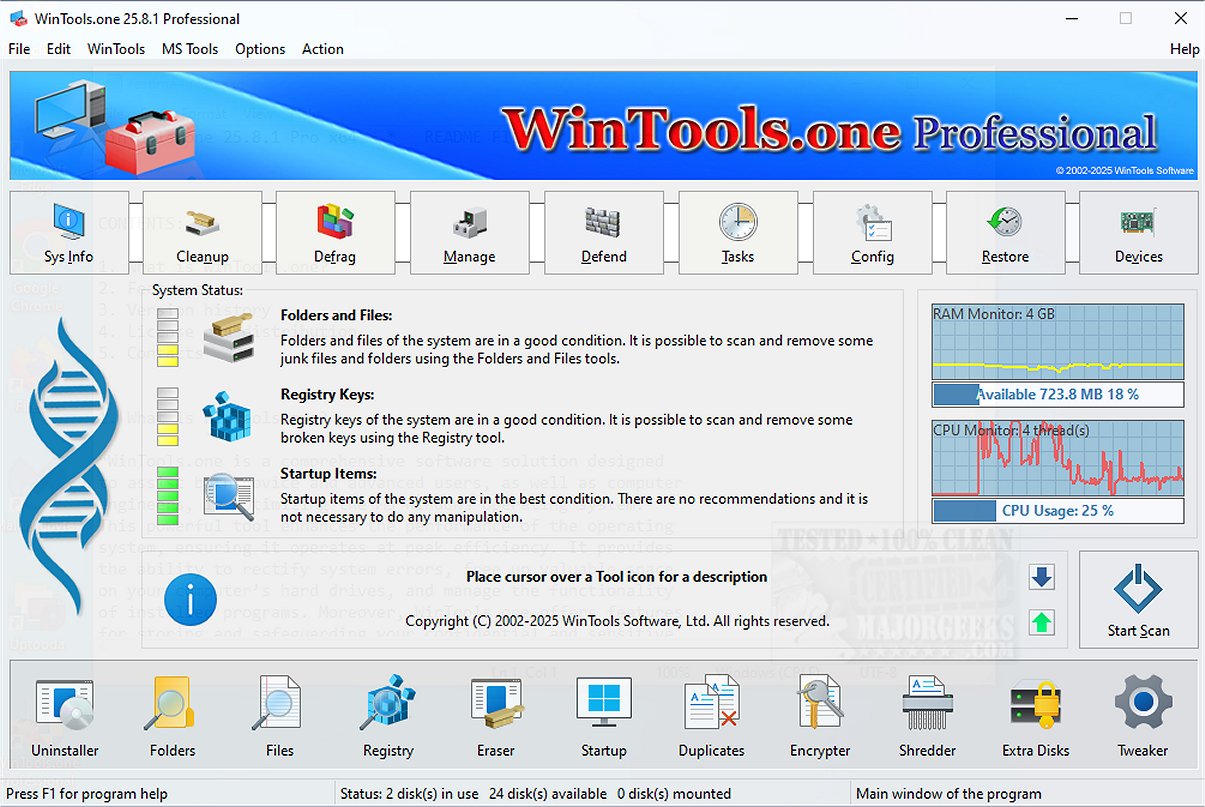
WinTools.one is a powerful system maintenance and cleanup utility that has recently launched version 26.7.1. This software encompasses a variety of diagnostic tools designed to assess and enhance your computer's performance by pinpointing areas that require improvement. Its goal is to optimize system functionality, ensuring that users experience smooth and efficient operations.
Purpose of WinTools.one
The primary function of WinTools.one is to assist users in effectively managing their files, folders, system registry, and startup items. By addressing common system issues and errors, it helps to free up storage space, resulting in a more responsive and faster PC.
Editions of WinTools.one
WinTools.one is available in two distinct editions: a Home edition for casual users and a Professional edition for more advanced users. The Professional edition encompasses all features of the Home edition, with added tools like a duplicate file manager and an expanded set of options in the ‘Tweaker’ section, catering to users who require more robust functionality.
Key Features of WinTools.one
The toolset within WinTools.one includes:
- Clean Uninstaller
- Scan Folders
- Scan Files
- Scan Shortcuts
- Scan Registry
- Objects Eraser
- Startup Manager
- Duplicate Files Manager
- File Encryptor
- File Shredder
- Extra Disks Management
- System Tweaker (with numerous additional settings and fixes)
User-Friendly Interface
The interface of WinTools.one is designed for ease of use, allowing users to perform system diagnostics quickly. It provides an overview of the status of files, folders, registry keys, and startup items, offering actionable suggestions based on the analysis. A single click initiates a comprehensive scan, targeting temporary files, Windows logs, web caches, and other data that may be unnecessary or invalid.
Integrated Maintenance Tools
WinTools.one includes various built-in maintenance tools. Its uninstaller feature safely removes unwanted applications, while the file and folder scanners help eliminate redundant data, fix broken shortcuts, and clear out empty folders. The registry scanner enhances performance by cleaning the registry, while the startup manager optimizes both boot and startup times. Additional tools such as the file eraser, shredder, and duplicate file manager work in concert to boost overall system performance.
Customization Options
One of the standout features of WinTools.one is the Tweaker section, which offers a suite of options for system customization, network management, and driver oversight, enabling users to gain deeper control over their Windows environment.
Conclusion
In conclusion, WinTools.one combines system cleanup, file management, startup optimization, and tweaking tools into a unified package aimed at facilitating regular system maintenance and enhancing performance. While the Professional edition is tailored for advanced users, the Home edition sufficiently meets the needs of everyday users, making it a versatile tool for anyone looking to improve their PC experience.
Future Developments
As technology evolves, future updates to WinTools.one may incorporate AI-driven analytics for even more precise performance recommendations, deeper system integration, and enhanced user customization options. Additionally, user feedback could lead to new features that respond to the changing landscape of computer maintenance and optimization, ensuring that WinTools.one remains a leading solution in its category
Purpose of WinTools.one
The primary function of WinTools.one is to assist users in effectively managing their files, folders, system registry, and startup items. By addressing common system issues and errors, it helps to free up storage space, resulting in a more responsive and faster PC.
Editions of WinTools.one
WinTools.one is available in two distinct editions: a Home edition for casual users and a Professional edition for more advanced users. The Professional edition encompasses all features of the Home edition, with added tools like a duplicate file manager and an expanded set of options in the ‘Tweaker’ section, catering to users who require more robust functionality.
Key Features of WinTools.one
The toolset within WinTools.one includes:
- Clean Uninstaller
- Scan Folders
- Scan Files
- Scan Shortcuts
- Scan Registry
- Objects Eraser
- Startup Manager
- Duplicate Files Manager
- File Encryptor
- File Shredder
- Extra Disks Management
- System Tweaker (with numerous additional settings and fixes)
User-Friendly Interface
The interface of WinTools.one is designed for ease of use, allowing users to perform system diagnostics quickly. It provides an overview of the status of files, folders, registry keys, and startup items, offering actionable suggestions based on the analysis. A single click initiates a comprehensive scan, targeting temporary files, Windows logs, web caches, and other data that may be unnecessary or invalid.
Integrated Maintenance Tools
WinTools.one includes various built-in maintenance tools. Its uninstaller feature safely removes unwanted applications, while the file and folder scanners help eliminate redundant data, fix broken shortcuts, and clear out empty folders. The registry scanner enhances performance by cleaning the registry, while the startup manager optimizes both boot and startup times. Additional tools such as the file eraser, shredder, and duplicate file manager work in concert to boost overall system performance.
Customization Options
One of the standout features of WinTools.one is the Tweaker section, which offers a suite of options for system customization, network management, and driver oversight, enabling users to gain deeper control over their Windows environment.
Conclusion
In conclusion, WinTools.one combines system cleanup, file management, startup optimization, and tweaking tools into a unified package aimed at facilitating regular system maintenance and enhancing performance. While the Professional edition is tailored for advanced users, the Home edition sufficiently meets the needs of everyday users, making it a versatile tool for anyone looking to improve their PC experience.
Future Developments
As technology evolves, future updates to WinTools.one may incorporate AI-driven analytics for even more precise performance recommendations, deeper system integration, and enhanced user customization options. Additionally, user feedback could lead to new features that respond to the changing landscape of computer maintenance and optimization, ensuring that WinTools.one remains a leading solution in its category
WinTools.one 26.7.1 released
WinTools.one is a comprehensive system maintenance and cleanup solution that includes a range of diagnostic tools that evaluate your computer's performance, identifying areas for improvement. Additionally, it offers effective solutions to optimize the functionality of your system, ensuring it runs smoothly.