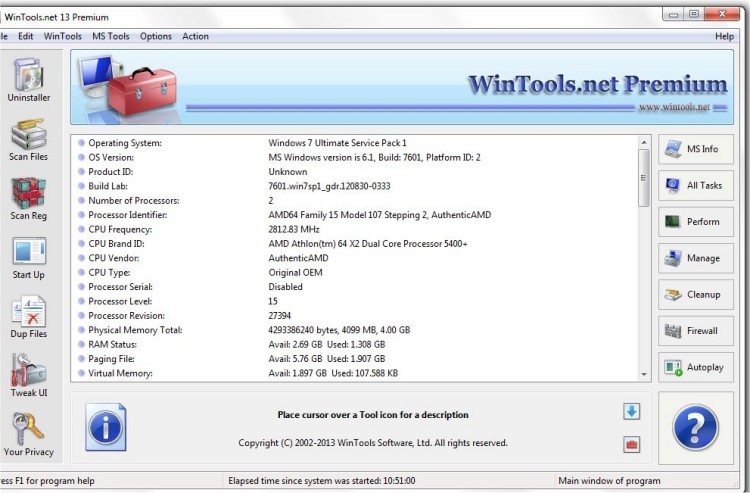
WinTools.net Professional has released version 26.7.1, providing users with enhanced control over the Windows operating system. This software suite allows individuals to manage the startup process, monitor memory usage, and customize various desktop and system settings according to their preferences.
Key features of WinTools.net Professional include:
1. Clean Uninstaller: Effectively removes software while tracking changes made to the hard drive and Windows registry during installations.
2. Scan Files: Periodically cleans the hard drive of outdated references and junk files, improving access time.
3. Scan Shortcuts: Cleans dead shortcuts from the Desktop and Start menu, which can clutter the system and slow down access times.
4. Scan Registry: Cleans unused applications and invalid references from the Windows registry, enhancing system performance.
5. Startup Manager: Allows users to manage startup items, enabling them to add, remove, or adjust applications that run during boot-up.
6. Tweak UI: Offers additional safety and performance tweaks not found in basic Windows settings.
7. Net Tweaker: Optimizes data transfer and connection speeds by adjusting hidden network settings (available in the Professional edition).
8. Your Privacy: A suite of tools designed to protect sensitive information (available in the Professional edition).
9. Invisible Man: Saves private information securely, allowing for later restoration if needed.
10. File Shredder: Permanently deletes files, ensuring they cannot be restored.
11. IE Favorites: Tools for managing Internet Explorer Favorites, including backup and restoration functions.
12. RAM Memory Booster: Monitors and optimizes RAM usage to improve overall system performance, with a recommendation to use RAM Saver Pro for more advanced capabilities.
In addition to these features, users can benefit from guides on how to manage startup apps, delete junk files automatically, and remove built-in Windows applications using PowerShell. WinTools.net Professional is an essential tool for anyone looking to enhance their Windows experience, boost performance, and maintain system integrity.
As technology continues to evolve, users are encouraged to stay informed about updates and best practices for maintaining their systems, as well as exploring additional functionalities that software like WinTools.net can offer
Key features of WinTools.net Professional include:
1. Clean Uninstaller: Effectively removes software while tracking changes made to the hard drive and Windows registry during installations.
2. Scan Files: Periodically cleans the hard drive of outdated references and junk files, improving access time.
3. Scan Shortcuts: Cleans dead shortcuts from the Desktop and Start menu, which can clutter the system and slow down access times.
4. Scan Registry: Cleans unused applications and invalid references from the Windows registry, enhancing system performance.
5. Startup Manager: Allows users to manage startup items, enabling them to add, remove, or adjust applications that run during boot-up.
6. Tweak UI: Offers additional safety and performance tweaks not found in basic Windows settings.
7. Net Tweaker: Optimizes data transfer and connection speeds by adjusting hidden network settings (available in the Professional edition).
8. Your Privacy: A suite of tools designed to protect sensitive information (available in the Professional edition).
9. Invisible Man: Saves private information securely, allowing for later restoration if needed.
10. File Shredder: Permanently deletes files, ensuring they cannot be restored.
11. IE Favorites: Tools for managing Internet Explorer Favorites, including backup and restoration functions.
12. RAM Memory Booster: Monitors and optimizes RAM usage to improve overall system performance, with a recommendation to use RAM Saver Pro for more advanced capabilities.
In addition to these features, users can benefit from guides on how to manage startup apps, delete junk files automatically, and remove built-in Windows applications using PowerShell. WinTools.net Professional is an essential tool for anyone looking to enhance their Windows experience, boost performance, and maintain system integrity.
As technology continues to evolve, users are encouraged to stay informed about updates and best practices for maintaining their systems, as well as exploring additional functionalities that software like WinTools.net can offer
WinTools.net Professional 26.7.1 released
WinTools.net Professional puts you in control of the Windows startup process, memory monitoring and gives you the power to customize desktop and system settings to fit your needs.