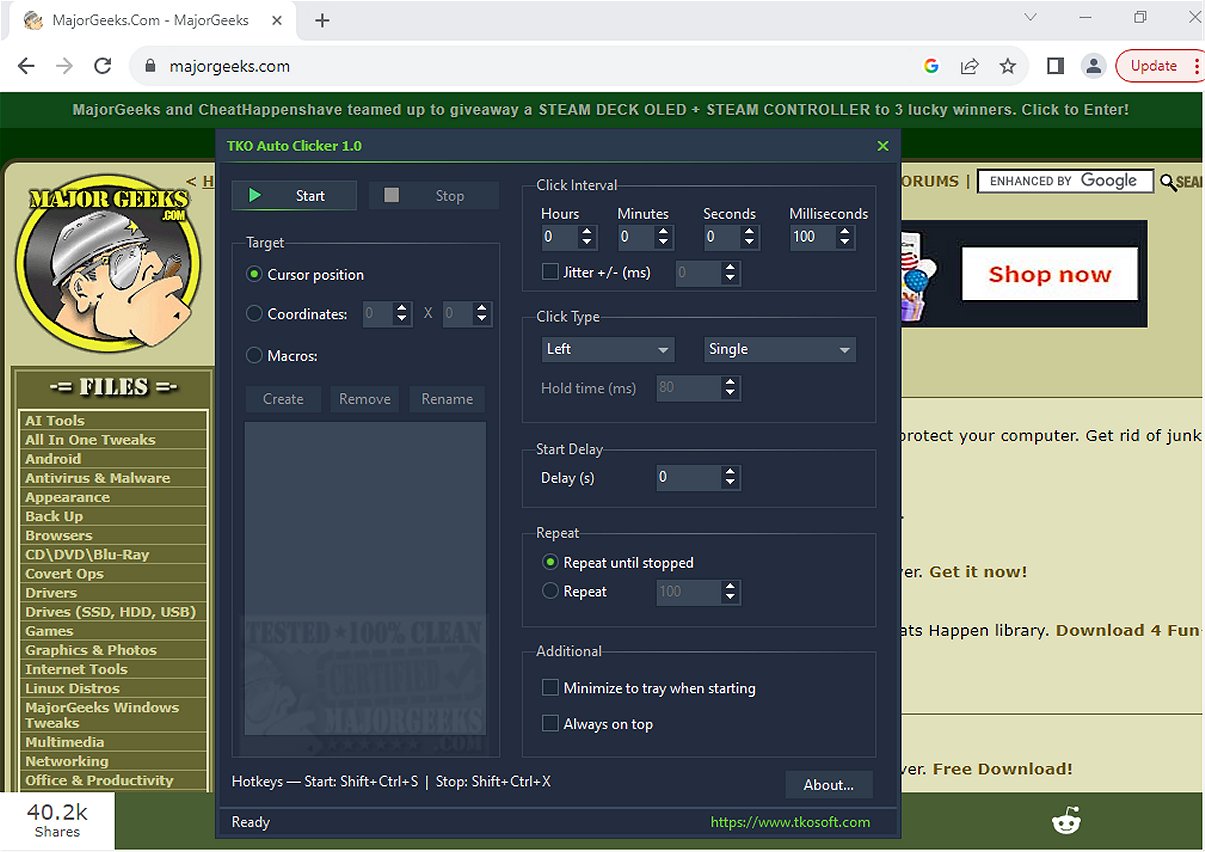
The TKO Auto Clicker has launched its latest version, 2.0, designed to automate repetitive mouse clicks, cursor movements, and recorded mouse macros. This tool is particularly beneficial for enhancing productivity by streamlining tasks that require frequent clicking or specific mouse actions.
Key Features of TKO Auto Clicker:
- User-Friendly Automation: The software allows for straightforward automation of left, right, and middle mouse clicks, with options for single clicks, double clicks, and hold clicks.
- Customizable Settings: Users can adjust the interval between clicks with millisecond precision, incorporate a start delay, and choose to repeat actions indefinitely or for a set number of times.
- Jitter Option: An optional jitter setting can be activated to introduce slight variations in click timing, simulating a more organic clicking pattern and reducing the mechanical feel of automation.
- Flexibility in Click Placement: TKO Auto Clicker can execute clicks based on the cursor's current position or at predefined screen coordinates, making it versatile for gaming and software applications.
- Mouse Macro Recorder: The built-in macro recorder captures mouse movements and button actions, allowing users to save, rename, and replay these sequences effortlessly. This feature is ideal for complex workflows requiring intricate actions.
- Global Hotkeys: Convenient global hotkeys enable users to manage the auto-clicker without switching applications, facilitating seamless operation during gaming or other full-screen tasks.
Highlighted Features:
The standout capability of TKO Auto Clicker lies in its flexibility to execute clicks precisely where needed, catering to both gaming and application use. The macro recorder feature allows for full automation of complex tasks, minimizing manual input.
Geek Verdict:
With TKO Auto Clicker 2.0, users can say goodbye to repetitive clicking and cursor movements, significantly boosting productivity. It streamlines workflows and helps reclaim valuable time, making it an indispensable tool for anyone looking to enhance their efficiency.
Future Enhancements:
To build on its capabilities, future updates could focus on introducing AI-driven features that adapt to user behavior, further optimizing click patterns and improving the overall user experience. Integration with more software applications and enhanced customization options could also provide users with even greater flexibility and control.
Overall, TKO Auto Clicker 2.0 represents a powerful solution for automating mouse actions, making it easier for users to manage repetitive tasks effectively
Key Features of TKO Auto Clicker:
- User-Friendly Automation: The software allows for straightforward automation of left, right, and middle mouse clicks, with options for single clicks, double clicks, and hold clicks.
- Customizable Settings: Users can adjust the interval between clicks with millisecond precision, incorporate a start delay, and choose to repeat actions indefinitely or for a set number of times.
- Jitter Option: An optional jitter setting can be activated to introduce slight variations in click timing, simulating a more organic clicking pattern and reducing the mechanical feel of automation.
- Flexibility in Click Placement: TKO Auto Clicker can execute clicks based on the cursor's current position or at predefined screen coordinates, making it versatile for gaming and software applications.
- Mouse Macro Recorder: The built-in macro recorder captures mouse movements and button actions, allowing users to save, rename, and replay these sequences effortlessly. This feature is ideal for complex workflows requiring intricate actions.
- Global Hotkeys: Convenient global hotkeys enable users to manage the auto-clicker without switching applications, facilitating seamless operation during gaming or other full-screen tasks.
Highlighted Features:
The standout capability of TKO Auto Clicker lies in its flexibility to execute clicks precisely where needed, catering to both gaming and application use. The macro recorder feature allows for full automation of complex tasks, minimizing manual input.
Geek Verdict:
With TKO Auto Clicker 2.0, users can say goodbye to repetitive clicking and cursor movements, significantly boosting productivity. It streamlines workflows and helps reclaim valuable time, making it an indispensable tool for anyone looking to enhance their efficiency.
Future Enhancements:
To build on its capabilities, future updates could focus on introducing AI-driven features that adapt to user behavior, further optimizing click patterns and improving the overall user experience. Integration with more software applications and enhanced customization options could also provide users with even greater flexibility and control.
Overall, TKO Auto Clicker 2.0 represents a powerful solution for automating mouse actions, making it easier for users to manage repetitive tasks effectively
TKO Auto Clicker 2.0 released
TKO Auto Clicker automates repetitive mouse clicks, cursor movements, and recorded mouse macros. This tool can enhance productivity by streamlining tasks that require frequent clicking or specific mouse actions.