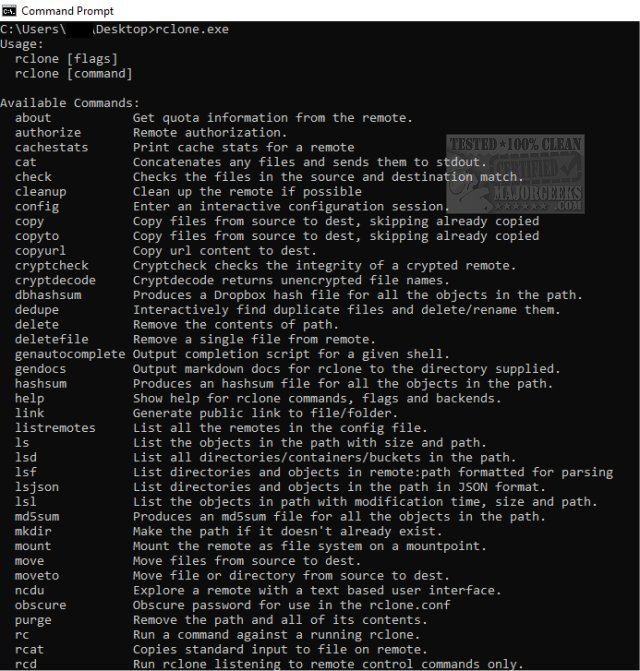
Rclone, a powerful command-line utility, has recently released version 1.74.4. This tool is specifically designed for synchronizing files and directories between various cloud storage services and local file systems, providing an effective alternative to web-based interfaces typically offered by cloud providers.
Rclone supports an extensive range of features, making it a versatile program for managing files across numerous cloud storage platforms, including prominent services like Google Drive, Dropbox, and Amazon S3. Its capabilities allow users to efficiently transfer, sync, and backup files, while also providing functionalities such as encryption, bandwidth throttling, and remote file management. With compatibility for over 70 cloud storage products, Rclone is suitable for both personal and professional use.
One of Rclone's standout features is its replication of various Unix commands, allowing users to manage files seamlessly across different cloud services. It offers functionalities similar to rsync for synchronization, cp for copying files, mv for moving files, and mount for mounting remote file systems. Additionally, it includes commands akin to ls for listing directory contents, ncdu for analyzing disk usage, tree for visualizing directory structures, rm for file removal, and cat for displaying file contents.
Rclone's user-friendly syntax supports shell pipelines, facilitating efficient file processing and manipulation. To enhance safety during operations, it includes a dry-run option, allowing users to preview changes before execution. This flexibility makes Rclone a valuable tool for individual users and developers alike, whether executed from the command line, incorporated into automated scripts, or accessed via its robust API.
The following services are compatible with Rclone:
- 1Fichier
- Alibaba Cloud (Aliyun) OSS
- Amazon Drive
- Amazon S3
- Backblaze B2
- Box
- Ceph
- Citrix ShareFile
- C14
- DigitalOcean Spaces
- Dreamhost
- Dropbox
- FTP
- Google Cloud Storage
- Google Drive
- Google Photos
- HTTP
- Hubic
- Jottacloud
- IBM COS S3
- Koofr
- Mail.ru Cloud
- Memset Memstore
- Mega
- Microsoft Azure Blob Storage
- Microsoft OneDrive
- Minio
- Nextcloud
- OVH
- OpenDrive
- Openstack Swift
- Oracle Cloud Storage
- ownCloud
- pCloud
- premiumize.me
- put.io
- QingStor
- Rackspace Cloud Files
- rsync.net
- Scaleway
- SFTP
- StackPath
- SugarSync
- Wasabi
- WebDAV
- Yandex Disk
- Local filesystem
Key Features of Rclone:
- Continuous MD5/SHA1 checks for file integrity
- Preservation of timestamps on files
- Support for partial syncs on a whole file basis
- Copy mode for new or changed files
- One-way sync mode for identical directory matching
- Check mode for file hash equality verification
- Ability to sync between different cloud accounts
- Encryption, cache, chunking, and union backends
- Optional FUSE mount (rclone mount)
- Multi-threaded downloads to local disk
- Serving of local or remote files over HTTP/WebDav/FTP/SFTP/DLNA
- Experimental web-based GUI
In summary, Rclone stands out as a powerful tool that streamlines file management across diverse cloud storage services, offering robust features that cater to both casual users and developers seeking efficient automation and integration of cloud functionalities. As cloud storage continues to evolve, tools like Rclone are becoming increasingly essential for users looking to optimize their file management processes
Rclone supports an extensive range of features, making it a versatile program for managing files across numerous cloud storage platforms, including prominent services like Google Drive, Dropbox, and Amazon S3. Its capabilities allow users to efficiently transfer, sync, and backup files, while also providing functionalities such as encryption, bandwidth throttling, and remote file management. With compatibility for over 70 cloud storage products, Rclone is suitable for both personal and professional use.
One of Rclone's standout features is its replication of various Unix commands, allowing users to manage files seamlessly across different cloud services. It offers functionalities similar to rsync for synchronization, cp for copying files, mv for moving files, and mount for mounting remote file systems. Additionally, it includes commands akin to ls for listing directory contents, ncdu for analyzing disk usage, tree for visualizing directory structures, rm for file removal, and cat for displaying file contents.
Rclone's user-friendly syntax supports shell pipelines, facilitating efficient file processing and manipulation. To enhance safety during operations, it includes a dry-run option, allowing users to preview changes before execution. This flexibility makes Rclone a valuable tool for individual users and developers alike, whether executed from the command line, incorporated into automated scripts, or accessed via its robust API.
The following services are compatible with Rclone:
- 1Fichier
- Alibaba Cloud (Aliyun) OSS
- Amazon Drive
- Amazon S3
- Backblaze B2
- Box
- Ceph
- Citrix ShareFile
- C14
- DigitalOcean Spaces
- Dreamhost
- Dropbox
- FTP
- Google Cloud Storage
- Google Drive
- Google Photos
- HTTP
- Hubic
- Jottacloud
- IBM COS S3
- Koofr
- Mail.ru Cloud
- Memset Memstore
- Mega
- Microsoft Azure Blob Storage
- Microsoft OneDrive
- Minio
- Nextcloud
- OVH
- OpenDrive
- Openstack Swift
- Oracle Cloud Storage
- ownCloud
- pCloud
- premiumize.me
- put.io
- QingStor
- Rackspace Cloud Files
- rsync.net
- Scaleway
- SFTP
- StackPath
- SugarSync
- Wasabi
- WebDAV
- Yandex Disk
- Local filesystem
Key Features of Rclone:
- Continuous MD5/SHA1 checks for file integrity
- Preservation of timestamps on files
- Support for partial syncs on a whole file basis
- Copy mode for new or changed files
- One-way sync mode for identical directory matching
- Check mode for file hash equality verification
- Ability to sync between different cloud accounts
- Encryption, cache, chunking, and union backends
- Optional FUSE mount (rclone mount)
- Multi-threaded downloads to local disk
- Serving of local or remote files over HTTP/WebDav/FTP/SFTP/DLNA
- Experimental web-based GUI
In summary, Rclone stands out as a powerful tool that streamlines file management across diverse cloud storage services, offering robust features that cater to both casual users and developers seeking efficient automation and integration of cloud functionalities. As cloud storage continues to evolve, tools like Rclone are becoming increasingly essential for users looking to optimize their file management processes
Rclone 1.74.4 released
Rclone is a powerful Command Line tool designed for synchronizing files and directories between a wide range of cloud storage services and local file systems.