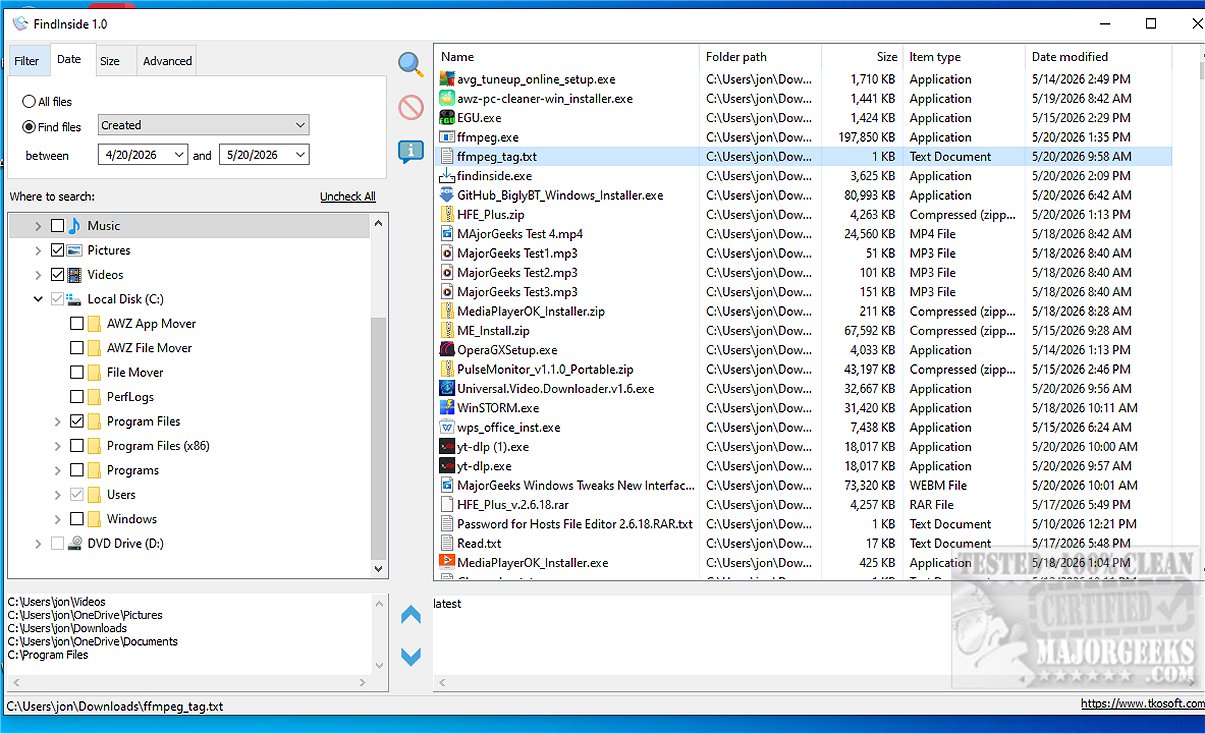
FindInside 2.5 has been released as a powerful, free desktop search utility that enables users to find detailed information across various document types, moving beyond the limitations of traditional file name searches. This tool is particularly beneficial for individuals or organizations that need to sift through extensive collections of documents to find specific words or phrases within file contents.
Once the search is conducted, FindInside enhances usability by providing a built-in text preview area that displays relevant document contents, automatically highlighting the searched phrases. This feature simplifies the identification of pertinent files, as users can navigate through multiple occurrences of their search terms using previous and next match buttons.
- Wildcard file name masks to target specific document types.
- Date range filters based on file access, creation, or modification dates.
- File size limits to exclude files that are too large or small.
- The option to search within hidden files.
The software also supports recursive folder searching, allowing users to explore nested directories easily. Its intuitive tree-view interface makes it simple to select one or multiple folders for searching, enabling users to pause or stop searches as needed. The results are displayed in an organized list, facilitating quick access to relevant documents.
Key Features and Functionality
FindInside allows for comprehensive searches across multiple folders and subfolders, supporting a wide array of file formats such as PDFs, Microsoft Office documents (Word and Excel), plain text, source code, logs, and configuration files. Its standout capability is the efficient retrieval of text embedded within mixed document collections, which is a common challenge for standard Windows search functions.Once the search is conducted, FindInside enhances usability by providing a built-in text preview area that displays relevant document contents, automatically highlighting the searched phrases. This feature simplifies the identification of pertinent files, as users can navigate through multiple occurrences of their search terms using previous and next match buttons.
Additional Features
FindInside includes various filters to help refine searches, such as:- Wildcard file name masks to target specific document types.
- Date range filters based on file access, creation, or modification dates.
- File size limits to exclude files that are too large or small.
- The option to search within hidden files.
The software also supports recursive folder searching, allowing users to explore nested directories easily. Its intuitive tree-view interface makes it simple to select one or multiple folders for searching, enabling users to pause or stop searches as needed. The results are displayed in an organized list, facilitating quick access to relevant documents.
Conclusion
With its robust features and user-friendly design, FindInside is an indispensable tool for anyone needing to efficiently locate content within their digital document collections. Its ability to find text within a wide variety of file formats and provide context through previews sets it apart from standard search tools.Future Enhancements
Looking ahead, potential updates for FindInside could include enhanced AI-driven search capabilities for even greater accuracy, integration with cloud storage services, and the addition of collaborative features for team environments. As users increasingly rely on diverse digital formats for information storage, tools like FindInside will continue to evolve, offering smarter and more efficient ways to access crucial data. Explore the functionality of FindInside today and elevate your document search experienceFindInside 2.5 released
FindInside is a powerful free desktop search utility designed for users who need to locate detailed information across various document types, rather than relying solely on file names.