FindInside is an advanced, free desktop search utility designed for users who require in-depth information retrieval across various document types rather than merely filtering by file names. The latest version, FindInside 2.0, enhances its capabilities to cater to the needs of professionals and casual users alike, making it easier to locate essential data swiftly.
Key Features and Functionality
FindInside allows users to search for specific words or phrases throughout numerous folders and subfolders. It supports an extensive range of file formats, including but not limited to PDFs, Microsoft Office documents (Word and Excel), plain text files, source code, log files, and configuration files. This comprehensive support ensures that users can uncover crucial information that may otherwise remain hidden, especially since standard Windows search often overlooks embedded text.
One of the standout aspects of FindInside is its built-in text preview feature. When a match is found, the relevant document content is displayed, with the searched phrase highlighted for easy identification. This functionality allows users to quickly evaluate why a specific file was included in the search results. Additionally, navigation through multiple occurrences of the searched term is facilitated by "previous" and "next" match buttons.
Search Filters and Navigation
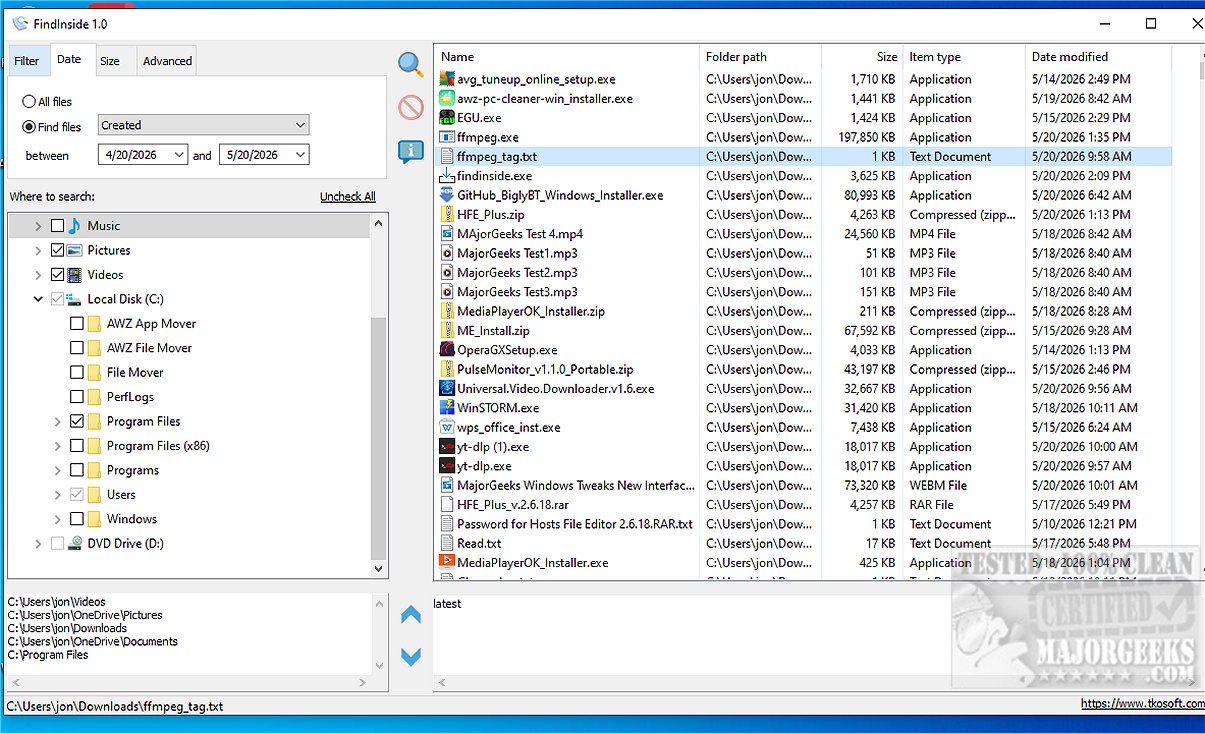
To enhance the search experience, FindInside incorporates a variety of practical filters. Users can apply file name masks to target specific document types, utilize date range filters based on file access, creation, or modification dates, and set limits on file sizes to exclude those that are either too large or too small. The program also supports recursive folder searching, allowing users to efficiently explore nested directories, and includes an option to search hidden files.
The intuitive tree-view interface of FindInside enables users to select one or multiple folders for searching. Users can pause or stop the search process at any time, and once completed, matching files are displayed in a well-organized results list, making it easy to access necessary documents.
Why Choose FindInside?
The tool's ability to effortlessly locate text within various formats, combined with its user-friendly interface, makes FindInside an invaluable resource for anyone seeking to efficiently manage and retrieve content from their digital document collections. The highlighting of search terms within the preview enhances the overall usability, making it a standout choice for users who value efficiency and simplicity in document searching.
Conclusion and Call to Action
With its robust features and practical design, FindInside 2.0 is set to revolutionize the way users search for and manage their documents. Whether you're a professional in need of quick data retrieval or an everyday user looking to simplify your digital organization, FindInside can help you achieve your goals. Explore the efficiency and simplicity of FindInside today and transform your document searching experience!
Additional Resources
- Users may also find helpful guides on related topics such as managing hidden files, resetting folder view settings, and customizing folder templates in Windows 10 & 11
Key Features and Functionality
FindInside allows users to search for specific words or phrases throughout numerous folders and subfolders. It supports an extensive range of file formats, including but not limited to PDFs, Microsoft Office documents (Word and Excel), plain text files, source code, log files, and configuration files. This comprehensive support ensures that users can uncover crucial information that may otherwise remain hidden, especially since standard Windows search often overlooks embedded text.
One of the standout aspects of FindInside is its built-in text preview feature. When a match is found, the relevant document content is displayed, with the searched phrase highlighted for easy identification. This functionality allows users to quickly evaluate why a specific file was included in the search results. Additionally, navigation through multiple occurrences of the searched term is facilitated by "previous" and "next" match buttons.
Search Filters and Navigation
To enhance the search experience, FindInside incorporates a variety of practical filters. Users can apply file name masks to target specific document types, utilize date range filters based on file access, creation, or modification dates, and set limits on file sizes to exclude those that are either too large or too small. The program also supports recursive folder searching, allowing users to efficiently explore nested directories, and includes an option to search hidden files.
The intuitive tree-view interface of FindInside enables users to select one or multiple folders for searching. Users can pause or stop the search process at any time, and once completed, matching files are displayed in a well-organized results list, making it easy to access necessary documents.
Why Choose FindInside?
The tool's ability to effortlessly locate text within various formats, combined with its user-friendly interface, makes FindInside an invaluable resource for anyone seeking to efficiently manage and retrieve content from their digital document collections. The highlighting of search terms within the preview enhances the overall usability, making it a standout choice for users who value efficiency and simplicity in document searching.
Conclusion and Call to Action
With its robust features and practical design, FindInside 2.0 is set to revolutionize the way users search for and manage their documents. Whether you're a professional in need of quick data retrieval or an everyday user looking to simplify your digital organization, FindInside can help you achieve your goals. Explore the efficiency and simplicity of FindInside today and transform your document searching experience!
Additional Resources
- Users may also find helpful guides on related topics such as managing hidden files, resetting folder view settings, and customizing folder templates in Windows 10 & 11
FindInside 2.0 released
FindInside is a powerful free desktop search utility designed for users who need to locate detailed information across various document types, rather than relying solely on file names.