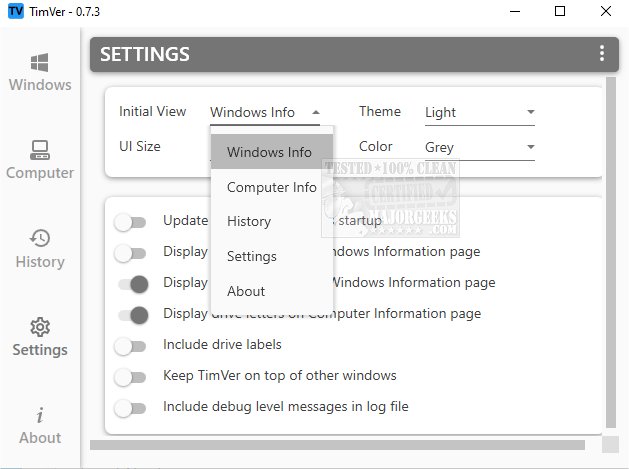
TimVer version 0.14.2 has been released, offering users an advanced alternative to the standard Winver command for obtaining detailed information about their Windows operating system. While Winver provides basic details such as the version number, TimVer goes further by presenting a thorough overview that includes the build number, release date, and additional system information. This enhanced level of detail can be particularly beneficial for troubleshooting, as it helps users identify potential conflicts with software and hardware.
Furthermore, TimVer is valuable for verifying compatibility with new applications or hardware upgrades, ensuring users have the information necessary for informed decision-making regarding their system. The tool is easy to install and utilizes Windows Management Information (WMI) along with data from the Windows registry to present its findings. Users can navigate through various sections organized in a user-friendly interface, which displays detailed specifications and performance metrics of their computers.
Additionally, TimVer features a comprehensive history log that tracks past activities and system changes, providing a clear overview of modifications over time. Users also have the option to customize the appearance of the tool with themes, colors, and layouts, allowing for a personalized experience.
The name "TimVer" caught the attention of users, particularly because it relates to “Tim,” but its open-source nature and the extra information it provides compared to the standard Winver truly sealed the deal for many. This tool is particularly useful for those who frequently engage with their system's performance or are considering upgrades.
Extension: In future updates, the developers could consider integrating more features such as automated hardware compatibility checks for popular software, a user-friendly troubleshooting guide based on the system's specifications, or a community forum for users to share experiences and solutions. Additionally, expanding support for various languages could make TimVer accessible to a broader audience, enhancing its usability and appeal
Furthermore, TimVer is valuable for verifying compatibility with new applications or hardware upgrades, ensuring users have the information necessary for informed decision-making regarding their system. The tool is easy to install and utilizes Windows Management Information (WMI) along with data from the Windows registry to present its findings. Users can navigate through various sections organized in a user-friendly interface, which displays detailed specifications and performance metrics of their computers.
Additionally, TimVer features a comprehensive history log that tracks past activities and system changes, providing a clear overview of modifications over time. Users also have the option to customize the appearance of the tool with themes, colors, and layouts, allowing for a personalized experience.
The name "TimVer" caught the attention of users, particularly because it relates to “Tim,” but its open-source nature and the extra information it provides compared to the standard Winver truly sealed the deal for many. This tool is particularly useful for those who frequently engage with their system's performance or are considering upgrades.
Extension: In future updates, the developers could consider integrating more features such as automated hardware compatibility checks for popular software, a user-friendly troubleshooting guide based on the system's specifications, or a community forum for users to share experiences and solutions. Additionally, expanding support for various languages could make TimVer accessible to a broader audience, enhancing its usability and appeal
TimVer 0.14.2 released
TimVer offers comprehensive information about the Windows version installed on your system.