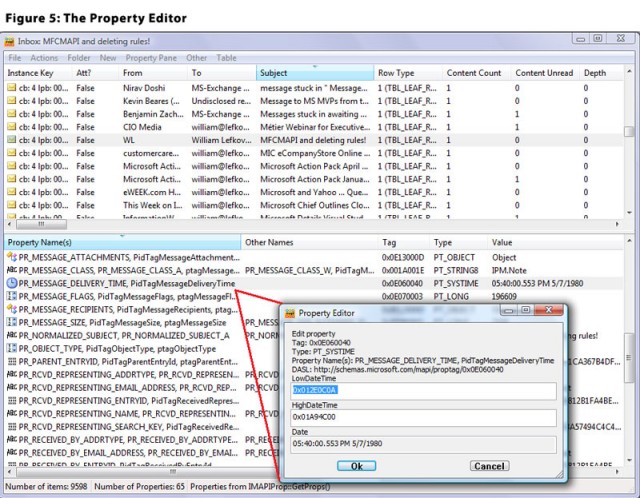
MFCMAPI version 26.0.26291.01 has been released, enhancing access to MAPI (Messaging Application Programming Interface) stores, which is pivotal for troubleshooting Exchange and Outlook issues. This tool serves as a valuable resource for developers by providing a practical example of MAPI development.
The application features a user-friendly graphical interface with a classic design, consisting of a spacious main window divided into two horizontal panels. This layout makes navigation intuitive and allows users to explore various MAPI stores and their properties with ease.
Key Features:
One of the standout features of MFCMAPI is its ability to set a default store, simplifying MAPI data management. The application allows users to verify store checksums for data integrity and export store contents into text documents, making data review more accessible. Users can also sort tables and manage active notifications, enhancing data interaction. Additionally, MFCMAPI supports content restrictions, allowing tailored access to information, and offers flexibility in editing MAPI properties in various formats, including ASCII, Unicode, Rich Text Format (RTF), or binary streams.
Email Management:
MFCMAPI excels in email management by enabling users to convert MSG emails to EML format and vice versa, powered by the IConverterSession functionality. It also provides a detailed exploration of the address book hierarchy, enhancing the visibility of contacts and their relationships.
Data Export:
A significant capability includes exporting store or server contents into text files, facilitating data analysis or archiving. Users can compare entry IDs to identify duplicates and track changes over time, while encoding entry IDs for MAPI protocol host URLs adds further utility.
Exchange Server Considerations:
It's worth noting that MFCMAPI may display error messages without an installed Exchange Server, but it operates efficiently with minimal CPU and memory usage, ensuring it does not burden the host system.
Conclusion:
Overall, MFCMAPI offers a robust and intuitive graphical interface that simplifies MAPI store access. It empowers users to manage and adjust various settings with confidence, transforming complex tasks into manageable ones. With a wide array of functionalities, MFCMAPI significantly enhances the user experience, driving efficiency and effectiveness in managing MAPI data.
Compatibility Note: The 64-bit version of MFCMAPI is compatible only with machines running Outlook 2010/2013/2016 64-bit. Users with other operating systems should utilize the 32-bit builds.
Future Enhancements: Future updates could focus on enhancing compatibility with newer versions of Outlook, improving error handling, and expanding the range of supported formats for data export and import, further solidifying MFCMAPI's position as an essential tool for MAPI development and management
The application features a user-friendly graphical interface with a classic design, consisting of a spacious main window divided into two horizontal panels. This layout makes navigation intuitive and allows users to explore various MAPI stores and their properties with ease.
Key Features:
One of the standout features of MFCMAPI is its ability to set a default store, simplifying MAPI data management. The application allows users to verify store checksums for data integrity and export store contents into text documents, making data review more accessible. Users can also sort tables and manage active notifications, enhancing data interaction. Additionally, MFCMAPI supports content restrictions, allowing tailored access to information, and offers flexibility in editing MAPI properties in various formats, including ASCII, Unicode, Rich Text Format (RTF), or binary streams.
Email Management:
MFCMAPI excels in email management by enabling users to convert MSG emails to EML format and vice versa, powered by the IConverterSession functionality. It also provides a detailed exploration of the address book hierarchy, enhancing the visibility of contacts and their relationships.
Data Export:
A significant capability includes exporting store or server contents into text files, facilitating data analysis or archiving. Users can compare entry IDs to identify duplicates and track changes over time, while encoding entry IDs for MAPI protocol host URLs adds further utility.
Exchange Server Considerations:
It's worth noting that MFCMAPI may display error messages without an installed Exchange Server, but it operates efficiently with minimal CPU and memory usage, ensuring it does not burden the host system.
Conclusion:
Overall, MFCMAPI offers a robust and intuitive graphical interface that simplifies MAPI store access. It empowers users to manage and adjust various settings with confidence, transforming complex tasks into manageable ones. With a wide array of functionalities, MFCMAPI significantly enhances the user experience, driving efficiency and effectiveness in managing MAPI data.
Compatibility Note: The 64-bit version of MFCMAPI is compatible only with machines running Outlook 2010/2013/2016 64-bit. Users with other operating systems should utilize the 32-bit builds.
Future Enhancements: Future updates could focus on enhancing compatibility with newer versions of Outlook, improving error handling, and expanding the range of supported formats for data export and import, further solidifying MFCMAPI's position as an essential tool for MAPI development and management
MFCMAPI 26.0.26291.01 released
MFCMAPI provides access to MAPI stores to facilitate the investigation of Exchange and Outlook issues and to provide developers with a sample for MAPI development.