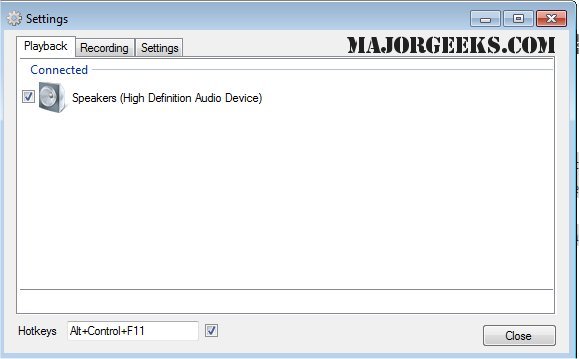
SoundSwitch is a handy utility designed to streamline the process of switching between multiple audio playback devices on Windows systems. By allowing users to toggle between devices such as speakers, headphones, and USB DACs with a simple hotkey, SoundSwitch alleviates the frustration of navigating through menus each time a change is needed.
Key Features:
- Quick Access: After installation, SoundSwitch integrates into the system tray, where users can customize their settings. The default hotkey (Ctrl+Alt+F11) can be modified to suit preferences, and users can specify which audio devices to include in the switching cycle. This ensures that the rotation avoids less desirable options, like the built-in speakers of a monitor.
- Background Functionality: Once configured, the application runs seamlessly in the background. Pressing the designated hotkey instantly switches to the next selected device, accompanied by a notification indicating the active output.
Practical Applications:
- Switch effortlessly between headphones and speakers when both are connected.
- Adjust audio sources on-the-fly while streaming, gaming, or recording.
- Transition between headset and speakers during work-from-home meetings or casual listening.
- Quickly resolve issues with Bluetooth audio reverting to "hands-free mode" by toggling devices.
Pros and Cons:
- Pros:
- Free and open-source software (GPL 3.0).
- Hotkey-based switching significantly reduces the number of clicks required.
- Lightweight and unobtrusive, making it easy to set up and forget.
- Cons:
- Lacks built-in audio profiles or per-application audio routing.
- Currently only available for Windows, with no support for macOS or Linux.
- Limited to switching playback and recording devices without comprehensive audio management features.
Conclusion:
SoundSwitch is a practical solution for users juggling multiple audio outputs, effectively addressing the need for quick and uncomplicated device switching. Whether you frequently alternate between speakers and a gaming headset or need to adjust audio settings during video calls, this utility offers a simple solution that enhances the user experience. For those who regularly navigate between various audio sources, SoundSwitch is an essential download that can greatly improve efficiency.
Further Reading:
- Explore how to manage key sounds in Windows 10 & 11.
- Learn how to enable Windows Sonic Surround Sound.
- Discover methods to diagnose sound delays, lags, and audio latency issues.
- Find out how to rename your audio input or output devices for clarity
Key Features:
- Quick Access: After installation, SoundSwitch integrates into the system tray, where users can customize their settings. The default hotkey (Ctrl+Alt+F11) can be modified to suit preferences, and users can specify which audio devices to include in the switching cycle. This ensures that the rotation avoids less desirable options, like the built-in speakers of a monitor.
- Background Functionality: Once configured, the application runs seamlessly in the background. Pressing the designated hotkey instantly switches to the next selected device, accompanied by a notification indicating the active output.
Practical Applications:
- Switch effortlessly between headphones and speakers when both are connected.
- Adjust audio sources on-the-fly while streaming, gaming, or recording.
- Transition between headset and speakers during work-from-home meetings or casual listening.
- Quickly resolve issues with Bluetooth audio reverting to "hands-free mode" by toggling devices.
Pros and Cons:
- Pros:
- Free and open-source software (GPL 3.0).
- Hotkey-based switching significantly reduces the number of clicks required.
- Lightweight and unobtrusive, making it easy to set up and forget.
- Cons:
- Lacks built-in audio profiles or per-application audio routing.
- Currently only available for Windows, with no support for macOS or Linux.
- Limited to switching playback and recording devices without comprehensive audio management features.
Conclusion:
SoundSwitch is a practical solution for users juggling multiple audio outputs, effectively addressing the need for quick and uncomplicated device switching. Whether you frequently alternate between speakers and a gaming headset or need to adjust audio settings during video calls, this utility offers a simple solution that enhances the user experience. For those who regularly navigate between various audio sources, SoundSwitch is an essential download that can greatly improve efficiency.
Further Reading:
- Explore how to manage key sounds in Windows 10 & 11.
- Learn how to enable Windows Sonic Surround Sound.
- Discover methods to diagnose sound delays, lags, and audio latency issues.
- Find out how to rename your audio input or output devices for clarity
SoundSwitch 7.4.0 Beta 1 / 7.3.3 released
SoundSwitch allows you to easily switch between the different playback devices currently connected to your machine via hotkeys.