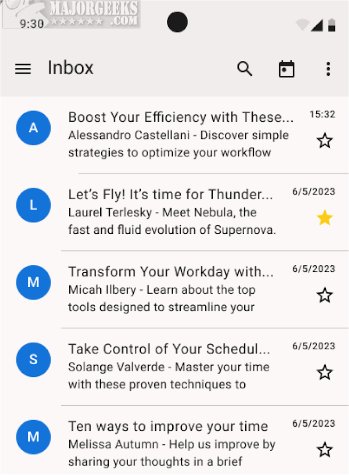
Thunderbird for Android has released version 20.1, allowing users to access the full suite of Thunderbird features on their Android devices. This mobile version maintains the powerful email management and productivity tools that users appreciate, enabling seamless connectivity and organization on the go.
Key Functionalities
In this latest version, users can thoroughly test essential functionalities such as automatic and manual email account setup, reading and fetching messages, switching between accounts, organizing emails, receiving timely notifications, and composing and sending emails. Additionally, Thunderbird for Android includes a migration tool for users transitioning from K-9 Mail, the foundation upon which this app is built.
All Your Favorite Features Included
Thunderbird for Android is equipped with all the features that have made Thunderbird popular, including automatic account setup, advanced inbox organization, and push notifications. Users can quickly establish accounts by entering their email credentials or opt for manual configuration to specify server settings. The app facilitates easy reading, fetching, and switching between multiple email accounts.
The application also provides comprehensive capabilities for composing and editing messages. Users can manage drafts, compose new emails, and execute essential actions like replying, forwarding, and deleting messages, all aimed at maintaining an organized inbox.
Customization Options
To enhance user experience, Thunderbird for Android supports light and dark themes, allowing for personalized interface preferences. Users can also create and customize email signatures, providing a professional look to their communications. The unified inbox feature consolidates emails from multiple accounts for easier management, while options to enable or disable contact pictures and threaded views improve conversation tracking. Moreover, privacy settings allow users to opt-out of data collection, enhancing security.
Organizational Features
The app is designed for efficient email communication management. Users can categorize messages by moving them into different folders, facilitating easy retrieval of important information. Push notifications keep users informed about incoming messages, allowing for timely responses.
Invitation to Try the Beta
The latest beta of Thunderbird for Android is now available for users looking to experience these features firsthand.
In conclusion, Thunderbird for Android 20.1 provides a robust mobile email solution that combines convenience with extensive functionality. With ongoing updates and improvements, it aims to meet the evolving needs of users who require efficient email management on their mobile devices. As Thunderbird continues to innovate, users can expect even more features and enhancements in future releases
Key Functionalities
In this latest version, users can thoroughly test essential functionalities such as automatic and manual email account setup, reading and fetching messages, switching between accounts, organizing emails, receiving timely notifications, and composing and sending emails. Additionally, Thunderbird for Android includes a migration tool for users transitioning from K-9 Mail, the foundation upon which this app is built.
All Your Favorite Features Included
Thunderbird for Android is equipped with all the features that have made Thunderbird popular, including automatic account setup, advanced inbox organization, and push notifications. Users can quickly establish accounts by entering their email credentials or opt for manual configuration to specify server settings. The app facilitates easy reading, fetching, and switching between multiple email accounts.
The application also provides comprehensive capabilities for composing and editing messages. Users can manage drafts, compose new emails, and execute essential actions like replying, forwarding, and deleting messages, all aimed at maintaining an organized inbox.
Customization Options
To enhance user experience, Thunderbird for Android supports light and dark themes, allowing for personalized interface preferences. Users can also create and customize email signatures, providing a professional look to their communications. The unified inbox feature consolidates emails from multiple accounts for easier management, while options to enable or disable contact pictures and threaded views improve conversation tracking. Moreover, privacy settings allow users to opt-out of data collection, enhancing security.
Organizational Features
The app is designed for efficient email communication management. Users can categorize messages by moving them into different folders, facilitating easy retrieval of important information. Push notifications keep users informed about incoming messages, allowing for timely responses.
Invitation to Try the Beta
The latest beta of Thunderbird for Android is now available for users looking to experience these features firsthand.
In conclusion, Thunderbird for Android 20.1 provides a robust mobile email solution that combines convenience with extensive functionality. With ongoing updates and improvements, it aims to meet the evolving needs of users who require efficient email management on their mobile devices. As Thunderbird continues to innovate, users can expect even more features and enhancements in future releases
Thunderbird for Android 20.1 released
Thunderbird for Android allows you to access the full range of Thunderbird features on your Android device. Try out the latest beta.