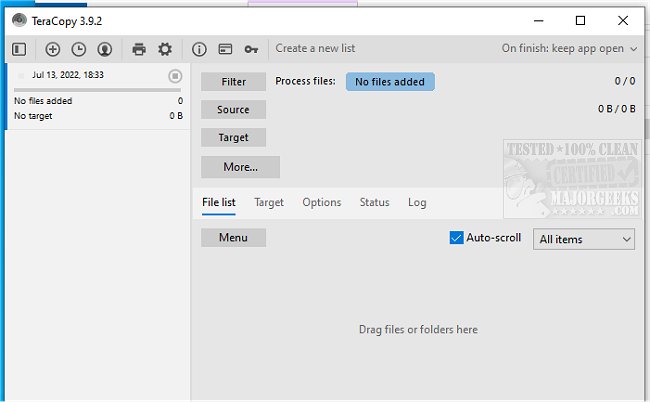
TeraCopy 4.0 (Build 37) and 3.17 have been released, enhancing the capabilities of this efficient file transfer utility. TeraCopy is specifically designed to facilitate the rapid copying and moving of files, boasting a range of features that improve performance and user experience.
One of TeraCopy's standout features is its ability to copy files more quickly by dynamically adjusting its buffers, which reduces seek times significantly. The asynchronous copy function accelerates transfers between two physical hard drives, making it particularly useful for users managing large files or datasets. Additionally, TeraCopy allows users to pause and resume file transfers, which can help conserve system resources when needed. Users can easily continue the copying process with just a single click.
To ensure data integrity, TeraCopy verifies the files post-transfer through a hash comparison between the source and target files. This verification process is crucial for users who need to guarantee that the copied files are identical to the originals. TeraCopy integrates seamlessly with Windows Explorer, providing a convenient right-click menu option and the ability to set it as the default copy handler for quick access.
In terms of error handling, TeraCopy is equipped with a robust recovery mechanism. If a copy error occurs, the program attempts to retry several times before skipping the problematic file and proceeding with the remainder of the transfer. Users are kept informed with an interactive file list that highlights any failed transfers, allowing them to address issues promptly and recopy only the affected files.
In summary, TeraCopy is a powerful tool for anyone who frequently manages file transfers, thanks to its speed, reliability, and user-friendly features. With continued updates and enhancements, it remains a top choice for optimizing file management tasks. Future improvements could focus on further increasing transfer speeds, enhancing user interface customization, or expanding compatibility with various operating systems
One of TeraCopy's standout features is its ability to copy files more quickly by dynamically adjusting its buffers, which reduces seek times significantly. The asynchronous copy function accelerates transfers between two physical hard drives, making it particularly useful for users managing large files or datasets. Additionally, TeraCopy allows users to pause and resume file transfers, which can help conserve system resources when needed. Users can easily continue the copying process with just a single click.
To ensure data integrity, TeraCopy verifies the files post-transfer through a hash comparison between the source and target files. This verification process is crucial for users who need to guarantee that the copied files are identical to the originals. TeraCopy integrates seamlessly with Windows Explorer, providing a convenient right-click menu option and the ability to set it as the default copy handler for quick access.
In terms of error handling, TeraCopy is equipped with a robust recovery mechanism. If a copy error occurs, the program attempts to retry several times before skipping the problematic file and proceeding with the remainder of the transfer. Users are kept informed with an interactive file list that highlights any failed transfers, allowing them to address issues promptly and recopy only the affected files.
In summary, TeraCopy is a powerful tool for anyone who frequently manages file transfers, thanks to its speed, reliability, and user-friendly features. With continued updates and enhancements, it remains a top choice for optimizing file management tasks. Future improvements could focus on further increasing transfer speeds, enhancing user interface customization, or expanding compatibility with various operating systems
TeraCopy 4.0 (Build 37) / 3.17 released
TeraCopy is a compact program designed for quickly copying and moving files.