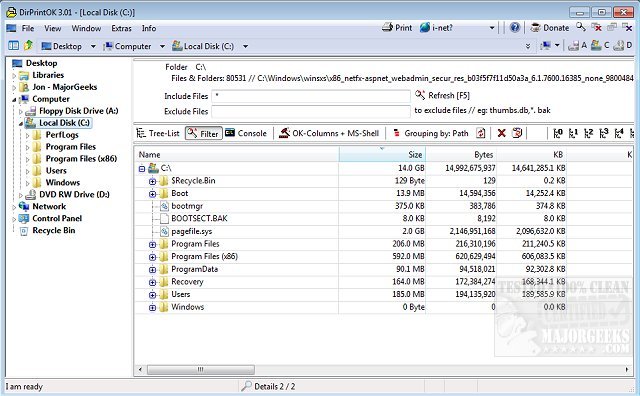
DirPrintOK has released version 7.67, a user-friendly, freeware program that allows users to print the contents of specific directories quickly and efficiently. This portable application simplifies the printing process by letting users select their desired directory, apply filters for file details (including the option to include or exclude MP3 ID3 tags), and then print the results with ease.
The software features a print preview option with a customizable aspect ratio and supports exporting directory listings to various formats such as XLS, HTML, CSV, and TXT. Users can choose from different viewing options, including tree-list, tree-list-plus, filters, and console views.
Key features of DirPrintOK include:
- Grouping options by file extension, modification time, size, or folders.
- A multi-tab interface that allows users to open a second folder in a new tab for easier management.
- A print function that includes a preview and adjustable aspect ratio.
- The ability to print directory lists directly from the cmd.exe.
In addition to these features, users can find helpful resources on managing installed printers and customizing their printer settings in Windows 10 and 11, as well as troubleshooting common printing issues.
With its straightforward interface and robust features, DirPrintOK 7.67 is an excellent tool for anyone needing to organize and print directory contents efficiently. Moving forward, the developers may consider adding more advanced filtering options and integration with cloud services to enhance functionality further
The software features a print preview option with a customizable aspect ratio and supports exporting directory listings to various formats such as XLS, HTML, CSV, and TXT. Users can choose from different viewing options, including tree-list, tree-list-plus, filters, and console views.
Key features of DirPrintOK include:
- Grouping options by file extension, modification time, size, or folders.
- A multi-tab interface that allows users to open a second folder in a new tab for easier management.
- A print function that includes a preview and adjustable aspect ratio.
- The ability to print directory lists directly from the cmd.exe.
In addition to these features, users can find helpful resources on managing installed printers and customizing their printer settings in Windows 10 and 11, as well as troubleshooting common printing issues.
With its straightforward interface and robust features, DirPrintOK 7.67 is an excellent tool for anyone needing to organize and print directory contents efficiently. Moving forward, the developers may consider adding more advanced filtering options and integration with cloud services to enhance functionality further
DirPrintOK 7.67 released
DirPrintOK is a fast, freeware, portable option for printing the content of a specific directory.