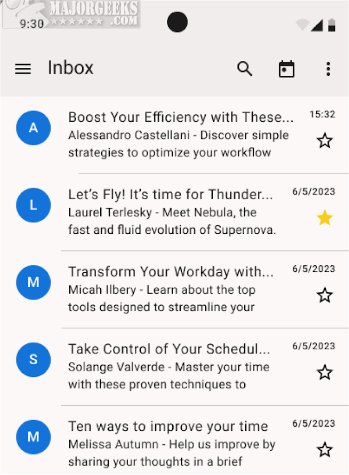
Thunderbird has launched the Beta version of its Android app, allowing users to access a comprehensive suite of Thunderbird features directly from their mobile devices. This new version aims to deliver powerful email management and productivity tools, making it easier to stay connected and organized while on the go.
Key Functionalities of Thunderbird for Android Beta
The Beta version offers users the opportunity to explore and test vital functionalities. These include setting up email accounts through both automatic and manual methods, reading and fetching messages, switching between multiple accounts, and efficiently organizing emails. Users can also expect timely notifications, straightforward email composition, and the ability to perform basic email actions effortlessly. Notably, the app includes a feature to help users transition seamlessly from K-9 Mail, the application upon which it is built.
All Your Favorite Features Included
Thunderbird for Android Beta preserves all the beloved features from the desktop version, including automatic account setup, advanced inbox organization, and push notifications. Users can quickly set up their accounts by simply entering their email address and password, while manual configuration is available for those with specific server settings. The app ensures a smooth experience when reading, fetching, and switching between different email accounts.
In addition, it offers robust tools for composing and editing messages, allowing users to manage drafts, create new emails, and send messages directly from their Android devices. Essential email actions such as replying, forwarding, and deleting messages are also included, helping to maintain an organized inbox.
Customization Options
Thunderbird for Android Beta allows for further customization with support for both light and dark themes. Users can personalize their experience by creating and modifying email signatures for added professionalism. The unified inbox feature lets users manage emails from various accounts in one location, while they can also control the visibility of contact pictures and enable a threaded view for easier email tracking. Privacy concerns are addressed with options to opt-out of data collection.
Efficient Organization
The app is designed to streamline email communication, enabling users to organize messages into different folders for easy retrieval of important information. Push notifications keep users informed of new correspondence, ensuring they stay responsive.
Availability
A stable version of Thunderbird for Android is also available for those who prefer a more established experience.
Conclusion
Thunderbird for Android 20.0 Beta 1 is a feature-rich and customizable email client that caters to the needs of mobile users looking for a powerful email management solution. With its comprehensive functionalities and user-friendly interface, it promises to enhance productivity for users on the go
Key Functionalities of Thunderbird for Android Beta
The Beta version offers users the opportunity to explore and test vital functionalities. These include setting up email accounts through both automatic and manual methods, reading and fetching messages, switching between multiple accounts, and efficiently organizing emails. Users can also expect timely notifications, straightforward email composition, and the ability to perform basic email actions effortlessly. Notably, the app includes a feature to help users transition seamlessly from K-9 Mail, the application upon which it is built.
All Your Favorite Features Included
Thunderbird for Android Beta preserves all the beloved features from the desktop version, including automatic account setup, advanced inbox organization, and push notifications. Users can quickly set up their accounts by simply entering their email address and password, while manual configuration is available for those with specific server settings. The app ensures a smooth experience when reading, fetching, and switching between different email accounts.
In addition, it offers robust tools for composing and editing messages, allowing users to manage drafts, create new emails, and send messages directly from their Android devices. Essential email actions such as replying, forwarding, and deleting messages are also included, helping to maintain an organized inbox.
Customization Options
Thunderbird for Android Beta allows for further customization with support for both light and dark themes. Users can personalize their experience by creating and modifying email signatures for added professionalism. The unified inbox feature lets users manage emails from various accounts in one location, while they can also control the visibility of contact pictures and enable a threaded view for easier email tracking. Privacy concerns are addressed with options to opt-out of data collection.
Efficient Organization
The app is designed to streamline email communication, enabling users to organize messages into different folders for easy retrieval of important information. Push notifications keep users informed of new correspondence, ensuring they stay responsive.
Availability
A stable version of Thunderbird for Android is also available for those who prefer a more established experience.
Conclusion
Thunderbird for Android 20.0 Beta 1 is a feature-rich and customizable email client that caters to the needs of mobile users looking for a powerful email management solution. With its comprehensive functionalities and user-friendly interface, it promises to enhance productivity for users on the go
Thunderbird for Android 20.0 Beta 1 released
Thunderbird for Android Beta allows you to access and test the full range of Thunderbird features on your Android device. Stable version is also available.