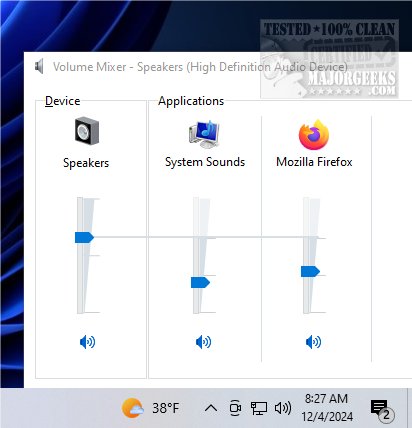
ClassicMixer 2.8 has been released, reintroducing the traditional volume mixer interface for Windows 11 users. This application allows for intuitive management of audio levels for individual applications, making it a valuable tool for those who prefer a more classic design and user-friendly experience. With ClassicMixer, users can easily adjust the volume of each program running on their system, enhancing their audio control and customization.
The application supports all screen resolutions, ensuring a versatile experience across different devices. It is optimized for 4K displays, but users can adjust the width and height settings to suit their specific screen resolution, whether on a high-definition monitor, standard display, or mobile device. This adaptability guarantees that ClassicMixer performs optimally regardless of the user's setup.
Although ClassicMixer lacks a dedicated settings window, users can conveniently set it to launch automatically using the Windows Task Scheduler. To do this, users need to create a basic task that triggers the application to start at logon. This involves opening Task Scheduler, following the setup wizard to name the task, selecting the trigger "At log on," and specifying the action to start the ClassicMixer application. Once set up, ClassicMixer will launch each time the user logs into their account, streamlining the audio management process.
ClassicMixer empowers users to switch between sound sources with ease, providing precise control over their audio experience. Its straightforward interface allows for individual volume adjustments for music, videos, and voice calls, ensuring that every sound is perfectly balanced to meet the user's preferences. Elevate your audio experience and enjoy tailored sound management with ClassicMixer.
In addition to its features, ClassicMixer can be an essential tool for gamers, content creators, and professionals who rely on clear audio differentiation between applications. The ability to finely tune sound levels can enhance gameplay, improve video production quality, and facilitate better communication during virtual meetings. As technology continues to evolve, tools like ClassicMixer that prioritize user experience and flexibility will become increasingly important in achieving an optimal audio environment
The application supports all screen resolutions, ensuring a versatile experience across different devices. It is optimized for 4K displays, but users can adjust the width and height settings to suit their specific screen resolution, whether on a high-definition monitor, standard display, or mobile device. This adaptability guarantees that ClassicMixer performs optimally regardless of the user's setup.
Although ClassicMixer lacks a dedicated settings window, users can conveniently set it to launch automatically using the Windows Task Scheduler. To do this, users need to create a basic task that triggers the application to start at logon. This involves opening Task Scheduler, following the setup wizard to name the task, selecting the trigger "At log on," and specifying the action to start the ClassicMixer application. Once set up, ClassicMixer will launch each time the user logs into their account, streamlining the audio management process.
ClassicMixer empowers users to switch between sound sources with ease, providing precise control over their audio experience. Its straightforward interface allows for individual volume adjustments for music, videos, and voice calls, ensuring that every sound is perfectly balanced to meet the user's preferences. Elevate your audio experience and enjoy tailored sound management with ClassicMixer.
In addition to its features, ClassicMixer can be an essential tool for gamers, content creators, and professionals who rely on clear audio differentiation between applications. The ability to finely tune sound levels can enhance gameplay, improve video production quality, and facilitate better communication during virtual meetings. As technology continues to evolve, tools like ClassicMixer that prioritize user experience and flexibility will become increasingly important in achieving an optimal audio environment
ClassicMixer 2.8 released
ClassicMixer brings back the traditional volume mixer interface on Windows 11, allowing you to easily manage audio levels for individual applications.