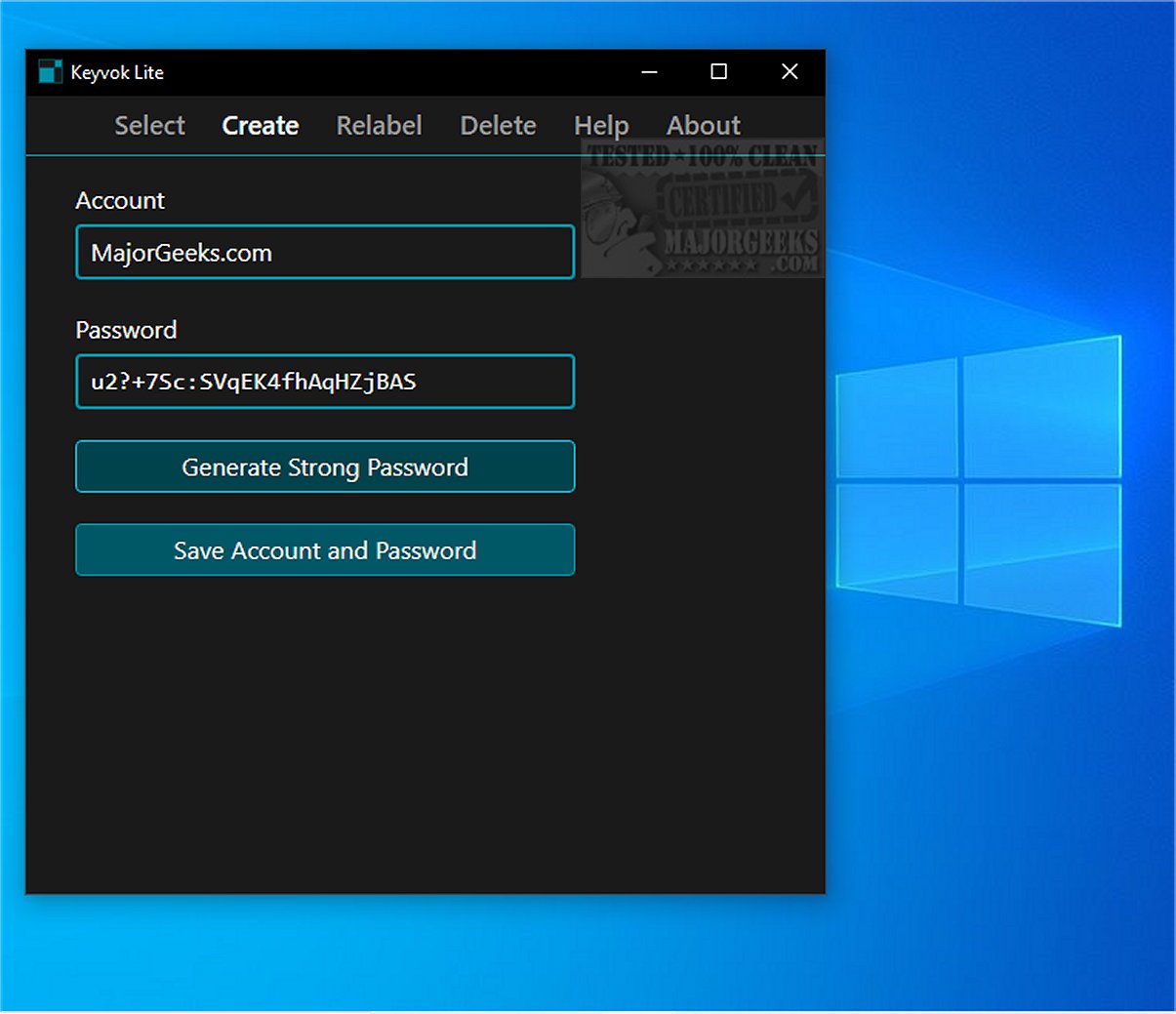
Keyvok Lite is a newly launched password management utility tailored for individuals who prioritize offline security and wish to maintain complete control over their sensitive information. This application deliberately avoids cloud synchronization and remote features, significantly reducing the risk of data breaches that are common with online storage solutions. It offers a local-first password management experience, making it especially suitable for users who are serious about their digital security.
Privacy-Centric Design
At its core, Keyvok Lite employs a robust native C++ architecture paired with a user-friendly Microsoft WebView2 interface. This design ensures a seamless user experience while safeguarding privacy, as the application operates entirely offline without accessing the internet or transmitting data outside the user’s device.
Strong Encryption with Windows DPAPI
Keyvok Lite places a strong emphasis on data protection, utilizing the Windows Data Protection API (DPAPI) to secure passwords. This system-level encryption ensures that sensitive information remains local and accessible only to authorized users. The application’s architecture is devoid of networking code, which eliminates the risk of remote breaches or unauthorized data access.
High-Entropy Password Generation
The utility also features the capability to generate high-entropy passwords, producing 144-bit passwords that surpass current security standards. Users can create password entries by inputting an account label and desired password. The “Generate Strong Password” function allows for effortless creation of secure passwords, relieving users from the burden of remembering complex strings.
User-Friendly Navigation
Keyvok Lite is designed with user-friendliness in mind. Users can easily copy passwords to the clipboard with a single click, and the clipboard is cleared automatically after 30 seconds to reduce the risk of accidental exposure. The application allows for easy adjustments, such as modifying account labels or generating new passwords when needed.
Backup and Portability Features
For backup purposes, the password file is located in the user’s AppData folder (C:\Users\\AppData\Local\Programs\Keyvok\keyvok.db), which is hidden by default. This file can only be accessed by individuals logged into the computer, thus ensuring security. However, it’s important to note that this backup will not work after a Windows reinstallation or if the motherboard is replaced. To maintain a portable copy of passwords, users can export them as a CSV file and store it on a secure flash drive.
The Verdict
Keyvok Lite emerges as a leading password management solution for those who prioritize security and control over their data. With its emphasis on robust password protection and a user-friendly interface, Keyvok Lite provides peace of mind, allowing users to say goodbye to the vulnerabilities associated with cloud-based systems. Experience a new level of security and independence in managing your passwords with Keyvok Lite.
Future Enhancements
Looking ahead, Keyvok Lite could consider implementing features such as biometric logins, multi-device support via secure local networks, and user customization options to further enhance the user experience. Adding a tutorial or onboarding feature could help new users navigate the application more easily, ensuring they maximize its security capabilities
Privacy-Centric Design
At its core, Keyvok Lite employs a robust native C++ architecture paired with a user-friendly Microsoft WebView2 interface. This design ensures a seamless user experience while safeguarding privacy, as the application operates entirely offline without accessing the internet or transmitting data outside the user’s device.
Strong Encryption with Windows DPAPI
Keyvok Lite places a strong emphasis on data protection, utilizing the Windows Data Protection API (DPAPI) to secure passwords. This system-level encryption ensures that sensitive information remains local and accessible only to authorized users. The application’s architecture is devoid of networking code, which eliminates the risk of remote breaches or unauthorized data access.
High-Entropy Password Generation
The utility also features the capability to generate high-entropy passwords, producing 144-bit passwords that surpass current security standards. Users can create password entries by inputting an account label and desired password. The “Generate Strong Password” function allows for effortless creation of secure passwords, relieving users from the burden of remembering complex strings.
User-Friendly Navigation
Keyvok Lite is designed with user-friendliness in mind. Users can easily copy passwords to the clipboard with a single click, and the clipboard is cleared automatically after 30 seconds to reduce the risk of accidental exposure. The application allows for easy adjustments, such as modifying account labels or generating new passwords when needed.
Backup and Portability Features
For backup purposes, the password file is located in the user’s AppData folder (C:\Users\
The Verdict
Keyvok Lite emerges as a leading password management solution for those who prioritize security and control over their data. With its emphasis on robust password protection and a user-friendly interface, Keyvok Lite provides peace of mind, allowing users to say goodbye to the vulnerabilities associated with cloud-based systems. Experience a new level of security and independence in managing your passwords with Keyvok Lite.
Future Enhancements
Looking ahead, Keyvok Lite could consider implementing features such as biometric logins, multi-device support via secure local networks, and user customization options to further enhance the user experience. Adding a tutorial or onboarding feature could help new users navigate the application more easily, ensuring they maximize its security capabilities
Keyvok Lite 1.0.0 released
Keyvok Lite is a password management utility designed for users who prioritize offline security and complete control over their sensitive information.