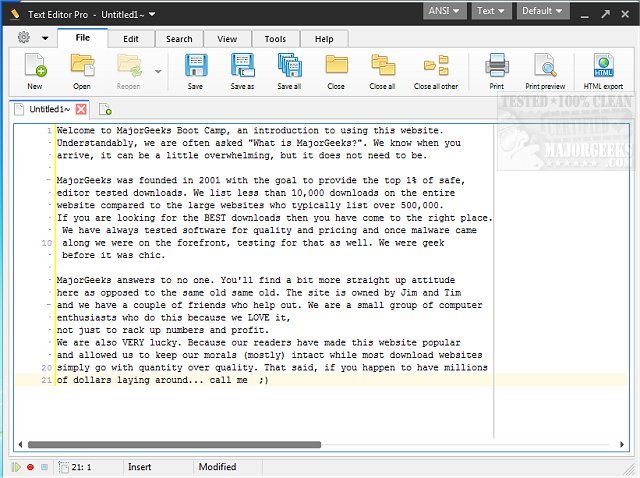
Text Editor Pro, previously known as EditBone, has released version 36.2.2, further enhancing its reputation as a robust text editing tool equipped with features like syntax highlighting for multiple programming languages and scripts. This powerful application offers over 100 customizable options and ready-made skins, a Unicode character map, and a numerical unit conversion tool, alongside SQL formatting capabilities and support for managing multiple directories and search results.
One of the standout attributes of Text Editor Pro is its dual-panel interface, which can be adjusted to single, double, or triple-column layouts. This design flexibility allows users to work on multiple projects simultaneously without feeling overwhelmed. The syntax highlighting feature is particularly advantageous for programmers, as it aids in both coding and reviewing their work across various languages such as HTML, Python, and Ruby.
The user-friendly interface allows for direct file and folder management within the application, making navigation simpler. A notable advanced feature is the Text Compare function, which enables users to open two documents side by side and highlights any differences, facilitating easy revisions and comparisons.
To further streamline the coding process, Text Editor Pro includes a Macro feature that allows users to record repetitive actions. By clicking "Record" and then typing, users can easily replay their macros using a simple hotkey combination (Shift+Ctrl+P), significantly reducing time spent on repetitive tasks.
In summary, Text Editor Pro stands out as a versatile and efficient text editing solution, integrating a wide array of features that go beyond basic text editing. It includes tools for numerical conversions, sophisticated formatting for various file types, and advanced navigation capabilities. With its extensive functionality, Text Editor Pro is an essential tool for anyone seeking a comprehensive and professional-grade text editing experience.
Extension: Future Enhancements and Community Engagement
Looking ahead, future updates to Text Editor Pro could focus on increasing collaboration features, allowing multiple users to work on the same document in real-time. Additionally, integrating AI-powered code suggestions could further enhance the coding experience, providing real-time feedback and optimization tips. Community engagement, such as forums or user feedback channels, could help developers understand user needs and prioritize features that enhance usability and functionality. Overall, Text Editor Pro is well-positioned to remain a leader in the text editing space, continuously adapting to the evolving demands of its user base
One of the standout attributes of Text Editor Pro is its dual-panel interface, which can be adjusted to single, double, or triple-column layouts. This design flexibility allows users to work on multiple projects simultaneously without feeling overwhelmed. The syntax highlighting feature is particularly advantageous for programmers, as it aids in both coding and reviewing their work across various languages such as HTML, Python, and Ruby.
The user-friendly interface allows for direct file and folder management within the application, making navigation simpler. A notable advanced feature is the Text Compare function, which enables users to open two documents side by side and highlights any differences, facilitating easy revisions and comparisons.
To further streamline the coding process, Text Editor Pro includes a Macro feature that allows users to record repetitive actions. By clicking "Record" and then typing, users can easily replay their macros using a simple hotkey combination (Shift+Ctrl+P), significantly reducing time spent on repetitive tasks.
In summary, Text Editor Pro stands out as a versatile and efficient text editing solution, integrating a wide array of features that go beyond basic text editing. It includes tools for numerical conversions, sophisticated formatting for various file types, and advanced navigation capabilities. With its extensive functionality, Text Editor Pro is an essential tool for anyone seeking a comprehensive and professional-grade text editing experience.
Extension: Future Enhancements and Community Engagement
Looking ahead, future updates to Text Editor Pro could focus on increasing collaboration features, allowing multiple users to work on the same document in real-time. Additionally, integrating AI-powered code suggestions could further enhance the coding experience, providing real-time feedback and optimization tips. Community engagement, such as forums or user feedback channels, could help developers understand user needs and prioritize features that enhance usability and functionality. Overall, Text Editor Pro is well-positioned to remain a leader in the text editing space, continuously adapting to the evolving demands of its user base
Text Editor Pro 36.2.2 released
Text Editor Pro (formerly EditBone) is a powerful text editing tool with syntax highlighting multiple languages and scripts.