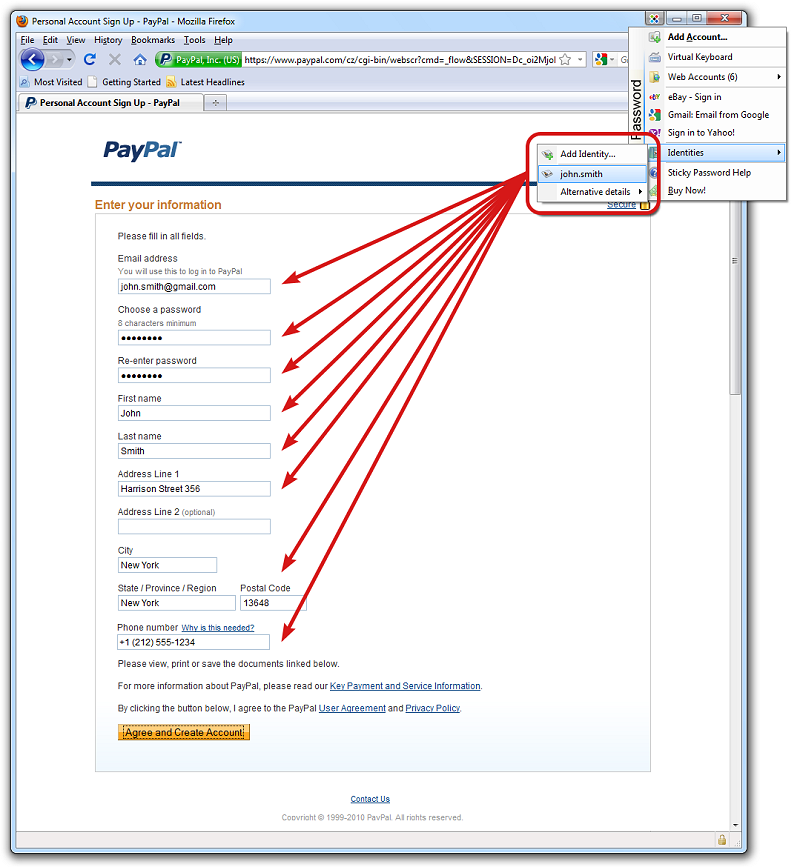
Sticky Password, now at version 8.10.1.2395, is a dedicated password management tool designed to bolster online security while optimizing user experience. This application aims to simplify the process of managing multiple login credentials by automatically filling in website forms and passwords, which saves time and enhances ease of access.
Enhanced Security Features
Sticky Password employs advanced security measures, including robust encryption algorithms, to protect sensitive information against threats like phishing, identity theft, and keyloggers. The software's capabilities include:
- Secure Password Generation: Users can create strong passwords with just a click.
- Encrypted Storage: All passwords are stored securely using military-grade AES encryption.
- Automatic Logins and Form Filling: The tool recognizes password-protected sites for seamless access and can fill in tedious online forms quickly.
- Protection Against Phishing and Keyloggers: The software ensures that login information is not transmitted to malicious websites and employs a Virtual Keyboard to further safeguard against unauthorized observation.
User-Friendly Features
Sticky Password simplifies the user experience with several practical features:
- Browser Integration: Works with popular browsers such as Internet Explorer, Firefox, and Google Chrome.
- Automatic Password Import: Users can easily import passwords from other password managers or browsers.
- Portable Version: Each license includes a portable version that can be used on USB drives for easy access anywhere.
- Organized Password Management: Users can categorize accounts into groups, ensuring easy navigation and management.
Licensing and Accessibility
The licensing model includes a portable version for convenient use, allowing users to access their passwords regardless of location. The combination of cloud and local syncing options gives users the flexibility to choose their desired security level.
Conclusion
Sticky Password is a competitive password management solution, recognized for its strong emphasis on security and intuitive interface. While it may not match the extensive features of some competitors like LastPass, its focus on security, ease of use, and competitive pricing makes it a compelling option for users seeking a reliable password manager. The addition of local Wi-Fi syncing further enhances its usability, making it a practical choice for those looking to keep their passwords organized and secure.
Future Considerations
As online threats continue to evolve, it will be essential for Sticky Password to maintain its commitment to security by regularly updating its algorithms and features. Additionally, expanding its compatibility with more platforms and enhancing collaboration features could further solidify its position in the password management landscape. Users should remain informed about updates and new functionalities to maximize their online safety and convenience
Enhanced Security Features
Sticky Password employs advanced security measures, including robust encryption algorithms, to protect sensitive information against threats like phishing, identity theft, and keyloggers. The software's capabilities include:
- Secure Password Generation: Users can create strong passwords with just a click.
- Encrypted Storage: All passwords are stored securely using military-grade AES encryption.
- Automatic Logins and Form Filling: The tool recognizes password-protected sites for seamless access and can fill in tedious online forms quickly.
- Protection Against Phishing and Keyloggers: The software ensures that login information is not transmitted to malicious websites and employs a Virtual Keyboard to further safeguard against unauthorized observation.
User-Friendly Features
Sticky Password simplifies the user experience with several practical features:
- Browser Integration: Works with popular browsers such as Internet Explorer, Firefox, and Google Chrome.
- Automatic Password Import: Users can easily import passwords from other password managers or browsers.
- Portable Version: Each license includes a portable version that can be used on USB drives for easy access anywhere.
- Organized Password Management: Users can categorize accounts into groups, ensuring easy navigation and management.
Licensing and Accessibility
The licensing model includes a portable version for convenient use, allowing users to access their passwords regardless of location. The combination of cloud and local syncing options gives users the flexibility to choose their desired security level.
Conclusion
Sticky Password is a competitive password management solution, recognized for its strong emphasis on security and intuitive interface. While it may not match the extensive features of some competitors like LastPass, its focus on security, ease of use, and competitive pricing makes it a compelling option for users seeking a reliable password manager. The addition of local Wi-Fi syncing further enhances its usability, making it a practical choice for those looking to keep their passwords organized and secure.
Future Considerations
As online threats continue to evolve, it will be essential for Sticky Password to maintain its commitment to security by regularly updating its algorithms and features. Additionally, expanding its compatibility with more platforms and enhancing collaboration features could further solidify its position in the password management landscape. Users should remain informed about updates and new functionalities to maximize their online safety and convenience
Sticky Password 8.10.1.2395 released
Sticky Password will help you stay safe online and save time by filling in website forms and passwords automatically.